
Here's the thing nobody tells you about Taskade in 2026: it quietly stopped being a pretty to-do list and turned into one of the cheapest ways to run actual AI agents. This Taskade review is written a couple of weeks after the platform finished rolling out its Genesis Kits (24 cloneable, working AI app workspaces) and Agents v2, where each agent now wields 33 built-in tools and can switch between 15+ frontier models depending on the job. At $16/month for the Pro tier, that's a wildly different value proposition than the $49.99 starting point at Lindy.
I've spent the last week running a real content-production workflow through it instead of skimming the marketing page. This isn't a press-kit rewrite. It's what actually happened when I cloned a Genesis Kit, pointed an agent at my own data, and tried to make it do a week of work. Worth it. With one caveat about credits I'll get to.
How I Tested This
Why Taskade is trending right now
Taskade had a busy spring, and it stacked four releases in five weeks.
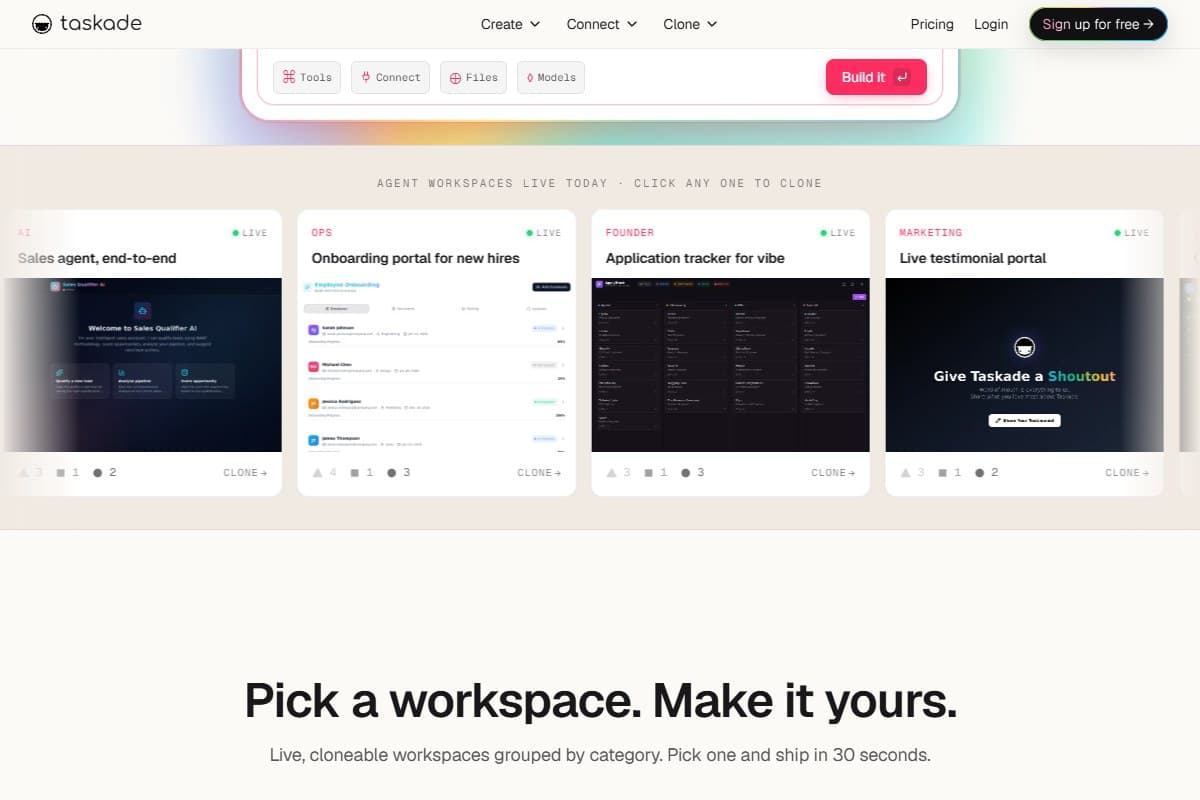
The build started on April 19, 2026 with the first five app kits and 100+ integrations. May 3 added Workspace Memory, agent workflows, and in-app payments. May 16 brought multi-agent workspace capabilities. Then on May 21, 2026, the full 24-kit Genesis drop landed: pre-built, cloneable AI app workspaces organized into five role-based stacks: Ops, Founder, Marketing, Sales, and Support.
That cadence is why "Taskade AI agents" started trending. Most AI workspace tools in 2026 still hand you an empty canvas and a chat box and wish you luck. Taskade flipped it: you open the gallery, find a workspace that already does roughly what you need (a sales-qualifier agent, an onboarding portal, a content pipeline) and clone it in one click. There are 500+ of these in the Community Gallery now. For solo founders staring down a blank workspace at 11pm, "clone this working thing" is a genuinely different starting line. If you've been following where this category is going, the AI agents hub tracks how the consumer and builder sides are converging.
What Taskade actually is
Strip the marketing and Taskade is a project workspace with AI agents wired directly into the data: not bolted on as a sidebar. The 2026 architecture is what they call "Workspace DNA," three layers that work together:
-
Memory: your Projects with custom fields and semantic search. Agents read your actual data, not a generic prompt.
-
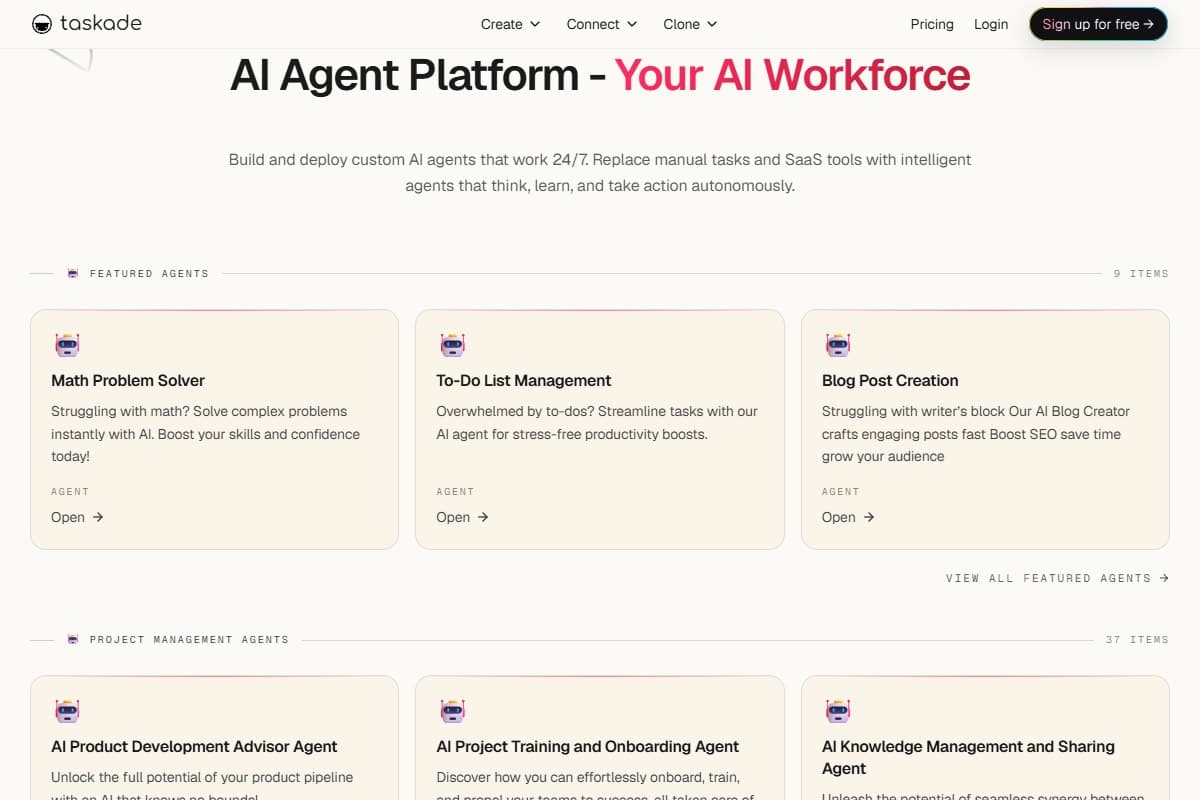
Intelligence: Agents v2, each carrying 33 built-in tools, routing across 15+ frontier models from OpenAI, Anthropic, Google, and open-weight providers. You can pick the model per agent, per workspace, or per task.
-
Execution: automations across 100+ bidirectional integrations, so an agent can actually do the thing (send the email, update the CRM) rather than just describe it.
-
Genesis Kits: 24 cloneable, working app workspaces across Ops, Founder, Marketing, Sales, and Support.
-
Per-task model routing: research-heavy steps default to Claude, structured-output steps to GPT, fast turns to a smaller model.
The line that matters: Notion AI writes text; a Taskade agent reads your sprint, finds the overdue tasks, drafts the status email, and proposes a new timeline: because it understands the project structure, not just the prose.
My honest testing experience
The moment that earned the rating was cloning the content-workflow kit.
I expected a skeleton. What I got was a working workspace: pipeline stages already defined, an agent already attached to the drafting stage, custom fields for status and owner already set up. I pasted in three old briefs and a style guide, told the agent to draft against them, and the first output actually sounded like my past work instead of generic AI sludge. That's the Workspace Memory layer doing its job. It read my data before it wrote.
Then I tested the per-model routing, which I was skeptical about. I ran the same outline through the agent on Claude, then GPT, then a fast model. The differences were real and predictable: Claude held the structure of a long argument better, GPT was tighter on formatted output, the fast model was fine for throwaway first passes and burned fewer credits. Being able to switch mid-task, without rebuilding the agent, is the kind of small thing that adds up over a week.
First draft matched my past style on the first try, because the agent read my pasted data before writing. Building the same workspace from scratch would have eaten an afternoon.
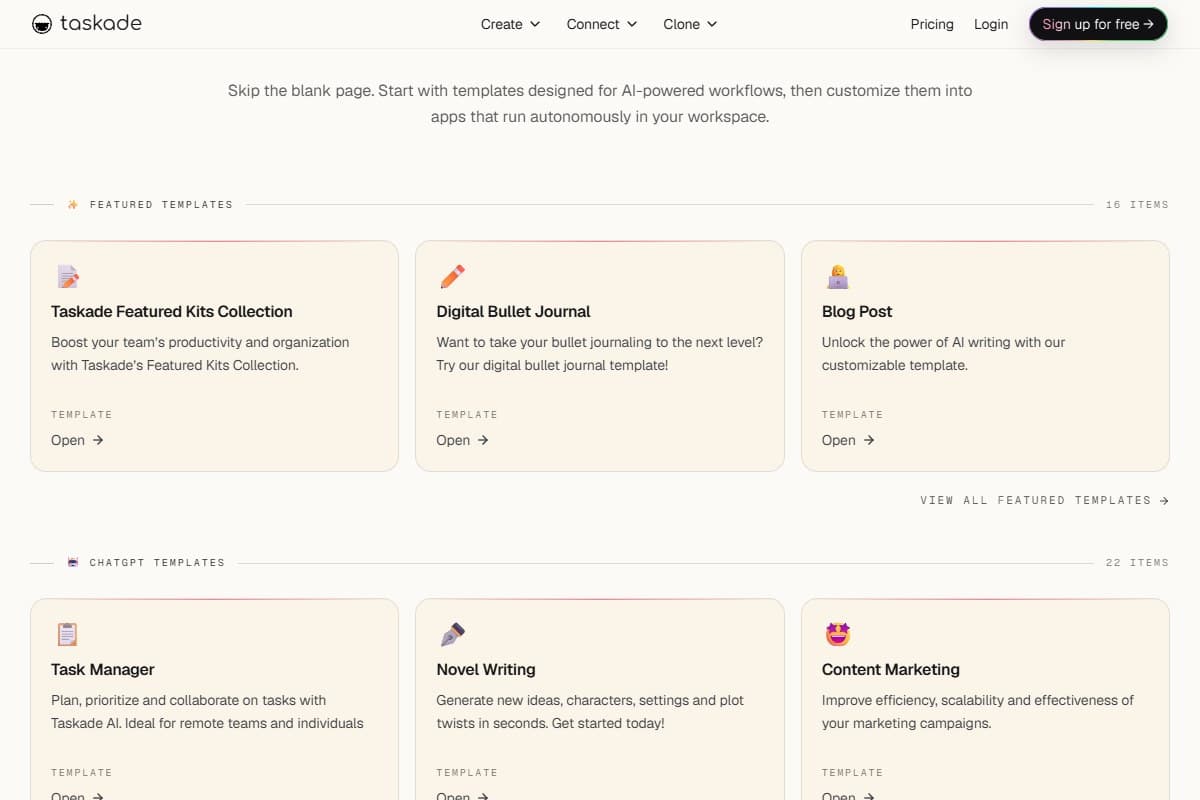
It's not flawless. The first day had a learning curve I didn't expect: the Create / Connect / Clone menu structure took a beat to map, and once a project filled up with documents, moving tasks between sections got laggy. Twice the editor dropped a character or two while I typed fast. None of it was a dealbreaker. All of it was the kind of friction that tells you this is a deep tool still smoothing its edges, not a polished-but-shallow one.
The bigger adjustment was credits. Pro gives you 50,000 a month, which sounds like a lot until a heavy agent day (multiple multi-step runs, a few model switches, some research tool calls) draws a visible chunk. I never hit zero, but I learned to reach for the fast model on low-stakes drafts. The unlimited-AI era is genuinely over here.
What I liked
After a week of real use, the honest list:
- Cloning a working kit beats a blank page. This is the whole game. Starting from a workspace that already does 80% of what you need is faster than configuring one, every single time.
- Agents read your actual data. Workspace Memory meant my agent drafted against my real briefs and style guide, not a generic prompt. That's the difference between useful and toy.
- Per-task model routing is real and useful. Switching the same agent between Claude, GPT, and a fast model mid-workflow, without rebuilding it, let me trade quality against credit burn deliberately.
- The price is aggressive. Pro at $16/mo (annual) with unlimited agents undercuts Lindy's $49.99 starting tier by a mile, and it's a real workspace, not just an automation runner.
- 33 tools per agent covers the common cases. Research, file handling, integrations: I rarely hit "the agent can't do that" during normal work.
- The free tier is genuinely usable for trying the whole flow. 3,000 credits and 500+ community templates is enough to know whether the model fits how you work before you pay.
What frustrated me
Three honest gripes, and one of them is a real warning:
- Credits are the new ceiling, and the change burned trust. Longtime lifetime-deal users have loudly complained that "unlimited AI" was quietly replaced with strict credit limits, with some plans downgraded and features re-gated behind payment. If you're coming in fresh on a subscription, plan around the credit meter from day one, and know the history before you commit.
- It gets laggy under load. As a project accumulated documents, navigation slowed and task-dragging got sticky. For a tool selling itself on speed-to-ship, the in-editor performance needs work.
- The AI occasionally stays too high-level. On a couple of prompts the agent gave me a tidy overview when I wanted something concrete and specific, and I had to push it twice to get there. Good defaults, but not always the right altitude.
Pricing: is it worth it?
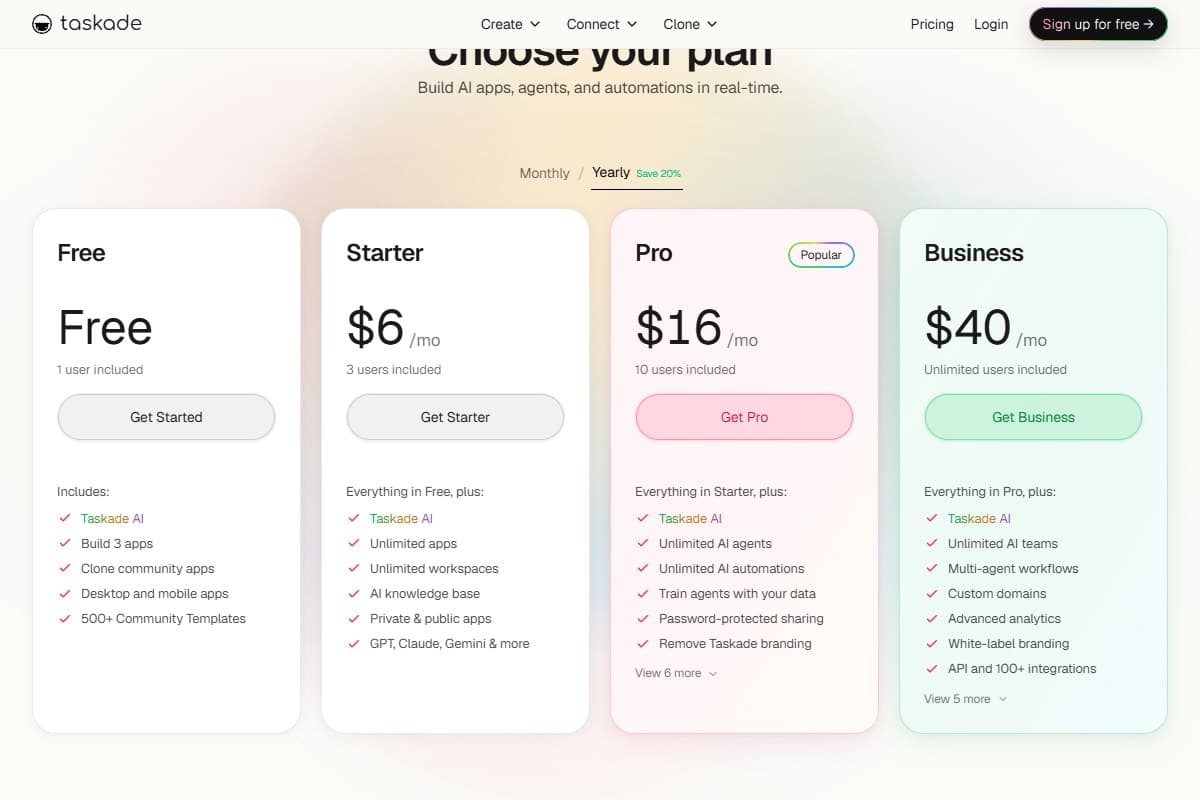
Taskade's 2026 pricing is credit-based, and the annual plans save 20% over monthly. Here's the lineup:
- 1 user · 3 apps
- 3,000 credits (one-time)
- 500+ community templates
- Best for: trying the full flow
- 3 users · unlimited apps
- 10,000 credits/month
- AI knowledge base
- Best for: solo light use
- 10 users · unlimited AI agents
- 50,000 credits/month
- Train agents on your data
- Best for: founders + small teams
- Unlimited users · AI teams
- 150,000 credits/month
- White-label + API + 100+ integrations
- Best for: agencies + scaling teams
Above Business there's Max at $200/mo (autonomous agents, extended thinking, per-agent model selection) and Enterprise at $400/mo (1.1M credits, SAML SSO, MCP, bring-your-own-key). For most readers of this review, the decision is Pro vs. Business.
My read: Pro at $16/mo is the sweet spot for a solo founder or a tiny team. Unlimited agents plus 50,000 credits and training-on-your-data is the tier where Taskade stops being a toy. Step up to Business at $40/mo only when you need white-labeling, the API, or the 150,000-credit headroom, which you will if agents are running real daily volume. The thing to internalize before you pay: credits are the real unit of cost now, not seats. Budget by how much agent work you'll actually run, not how many people are on the team. For a fuller picture of how agent platforms are pricing this shift, the Make.com review breaks down per-operation billing in the automation world.
Who should use Taskade
Buy it if you are:
- A solo founder who wants AI agents doing real work inside your actual projects, not in a separate chat window
- A small team that needs a shared workspace where agents read the team's data and act on it
- Someone who'd rather clone a working app and customize it than build a workspace from a blank page
Who should avoid Taskade
Skip it (try alternatives) if you are:
- A heavy automation shop that needs deep, branching, production-grade agent pipelines: Lindy or Make.com fit better
- A team that lives entirely in documents and wikis: Notion's editor and knowledge base are still more mature
- Anyone who needs predictable flat-rate AI costs: the credit model means heavy months cost more, and that's a real planning headache
How Taskade compares to the alternatives
| Tool | Rating | Price | Best for | Verdict |
|---|---|---|---|---|
| Taskade | 4.2/5 | $16/mo Pro | AI agents inside a real project workspace | Best value for founders who want agents that act on their data. Watch the credits. |
| Lindy | 4.1/5 | $49.99/mo Plus | Deep AI agent automation across email/calendar/CRM | More powerful agent builder, but 3x the price and no permanent free tier. |
| Notion AI | 4.0/5 | $10–20/user | Docs, wikis, and AI writing over your knowledge base | Better editor; AI writes text, doesn't take action like Taskade's agents. |
| Use case | Winner |
|---|---|
| Cloning a working agent workspace in 30 seconds | Taskade |
| Cheapest unlimited-agent plan | Taskade |
| Deep automation across email + CRM + calendar | Lindy |
| Company wiki + flexible knowledge base | Notion AI |
| Agents that read project structure and act | Taskade |
| Predictable flat-rate AI costs | Notion AI |
If your work is mostly automation pipelines rather than a project workspace, read the Make.com review before deciding. And if you're weighing agents against a full app builder, the Lovable review covers the build-an-app-from-a-prompt side of this same 2026 shift. If you'd rather an AI agent that works alongside your team in Slack than one that lives inside a project workspace, the Viktor review covers that Slack-native AI coworker. And if your real question is less about agents and more about which workspace should run your projects day to day, my ranking of the best AI project management tool 2026 compares the whole category head-to-head. And if you're pointing agents at on-chain work specifically, my roundup of the best AI tools for crypto traders 2026 covers the trading and analytics side.
Final verdict: 4.2 out of 5
Taskade earned a 4.2 because the 2026 reinvention actually landed. Genesis Kits make "clone a working workspace" a real, fast starting line, Agents v2 do genuine multi-step work against your own data, and per-task model routing is a smart, practical touch. At $16/mo it's the best value in the AI-agent-workspace category right now: nothing else gives you unlimited agents this cheaply inside a real project tool.
I'm holding back the last 0.8 of a point for three reasons: (1) the shift to a credit model, and the way it landed on existing lifetime-deal users, is the kind of trust-eroding change that deserves a deduction, (2) the editor gets laggy under document load, which is a bad look for a speed-first product, and (3) agents occasionally stay too high-level and need pushing. None of those are dealbreakers. All of them are real.
Net: if you're a solo founder or small team and you want AI agents that act inside your projects instead of in a chat box, start on the free tier tonight and upgrade to Pro once you've watched how fast you burn credits. If you need deep automation or flat-rate costs, look at Lindy or Make.com instead.
FAQ: Taskade review
Is Taskade worth it in 2026?
For solo founders and small teams who want AI agents doing real work inside their projects, yes: Pro at $16/mo (annual) with unlimited agents is the best value in the category. The honest caveat is the credit model: 50,000 monthly credits on Pro is plenty for normal use but a heavy agent day draws them down fast, so budget by workload, not by seats.
What are Genesis Kits and Agents v2?
Genesis Kits are 24 pre-built, cloneable AI app workspaces that finished rolling out on May 21, 2026, organized into five role stacks: Ops, Founder, Marketing, Sales, and Support. Agents v2 is the upgraded agent engine where each agent carries 33 built-in tools and can route across 15+ frontier models from OpenAI, Anthropic, Google, and open-weight providers, switchable per agent, workspace, or task.
How does Taskade pricing work?
Taskade is credit-based with annual billing saving 20%: Free ($0, 3,000 one-time credits), Starter ($6/mo, 10,000 credits), Pro ($16/mo, 50,000 credits + unlimited agents), Business ($40/mo, 150,000 credits), Max ($200/mo) and Enterprise ($400/mo, 1.1M credits). The key shift from older plans is that "unlimited AI" is gone: credits now cap how much agent work you can run each month.
Taskade vs Lindy vs Notion AI, which should I pick?
Pick Taskade if you want affordable AI agents living inside a real project workspace and acting on your data. Pick Lindy if you need deeper agent automation across email, calendar, and CRM and don't mind the $49.99 starting price. Pick Notion AI if your work is mostly documents and wikis and you want AI that writes and answers questions over your knowledge base, though it writes text rather than taking action the way Taskade's agents do.
Did Taskade remove unlimited AI from lifetime deals?
This is the most common complaint in 2026 reviews, and it's worth knowing before you buy. Longtime lifetime-deal holders report that previously-unlimited AI access was replaced with strict credit limits, with some plans downgraded and features re-gated behind additional payment. If you're starting fresh on a current subscription you won't be affected by the change itself, but you should plan around the credit meter from day one rather than assuming unlimited usage.
Related reviews
- AI Agents topic hub: every AI agent review on the site in one place.
- Make.com Review 2026: the no-code automation platform if your work is pipelines, not a project workspace.
- Lovable Review 2026: I Built 3 Real Apps to Find Out: the build-an-app-from-a-prompt side of the 2026 agent shift.
- Best AI meeting assistant roundup: focused single-purpose meeting agents, the opposite end of the workspace spectrum.
Got a Taskade question I didn't cover, or want me to run a specific Genesis Kit through a real workflow? Get in touch: reader questions shape the next round of reviews.
Free interactive tool
Compare Taskade with other AI toolsSide-by-side pricing, features, and ratings — plus a recommended pick for your use case.
Independent AI tools researcher. Testing and reviewing the agent platforms solo founders and small teams actually run their work on.
Keep reading
Related reviews

Best AI Agents 2026: I Tested 7 Tools and Ranked Them
I tested 7 AI agents in 2026 on the same real workflows. Taskade, Chatbase, CustomGPT, Viktor and more, ranked by what they actually finish.

New Siri AI 2026: Apple Intelligence Rebuilt from Scratch (What's Actually New)
Apple rebuilt Siri at WWDC 2026 on its own Foundation Models: personal context, onscreen awareness, and the Gemini-under-the-hood question.

Claude Fable 5 Review: Anthropic's Most Powerful Public Model Ever (First Look)
Anthropic just made its most powerful model public. I spent launch day testing Claude Fable 5: benchmarks, pricing, the Opus fallback, and the catch.