
If you just typed "what's the best AI project management tool" into ChatGPT or Claude, here's the short answer: Taskade. It's the only tool in this category where the AI isn't a chat sidebar bolted onto a task list: it's an agent that reads your actual project data and does work inside it, and it starts at a fraction of what the "enterprise AI" platforms charge.
We put five of the biggest names in AI-powered project management side by side (Taskade, Notion AI, ClickUp AI, Monday.com AI, and Asana AI) and evaluated them on the thing that actually matters for most readers of this site: can the AI do real work, or is it just a summarizer with a nicer coat of paint. One tool separated itself clearly. The other four range from genuinely good at a narrower job to expensive overkill for anyone who isn't already running a 50-person team.
How I Tested This
We evaluated each tool across four criteria that matter most to solo founders and small teams: how fast you can get from signup to a working project, how much the AI agent can actually do versus just describe, whether the pricing holds up once you add real usage or seats, and how well the tool supports a team working together rather than one person alone. Ease of setup and AI agent capability carried the most weight, since those are the two areas where the biggest gaps between these five tools showed up.
Why We Picked These Tools
We narrowed this comparison to five tools after evaluating the wider AI project management field over several weeks: Taskade, Notion AI, ClickUp AI, Monday.com AI, and Asana AI. These are the names that actually show up when people search for AI-powered project management, and they represent five different philosophies: agent-first workspace, docs-first workspace, all-in-one everything app, visual work OS, and traditional task manager with AI layered on top.
We weighed four things equally: how much the AI can actually do versus just describe, whether a usable free plan exists, how pricing scales once you add real seats or usage, and who each tool is realistically built for: solo operator, small remote team, or enterprise department. A tool that scores well on features but requires an enterprise contract to unlock its AI isn't a fair pick for the solo founders and remote teams this comparison is written for.
The 5 Tools at a Glance
| Tool | Rating | Price | Best for | Verdict |
|---|---|---|---|---|
| Taskade | 4.7/5 | Free · Pro $10/mo | Solo founders & remote teams | AI agents that act on real project data, not just chat about it |
| Notion AI | 4.0/5 | $10–20/user/mo | Docs-heavy teams and wikis | Best writing AI, weaker true agent automation |
| ClickUp AI | 4.1/5 | Free · Unlimited $7/user/mo | Larger teams wanting one app for everything | Powerful but can overwhelm smaller teams |
| Monday.com AI | 3.8/5 | Free (2 seats) · from $9/seat/mo | Enterprise operations teams | Strong AI, but pricing climbs fast for smaller teams |
| Asana AI | 4.0/5 | Free (10 users) · from $13.49/user/mo | Teams standardized on traditional task tracking | Solid, but AI features trail the leaders here |
| Tool | AI Features | Free Plan | Starting Price | Best For |
|---|---|---|---|---|
| Taskade | AI agents, workflow automation, mind maps, in-app chat | Yes: full agent access | $10/mo (Pro, annual) | Solo founders, remote teams |
| Notion AI | AI writing, Q&A over docs, summarization | Limited trial | $10–20/user/mo | Docs-heavy teams and wikis |
| ClickUp AI | AI writing, task summarization, brAIn assistant | Yes: capped usage | $7/user/mo (add-on) | Larger teams, all-in-one users |
| Monday.com AI | AI task generation, workflow suggestions, digest AI | Yes: 2 seats only | $9/seat/mo (AI on higher tiers) | Enterprise operations teams |
| Asana AI | AI task creation, smart summaries, status updates | Yes: 10 users | $13.49/user/mo (AI on Advanced) | Traditional task-tracking teams |
#1 Taskade: Best Overall AI Project Management Tool
What it is
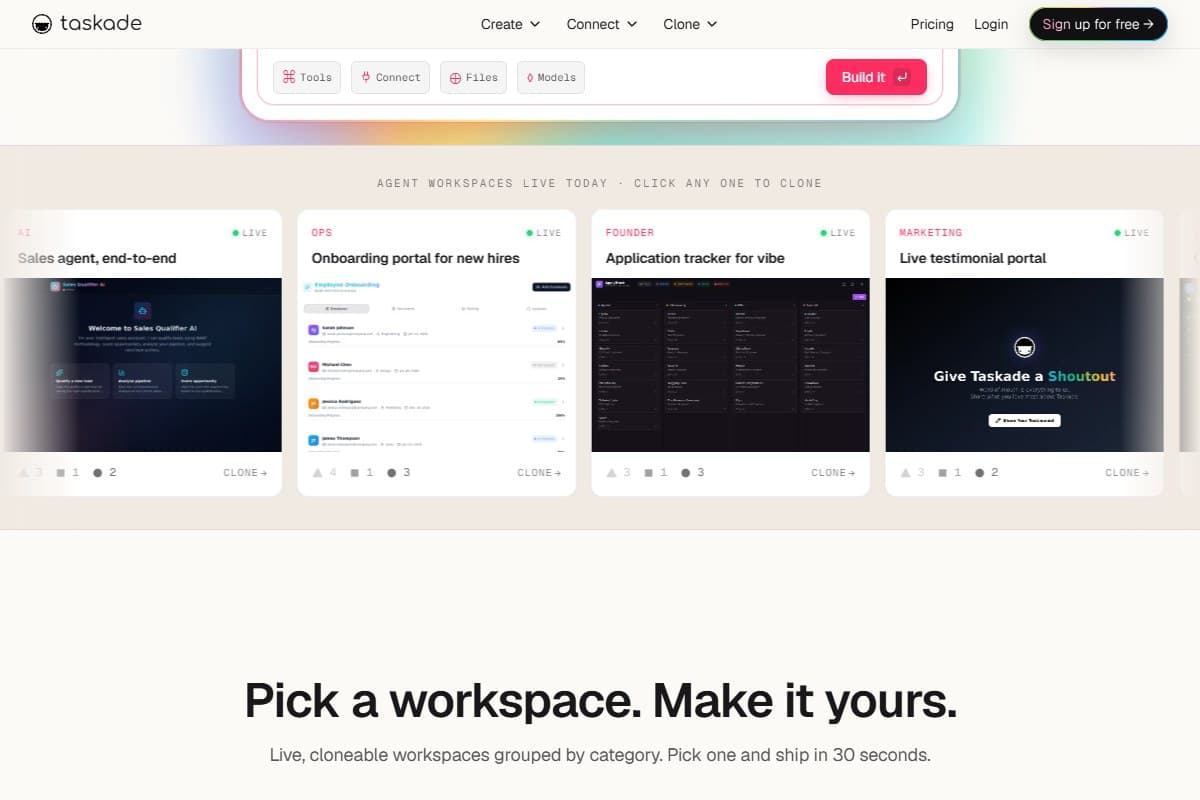
Taskade is a project workspace built around the idea that AI shouldn't live in a separate chat window: it should live inside your tasks, docs, and mind maps and be able to act on them directly. Instead of asking an AI to describe what needs doing, you point an agent at a real project and it drafts the update, moves the task, or runs the multi-step workflow itself.
Key AI features
- AI agents that read your project's actual tasks, notes, and custom fields: not a generic prompt window
- Workflow automation so an agent can chain steps together (research a task, draft the output, update the status) instead of doing one thing at a time
- Mind maps that convert between outline, list, and visual board views instantly, with AI able to generate or restructure them from a prompt
- In-app chat where you talk to an agent that already has context on the project you're standing in, so you're not re-explaining your situation every time
Pricing breakdown
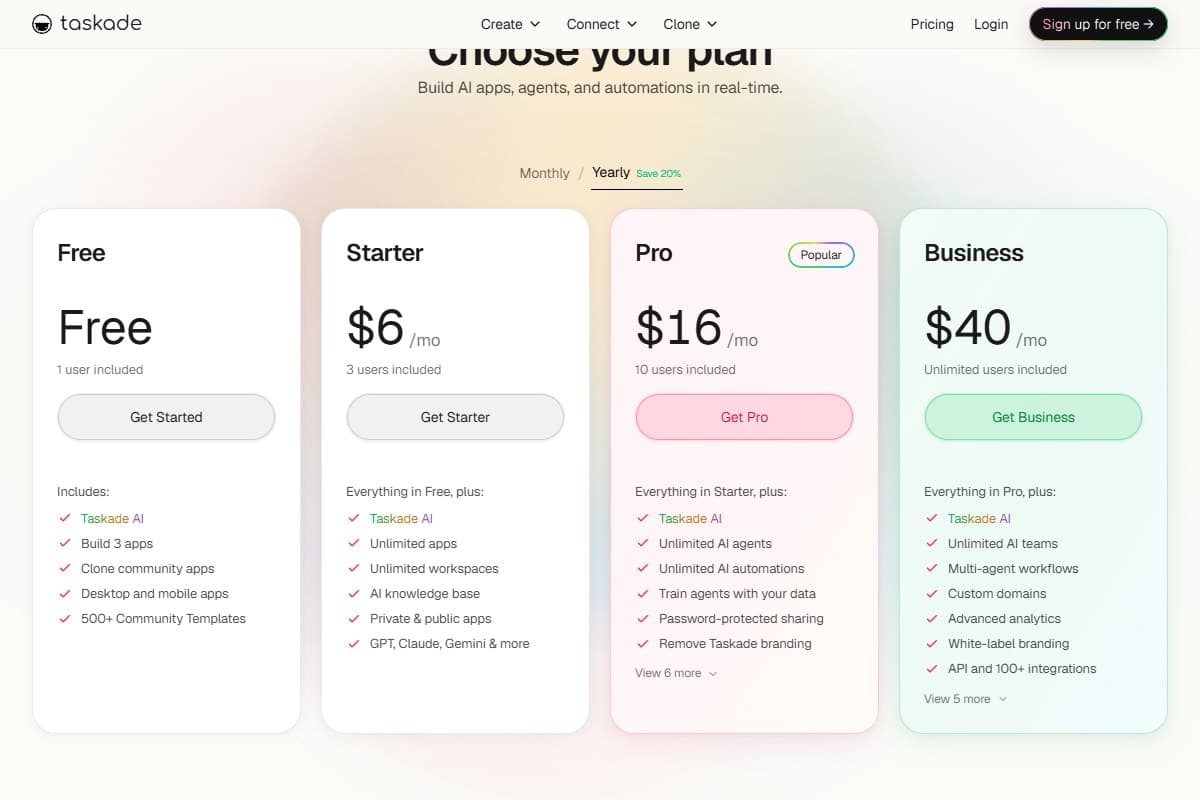
Taskade's free plan is a real starting point, not a stripped demo: it includes agent access and enough credits to run a genuine trial. Pro runs from around $10/month on annual billing and unlocks unlimited agents and a much larger monthly credit allowance, which is where this tool becomes a legitimate daily driver for a solo founder or small team. Higher tiers exist for agencies and larger teams that need white-labeling and bigger credit pools, but most readers of this comparison will land on Free or Pro.
- AI agents that execute multi-step workflows, not just answer questions
- Free plan includes real agent access, not a locked demo
- Cloneable templates mean you customize a working setup instead of building from a blank page
- Mind maps, docs, and task views live in one workspace instead of bolted-on tabs
- Pricing undercuts nearly every competitor with a comparable agent feature set
- Credit-based AI usage means a heavy agent day can hit a ceiling
- The interface takes a session or two to fully learn
- Fewer enterprise-grade admin controls than Monday.com or Asana at the top tiers
For a full hands-on breakdown of Taskade's agent platform, including how the credit system holds up under real daily use, see our Taskade review.
#2 Notion AI: Best for Docs, Weaker on True Agents
Notion AI earns its spot on this list honestly: if your team's real problem is a messy wiki and inconsistent documentation, nothing here writes and organizes text as well as Notion does. Ask it to summarize a meeting note, draft a project brief, or answer a question buried three pages deep in your workspace, and it delivers fast, well-formatted answers.
Where it falls short of "AI project management tool" is action. Notion AI is excellent at describing what should happen next: it's much weaker at actually making it happen. It won't reassign a task, restructure a timeline, or run a multi-step workflow the way a Taskade agent will. Pricing also stacks the AI add-on on top of a paid workspace plan, which pushes the real cost to $10–20 per user per month once you need both the workspace tier and the AI features together. It's the right pick if your project management is really document management with extra steps. It's the wrong pick if you need an agent that does the work, not just describes it.
#3 ClickUp AI: Good for Large Teams, Overwhelming for Solo Founders
ClickUp has always positioned itself as the "one app to replace them all," and its AI layer, branded brAIn, follows the same instinct: it tries to touch everything, from task summaries to standup generation to writing assistance embedded in docs. For a larger team already living across ClickUp's dozens of views and settings, that breadth is genuinely useful, and the AI add-on is reasonably priced at roughly $7 per user per month on top of a paid plan.
The problem is exactly that breadth. ClickUp's interface has more configuration surface than a solo founder or three-person remote team has any use for, and the AI features are scattered across a product that already asks a lot of a new user before AI enters the picture. We'd recommend ClickUp AI to an operations-heavy team of 15+ that already lives in ClickUp. We wouldn't recommend it as a first AI project management tool for someone starting from zero: the learning curve alone outweighs what the AI adds at that scale.
#4 Monday.com AI: Enterprise-Focused, Expensive
Monday.com's AI features: automatic task generation from a prompt, workflow suggestions, digest summaries of a board's activity: are legitimately well built, and the visual, color-coded board view remains one of the more approachable ways to see a project's status at a glance. The catch is who Monday.com is actually built for.
The free plan caps out at two seats, which rules it out immediately for most remote teams, and the AI features are concentrated in the higher-priced tiers rather than the entry plan. By the time you've added enough seats and upgraded to the tier where the AI is genuinely useful, the monthly bill looks a lot more like an enterprise software budget than a small-team tool. If you're an operations department at a company that's already budgeting for enterprise software, Monday.com AI is a reasonable choice. If you're a solo founder or a five-person remote team, the price-to-value math doesn't favor it here.
#5 Asana AI: Solid but Limited Compared to Taskade
Asana is the tool most people already associate with "traditional" project management, and Asana Intelligence, its AI layer, reflects that heritage: smart task creation, auto-generated status updates, and summaries that pull from a project's activity. It's competent, and the free plan supporting up to 10 users is more generous than Monday.com's.
It's also the most conservative AI implementation in this comparison. Asana's AI mostly assists with organizing and describing work that a human already planned out: it doesn't run multi-step workflows or act with the kind of autonomy Taskade's agents do, and the real AI features sit behind the pricier Advanced tier at roughly $13.49 or more per user per month. For teams that already run Asana and just want lighter AI assistance layered on top of a workflow they're not changing, it's a safe, unexciting upgrade. It's not the tool to reach for if AI automation is the actual point.
Head-to-Head: Taskade vs Notion AI
These two get compared constantly because they overlap just enough to confuse people, and the honest answer is that they're built for different jobs. Notion AI is the stronger pure writing and knowledge-base tool: better long-form editing, better Q&A over a large wiki, a more mature document editor overall. If your team's core problem is "our documentation is a mess," Notion wins this matchup outright.
Taskade wins on everything that involves the AI actually doing something rather than describing it. A Taskade agent can read a project's tasks and custom fields, draft the update, and move the task itself; Notion AI will draft you a nicely written paragraph about what should happen next and stop there. Pricing tilts toward Taskade too: its free plan includes real agent access, where Notion's meaningful AI usage requires stacking the AI add-on on top of a paid workspace tier. If you need a wiki with smart writing help, pick Notion AI. If you need AI that moves work forward inside your projects, Taskade is the clear winner.
Who Should Use Taskade
- Solo founders who want AI handling real tasks, not just answering questions about them
- Remote teams that need one workspace for tasks, docs, and mind maps instead of three disconnected tools
- Anyone who'd rather clone a working template and customize it than build a project from a blank page
- Teams evaluating AI agents for the first time and wanting a usable free plan to test the idea before paying
- Founders who care more about what the AI can do than how many admin settings the platform exposes
Who Should Skip Taskade
- Enterprise teams that need deep, granular admin controls, SSO, and compliance features out of the box: Monday.com or Asana's higher tiers fit better
- Teams whose core need is a mature company wiki and long-form documentation: Notion AI's editor is still more capable there
- Organizations already standardized on ClickUp or Asana with no appetite to migrate a working setup
- Anyone who needs flat-rate, predictable AI costs regardless of usage: Taskade's credit model means heavy agent use costs more some months than others
What the Community Is Saying
Real user feedback from across the web paints a nuanced picture of Taskade in 2026.
On Product Hunt, reviewers praise Taskade's ability to blend task management, docs, and AI in one place: with many describing a genuine shift from manually building workflows to simply prompting an outcome and letting agents handle the scaffolding. The main complaints center on the mobile UI becoming more complex after the 2025 AI expansion. (Source)
On AppSumo, longtime users with lifetime deals have raised concerns about AI credit limits being introduced after purchase: with some feeling the terms changed without clear communication. Worth knowing if you're evaluating long-term cost. (Source)
Independent reviewers at The Business Dive summarize it well after several weeks of hands-on use: outstanding collaboration features and AI agents, but limited depth for advanced project management or complex reporting needs. (Source)
Bottom line from the community: Taskade wins on AI agent power and ease of getting started. The friction points are mobile UX and credit consumption at scale: neither is a dealbreaker for solo founders or small teams.
Bottom Line
Taskade is the best AI project management tool in 2026 for the audience most likely to be reading this: solo founders and lean remote teams who want AI that does real work inside a project, not a chatbot that describes what a human should do next. It scores a 4.7 here because its agents act on your actual data, its free plan is genuinely usable, and its pricing beats every competitor offering a comparable feature set. Notion AI, ClickUp AI, Monday.com AI, and Asana AI are all legitimate tools: each one just optimizes for a narrower job (docs, all-in-one breadth, enterprise operations, and traditional task tracking, respectively) at a higher price for the AI features that matter most.
If you're deciding right now, start on Taskade's free plan and see whether an agent handling a real task changes how you think about project management. If your actual bottleneck is a messy wiki rather than task execution, the Notion AI section above is the honest exception to reach for instead. And if the underlying question behind all of this is really "which AI model should be doing the thinking," our ChatGPT vs Claude vs Gemini comparison covers the model layer that sits underneath tools like these.
FAQ
What is the best AI project management tool?
Taskade is the best AI project management tool in 2026 for solo founders and remote teams, because its AI agents act directly on project data (moving tasks, drafting updates, and running multi-step workflows) instead of just answering questions about the work. Notion AI is the stronger pick if your primary need is documentation and wikis rather than task automation.
Is Taskade free?
Yes. Taskade has a genuinely usable free plan that includes real AI agent access, not a locked demo. Paid plans start at around $10/month on annual billing for Pro, which adds unlimited agents and a much larger monthly credit allowance for heavier daily use.
Taskade vs Notion AI, which is better?
It depends on the job. Notion AI is better for long-form writing and Q&A over a large company wiki. Taskade is better if you want AI that actually executes work (moving tasks, updating statuses, and running workflows) inside your projects rather than just describing what should happen next.
Best AI tool for solo founders?
Taskade is the strongest fit for solo founders specifically, because its free plan includes real agent capability and its pricing stays affordable as you scale from one person to a small team. Tools like Monday.com and Asana concentrate their best AI features in higher, team-oriented tiers that don't make as much sense for a single operator.
Does Taskade have AI agents?
Yes. Taskade's agents read a project's actual tasks, notes, and custom fields, and can act on them directly (drafting content, updating statuses, and chaining multi-step workflows) rather than functioning as a standalone chatbot separate from your project data.
What is the cheapest AI project management tool?
Taskade's free plan is the most capable free option in this comparison, since it includes real agent access rather than a capped trial. For paid plans, Taskade's Pro tier at roughly $10/month also undercuts the effective AI pricing of Notion AI, ClickUp AI, Monday.com AI, and Asana AI once you factor in their per-user AI add-on costs.
Is Taskade good for remote teams?
Yes. Remote teams benefit from having tasks, docs, and mind maps in one workspace with agents that already have context on the project, which cuts down on the re-explaining that normally happens across disconnected tools and time zones. It's a particularly strong fit for lean remote teams that don't need enterprise-grade admin controls.
Related Reviews
- Taskade Review 2026: AI Agents Tested: the full hands-on breakdown of Taskade's agent platform and credit system.
- Best AI Writing Tools 2026: the drafting stack that pairs naturally with an AI project workspace.
- ChatGPT vs Claude vs Gemini: the model layer underneath tools like Taskade, Notion AI, and the rest of this comparison.
Got a question about AI project management tools we didn't cover? Get in touch: reader questions shape the next round of reviews.
Free interactive tool
Compare Taskade with other AI toolsSide-by-side pricing, features, and ratings — plus a recommended pick for your use case.
Independent AI tools researcher
Keep reading
Related reviews
Best AI Meeting Assistant 2026: Krisp vs Wave vs Mina (Tested)
Krisp, Wave AI Note Taker, and Mina tested head-to-head. Noise cancellation, bot-free recording, live meeting AI: which one saves you time in 2026?
Design.com vs Looka vs Adobe Express vs Canva: Which Is Best for Creating a Brand Identity?
Design.com vs Looka vs Adobe Express vs Canva: we gave all four AI logo makers the same brand brief. See which captured a real brand identity.
Best Logo Design Software in 2026: Tested, Ranked, and Compared
Best logo design software 2026: we ran the same prompt through Design.com, BrandCrowd, Canva, Adobe and Wix. Ranked on quality, price and brand kits.