
Here's the thing nobody tells you about switching from Zapier: the first afternoon in Make.com feels like a downgrade. Then it clicks, and you can't go back. This Make.com review is based on actually migrating my own Zapier automations onto the platform: not a feature tour. Make (the platform formerly known as Integromat) is a visual automation builder where you wire apps together on a canvas instead of stacking linear steps, and in 2026 it's leaning hard into AI agents and over 3,000 app integrations.
So is it the best Zapier alternative? For most people building anything beyond a two-step "when X, do Y" automation: yes, with one honest caveat about the learning curve I'll keep coming back to. Worth it. If you'll put in the weekend.
How I Tested This
Why Make.com is trending right now
The reason Make is back in every automation conversation this year is AI agents.
Through 2025 and into 2026, anchored around its Make Waves '25 launches, the company shipped Make AI Agents (agentic automations that can reason on the canvas), a conversational assistant called Maia that builds entire scenarios from a plain-English description, and support for MCP (the Model Context Protocol), which lets your Make scenarios be called as tools by external AI agents like Claude or GPT, and vice versa. It also added Make Grid for monitoring credit and data usage across your scenarios.
That's a meaningful bet. Automation is shifting from "rigid if-this-then-that rules" to "AI agents that decide what to do," and Make is positioning its visual canvas as the place you orchestrate them. Zapier is chasing the same wave, so Make isn't alone, but it's doing it on top of a builder that was already more powerful for complex logic.
What Make.com actually is
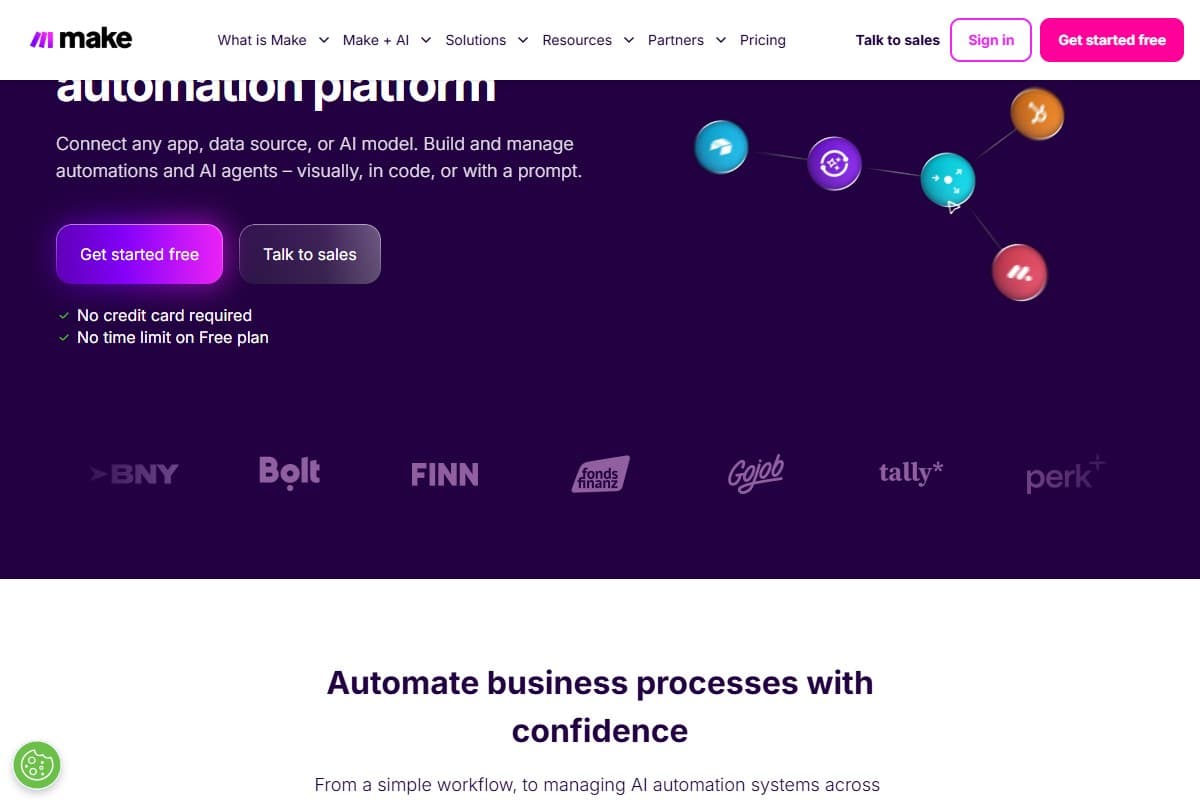
Strip away the AI buzz and Make is a visual workflow automation tool. You connect apps (Gmail, Slack, Notion, your CRM, any REST API) into "scenarios" that run automatically. The defining difference from Zapier is the interface: instead of a vertical list of steps, you build on a 2D canvas where each app is a "module" you wire together, and data flows visually between them.
- Visual scenario builder: drag-and-drop modules on a canvas; you can see the whole flow at a glance, branches included.
- 3,000+ app integrations: plus a generic HTTP module to hit any API that isn't natively supported.
- Routers, filters, iterators, aggregators: split a flow into multiple paths, gate steps with conditions, loop over lists, and recombine data. This is the real power, and the real learning curve.
- Webhooks, scheduling, and error handling: instant triggers, cron-style scheduling, and dedicated error routes with retry and rollback.
- AI features (2025–2026): Make AI Agents, the Maia scenario-builder assistant, MCP support, and native OpenAI / Claude / Gemini modules.
One thing worth knowing up front: in August 2025 Make renamed its billing unit from "operations" to "credits." For ordinary actions it's a one-to-one swap (1 operation = 1 credit), so most of what you'll read still works, but native AI steps can cost more than one credit each.
My honest testing experience
The moment Make earned its rating was a workflow I'd given up on building in Zapier.
I needed to take a list of new rows from a sheet, loop over each one, enrich it with an API call, branch based on the result, and post different messages to different Slack channels. In Zapier that's a tangle of separate Zaps and paid "paths." In Make, I dropped an iterator, a router, and two filters onto one canvas and watched the whole thing run as a single scenario. Seeing the data flow down each branch in the visual editor: that's when the canvas stopped feeling like a gimmick and started feeling like the point.
What took several chained Zaps and paid paths in Zapier became a single Make scenario with one iterator and a router. The visual canvas made the branching logic obvious instead of hidden across separate automations.
The cost side genuinely surprised me too. Because Make bills per credit and its paid tier starts cheap, the same automations that were nudging me toward a pricier Zapier plan ran comfortably within an entry-level Make plan. For anyone running a lot of low-value steps, that gap is the whole argument.
But I won't pretend the first two days were smooth. Iterators and aggregators didn't click immediately, the credit counter ticked in ways I didn't expect: a scenario that polls a sheet every minute quietly burns credits even when nothing's changed, and one scenario failed halfway with a "bundle rejected" error that told me almost nothing, and the setting I needed to fix it turned out to be tucked a couple of clicks into the module's advanced options rather than the obvious panel. I redesigned that polling scenario to use a webhook instead, and the credit drain stopped. The power is real. So is the homework.
What I liked
After the migration, the honest list:
- The visual canvas is genuinely better for complex flows. Branching, looping, and data-restructuring that hide across multiple Zaps live on one screen here. You can see what your automation actually does.
- It's far cheaper per credit. The paid plan starts at $9/month, and per-credit pricing means heavy, multi-step automations cost a fraction of what Zapier's per-task billing would charge.
- Routers, iterators, and aggregators are powerful. Once they click, you can build things that would need code, or a much more expensive plan, anywhere else.
- 3,000+ integrations plus a raw HTTP module. I never hit an app it couldn't connect to, and when a native module didn't exist, the HTTP module covered it.
- The AI direction is real, not vaporware. AI Agents, MCP support, and the Maia assistant make Make a credible place to orchestrate agentic workflows in 2026.
- The free plan is usable, not a teaser. 1,000 credits a month is enough to actually learn the tool and run a small automation for real.
What frustrated me
The honest gripes, and the first one sets the rating:
- The learning curve is steep. Iterators, routers, aggregators, arrays, JSON: none of it is hard once it clicks, but the first couple of days are genuinely confusing if you're coming from Zapier's plain trigger-action model.
- Credit counting is easy to get wrong. Scenarios that poll on a short interval burn credits even when there's no new data, and costs can escalate faster than you'd expect until you redesign around webhooks. I didn't notice mine creeping up until I happened to open Make Grid, which isn't the first place I'd have thought to look.
- You pay for failed runs. If a scenario fails halfway, the credits it already consumed still count, which stings during testing.
- Error messages can be cryptic. "Bundle rejected" and similar messages don't always tell you what actually went wrong, so debugging complex scenarios takes patience.
Pricing: is it worth it?
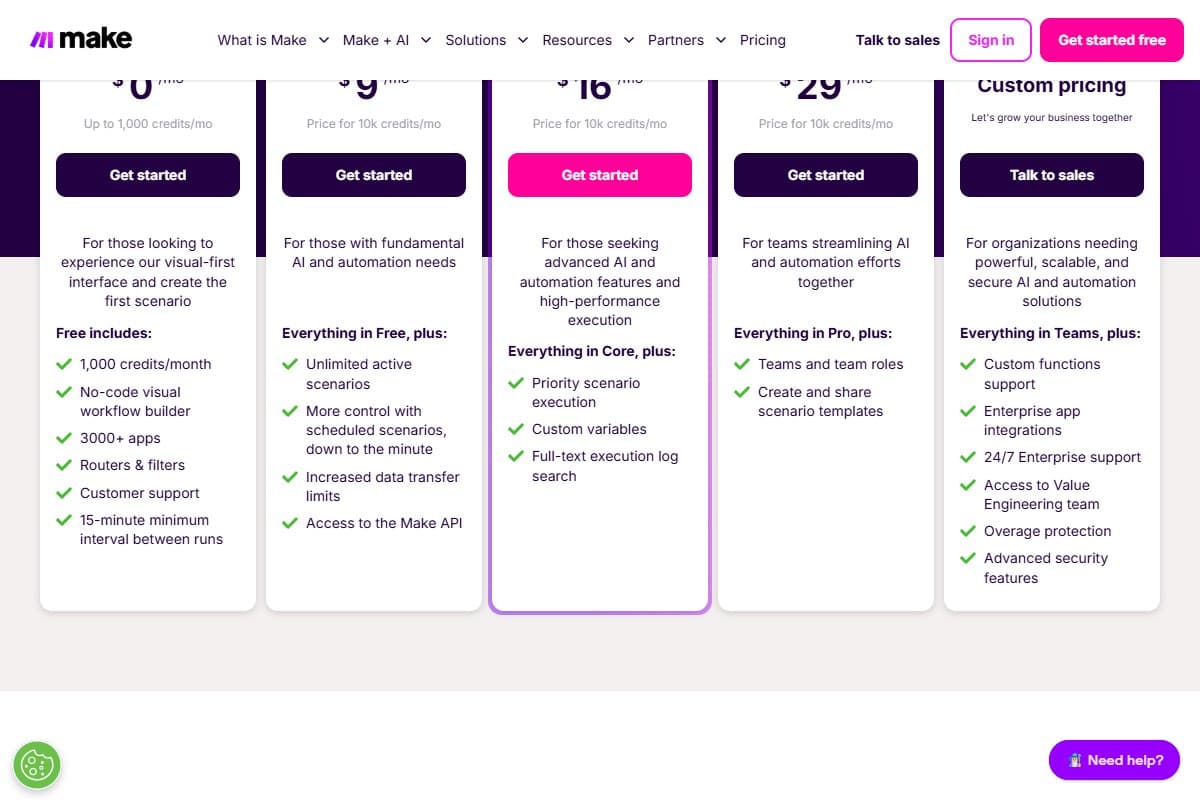
Make prices on operations (now "credits"), and paid plans start with a 10,000-credits-per-month bundle. The figures below are the current 2026 annual-billing prices straight off Make's pricing page: monthly billing runs a bit higher, and the dollar figures can vary slightly by region.
- 1,000 ops/month
- Visual builder + 3,000+ apps
- Routers & filters
- 15-min minimum interval
- Best for: learning it
- 10,000 ops/month
- Unlimited active scenarios
- Scheduling down to the minute
- Make API access
- Best for: solo users & small teams
- 10,000 ops/month (scalable)
- Priority execution
- Custom variables
- Full-text log search
- Best for: power users
- 10,000 ops/month (scalable)
- Team roles
- Shared scenario templates
- Best for: collaborating teams
The honest math: Core at $9/month is the sweet spot, and it's where Make's value argument lands hardest. For roughly half the price of Zapier's entry paid plan, you get more credits and far more power. The one thing to watch is that credit bundle: 10,000 sounds like a lot until a chatty, frequently-running scenario eats through it, so design with webhooks over polling where you can. Pro mainly buys you priority execution and better log search, which matter once automations are business-critical.
There's also an Enterprise tier with custom pricing for SSO, advanced security, and 24/7 support, but most marketers and small businesses will live happily on Core or Pro.
Who should use Make.com
Buy it if you are:
- A marketer wiring together lead routing, CRM updates, and multi-channel notifications without paying Zapier's per-task premium
- A developer or technical user who wants branching, looping, and raw API calls in one visual tool
- A small-business owner automating repetitive operations on a budget
- Anyone building complex, multi-branch workflows that a linear step-based tool makes painful
- A content creator who wants every blog post turned into a short video automatically: our Pictory and Make.com workflow guide walks through the full three-scenario build
Who should avoid Make.com
Skip it (try alternatives) if you are:
- A non-technical user who just needs simple two-step automations and zero learning curve: Zapier is gentler
- Someone who wants to self-host everything for free and lives in code: n8n is the better fit
- Running huge volumes of short-interval polling scenarios you won't redesign: the credit cost will bite
- Allergic to debugging: Make's error messages reward patience you may not want to spend
How Make.com compares to the alternatives
| Tool | Rating | Price | Best for | Verdict |
|---|---|---|---|---|
| Make.com | 4.4/5 | $9–$16/mo | Powerful visual automation, cheap per op | Best value for complex workflows; learning curve |
| Zapier | 4.3/5 | $19.99+/mo | Simplest setup, biggest app library | Easiest to start, priciest at scale |
| n8n | 4.2/5 | Free self-host / €20+ cloud | Developers who want to self-host | Most flexible and cheapest if you self-host |
| Use case | Winner |
|---|---|
| Easiest for non-technical beginners | Zapier |
| Complex multi-branch / looping workflows | Make.com |
| Lowest cost at high volume | Make.com |
| Self-hosting for free | n8n |
| Biggest native app library | Zapier |
Zapier is the easiest on-ramp: its linear trigger-action model and slightly larger app library make it the better pick if you just want something simple working in five minutes, but its per-task pricing (the Professional plan starts around $19.99/month annually) climbs fast. n8n is the developer's choice: it's open-source and can be self-hosted for free, with cloud plans from around €20/month, but it expects you to be comfortable with technical setup. Make sits in the middle: more powerful and far cheaper per credit than Zapier, more approachable than self-hosting n8n. For a model to power Make's AI steps, my ChatGPT vs Claude vs Gemini comparison helps, and if you're exploring agentic tools more broadly, the AI agents hub collects the rest.
Final verdict: 4.4 out of 5
Here's the breakdown.
On capability and value, Make.com is a 4.7. The visual canvas is genuinely better than Zapier's linear steps for anything complex, routers and iterators let you build workflows that would otherwise need code, the per-credit pricing is a fraction of Zapier's, and the 2026 push into AI agents and MCP is real. As a pure automation engine, it's the best value on the market.
I dock the score for the learning curve and the credits gotchas. The first two days are confusing, the credit counter punishes poorly-designed scenarios (polling and failed runs both burn credits), and the error messages can be cryptic. None of that changes how powerful the tool is, but an honest review has to weight the on-ramp, because plenty of people bounce off it before it clicks.
That nets out to 4.4 out of 5. If you build anything beyond trivial two-step automations and you'll invest a weekend learning it, Make is the Zapier alternative I'd choose. If you want zero friction and only simple flows, stay on Zapier. On a budget and exploring tools generally? My top 5 free AI tools round-up pairs well with this.
What I'd change about Make.com
If the Make team handed me the roadmap for a weekend, here's where I'd spend it: all of it grounded in friction I actually hit during the migration.
- Fix the error messages first. A "bundle rejected" message that tells me almost nothing is the single biggest reason debugging a complex scenario takes patience. Tell me which module, which field, and what the rejected bundle looked like: surface that in the run log instead of making me guess.
- Make the credit counter impossible to ignore. I didn't notice my polling scenario quietly burning credits until I happened to open Make Grid, which isn't the first place I'd think to look. Put a live credit-burn warning on the scenario canvas itself when a frequently-polling module is draining the bundle.
- Stop charging for failed runs, or at least flag it loudly. Paying for the credits a halfway-failed scenario already consumed stings most during testing, exactly when failures are expected. A free or discounted "test run" mode would fix it.
- Surface the settings that actually fix errors. The setting I needed was tucked a couple of clicks into a module's advanced options, not the obvious panel. When a module errors, link straight to the relevant setting.
- Soften the on-ramp. Iterators and aggregators cost me two confusing days; a guided first-scenario walkthrough using Maia would shorten that curve dramatically.
FAQ: Make.com review
How much does Make.com cost in 2026?
Make has a genuinely usable free plan (1,000 credits/month), then paid plans priced per 10,000-credit bundle: roughly $9/mo (Core), $16/mo (Pro), and $29/mo (Teams) on annual billing, with custom Enterprise pricing above that. Monthly billing runs a bit higher and figures can vary by region. The key thing to watch is the credit count: it's cheap, but frequently-running scenarios can eat through your bundle faster than you'd expect.
Is Make.com better than Zapier?
For complex, multi-branch automations and for cost, yes. Make's visual canvas handles branching, looping, and data restructuring far more gracefully than Zapier's linear steps, and its per-credit pricing is a fraction of Zapier's per-task billing. Zapier wins on simplicity and a slightly larger app library, so if you only need basic two-step automations with no learning curve, it's the easier choice.
Is Make.com hard to learn?
It's the tool's main downside. If you're coming from Zapier's plain trigger-action model, concepts like iterators, routers, aggregators, and arrays take a couple of days to click. The payoff is that once they do, you can build things that would otherwise require code, but budget a weekend to get comfortable before relying on it for anything important.
What are "operations" (credits) in Make.com?
An operation is a single action a module performs: fetching an email, adding a row, sending a message. Make renamed the billing unit to "credits" in August 2025, but for ordinary actions it's still one-to-one (1 operation = 1 credit). Native AI steps can cost more than one credit each. Plans include a monthly bundle, and importantly, scenarios that poll on a short interval or fail halfway still consume credits.
Make.com vs n8n, which should I choose?
Choose Make if you want a polished, hosted visual builder with thousands of ready integrations and don't want to manage infrastructure. Choose n8n if you're technical and want to self-host for free (it's open-source) or need maximum flexibility, with cloud plans from around €20/month if you'd rather not self-host. Make is friendlier out of the box; n8n is cheaper and more flexible if you're comfortable with the setup.
Related reviews
- AI Automation Tools topic hub: automation platforms compared, all in one place.
- Best AI automation tools 2026: six platforms ranked, with Make taking the top spot on cost per unit of work.
- CustomGPT review 2026: building a no-code AI agent, a natural companion to Make's AI Agents.
- Systeme.io review 2026: the all-in-one funnel and email platform to point your Make automations at.
- Best AI tools for marketers: the wider marketing stack for automation, SEO, funnels, and analytics.
- Best AI tools for social media managers: tools for content production, scheduling, and repeatable social workflows.
- How to repurpose blog posts into videos with Pictory and Make.com: the full Make build, module by module, with the credits budget worked out.
- ChatGPT vs Claude vs Gemini: pick the model that powers your Make AI steps.
- Top 5 free AI tools: the budget-conscious companion to this review.
Got a Make.com question I didn't cover, or an automation you're stuck building? Get in touch: reader questions shape the next round of reviews.
Free interactive tool
Compare Make.com with other AI toolsSide-by-side pricing, features, and ratings — plus a recommended pick for your use case.
Independent AI tools researcher testing what actually works.
Keep reading
Related reviews

LoopCV Review 2026: Does AI Job Applications Actually Work?
LoopCV review 2026: honest verdict on the AI auto-apply tool, real Trustpilot and G2 data, current pricing, and whether it actually submits applications.
Best AI Automation Tools 2026: I Tested 6 Tools and Ranked Them
I tested 6 AI automation tools on the same workflows. Make.com, Systeme.io, Taskade, Zapier, n8n and ActivePieces, ranked by what they cost to run.

Lovable Review 2026: Is the $6.6B AI App Builder Worth It? (I Built 3 Real Apps to Find Out)
Lovable hit $400M ARR and a $6.6B valuation in six months. I built three real apps in a week to test whether the hype actually holds up.