
Most people who search for a Synthesia review arrive expecting another AI video generator comparison, and then get confused when the output looks nothing like the cinematic clips coming out of Kling or Veo. That confusion is the single biggest reason people buy this tool and regret it. Synthesia does not generate footage. It generates a person, standing in a frame, reading your script with accurate lip sync, in any of 160+ languages, and it will do that at three in the morning without booking a studio.
This review is based on two weeks of hands-on use on a real project rather than a walkthrough of the marketing site. I built an actual employee onboarding module, localized it into three languages, cloned my own avatar, and pushed the platform until it broke. Worth it for a specific job. Genuinely wasteful for anything outside it.
How I Tested This
What Synthesia actually is
Synthesia is an AI video platform built on one primitive: a synthetic presenter reading text. Everything else on the platform exists to support that.
- Stock avatar library: a large cast of licensed synthetic presenters across ages, ethnicities and presentation styles, usable immediately with no setup.
- Custom avatars: your own likeness, trained from either webcam footage or a studio recording, with the studio route producing a noticeably better result.
- 160+ language support: one script becomes the same presenter delivering the same content in another language, with lip sync matched to the new audio.
- AI Video Assistant: paste a document, a URL or a PowerPoint deck and it drafts a scened-out video you then edit rather than starting from a blank timeline.
- Screen recorder and media library: the pieces that turn a talking head into an actual software tutorial.
- Brand kits and templates: fonts, colors, logos and reusable layouts, which matter more than they sound once several people are producing video.
The mental model that helped most: treat it as a document-to-video pipeline, not a camera. If your source material is written and needs a human face attached, this is the correct tool. If your source material is an idea that needs footage invented for it, you want a generative model instead, and our best AI video generator 2026 roundup covers those properly.
Why Synthesia matters more in 2026 than it did in 2024
Two things changed. The avatars crossed a quality threshold where a general audience stops noticing, at least for the first minute, and the localization workflow went from a novelty to something companies genuinely restructure their training budget around.
The second point is the commercially interesting one. A mid-sized company maintaining onboarding content across six regions used to face a choice between filming six times, paying for six voiceover sessions, or shipping English-only content and accepting the comprehension hit. Synthesia collapses that into editing one script and regenerating. The value is not that the video is good. It is that video five through video six cost almost nothing.
My honest testing experience
The moment that set the rating came about forty minutes in. I pasted my onboarding script into the AI Video Assistant expecting to spend the afternoon fixing its output. It came back with the script already broken into eleven scenes, each with a sensible visual, a matched avatar shot, and on-screen text pulled from the right sentences. Perhaps 70% of it was usable as generated. That is a real hour saved on the first project, and it compounds.
Then the pattern that kept repeating showed up. The avatars are excellent at neutral, informative delivery and noticeably weak the moment the script asks for anything else. I wrote one line intended to land as dry humor. Every avatar I tried delivered it with the same even, pleasant, slightly corporate cadence. There is emphasis control and there are pauses, and they help, but you are directing a narrator, not an actor. For a compliance module this is fine and arguably preferable. For a brand video with personality, it is a ceiling you will hit on day one.
Pronunciation was the other recurring friction. Ordinary prose was clean. Acronyms, product names and anything technical needed manual phonetic correction, and I ended up maintaining a small list of terms to fix on every regeneration. The tooling for this exists and works. It is simply more hands-on than the demos suggest.
Both passed native-speaker review as publishable for internal training, with Arabic needing two pronunciation fixes on proper nouns
The custom avatar was the biggest gap between expectation and reality. Trained from webcam footage, mine was recognizably me and completely usable for internal content. It was also subtly wrong in a way colleagues noticed within seconds, mostly in how little the head and shoulders move. Synthesia is honest that a studio recording produces a better result, and having seen the difference, I would treat webcam-trained avatars as an internal-comms tool rather than anything customer-facing.
- Localization into 160+ languages from a single script is genuinely transformative for anyone maintaining regional content
- The AI Video Assistant produces a usable first draft from a document instead of a blank timeline
- Lip sync is accurate enough that a general audience stops noticing within the first minute
- Brand kits and templates keep output consistent once more than one person is producing video
- No camera, no studio, no reshoot when a single policy line changes: you edit the script and regenerate
- Genuinely useful free plan for evaluating avatar quality before spending anything
- Avatars deliver information well but cannot act, so anything needing emotional range falls flat
- Minute-based limits are the real constraint, and heavy publishing pushes you up a tier faster than expected
- Technical terms, acronyms and product names need manual pronunciation fixes on every regeneration
- Webcam-trained custom avatars are noticeably stiffer than studio-recorded ones
- Completely the wrong tool for cinematic, creative or photoreal video work
Pricing: is it worth it?
- Limited video minutes per month
- Access to a subset of stock avatars
- Watermark on output
- Best for: checking whether the avatars clear your quality bar
- $29/mo if billed monthly
- Stock avatar library
- 160+ languages included
- No watermark
- Best for: solo creators and occasional video
- $89/mo if billed monthly
- More video minutes per month
- Custom avatar options
- Brand kits and templates
- Best for: regular training and marketing output
- Seat and workspace controls
- Studio-grade custom avatars and voice cloning
- SSO, compliance and security review
- Best for: teams publishing at scale
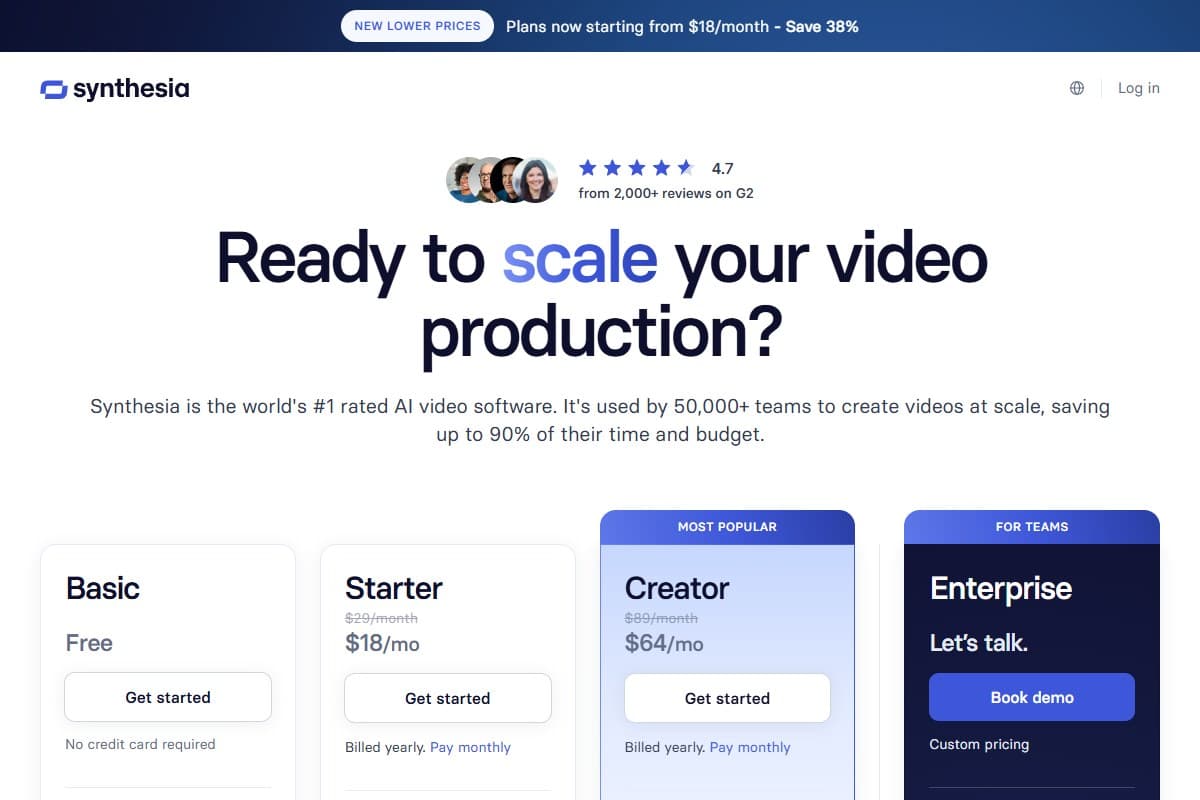
The number that actually decides this is not the monthly fee. It is video minutes. Starter at $18 a month billed yearly works for someone publishing a couple of short videos a month. The instant video becomes a habit rather than an experiment, you are on Creator at $64 a month billed yearly, and the honest way to evaluate that is against what the same output costs otherwise. One professionally filmed and edited training video, with a presenter, typically costs more than a year of Creator. Judged that way it is cheap. Judged against a $6.99 generative video subscription it looks expensive, and that comparison is meaningless because those tools cannot do this job at all.
Note that the headline prices assume annual billing. Month-to-month costs $29 for Starter and $89 for Creator, so paying yearly saves roughly 38% on Starter and 28% on Creator. If you are unsure whether the habit will stick, one month at the monthly rate is a cheaper test than committing to a year.
Verify current tiers and minute allocations on the pricing page before committing, since Synthesia has adjusted both more than once.
Who should use Synthesia
Buy it if you are:
- An L&D or training team maintaining course content that changes more than once a year
- A company shipping the same material across multiple language regions
- A marketer producing explainer and product videos on a recurring schedule
- An internal comms function that needs a presenter on screen weekly and cannot film one
Who should avoid Synthesia
Skip it (try alternatives) if you are:
- A creator who needs original cinematic footage, where Kling is the better buy
- Anyone repurposing written content into stock-footage social video, which is Pictory's job and cheaper
- Anyone whose source material is recorded video rather than a script, where a clipper like OpusClip cuts the shorts for you instead
- A brand whose video identity depends on personality, humor or emotional performance
- Someone making occasional one-off videos, where the per-video cost is hard to justify
How Synthesia compares to the alternatives
| Tool | Rating | Price | Best for | Verdict |
|---|---|---|---|---|
| Synthesia | 4.3/5 | $18–$64/mo billed yearly | Avatar-led training and localization | Best for corporate video at scale |
| Pictory | 4.4/5 | $25–$119/mo | Turning written content into stock-footage video | Best for content repurposing |
| Kling 3.0 | 4.6/5 | $6.99–$127.99/mo | Generative cinematic clips | Best overall generative model |
| Use case | Winner |
|---|---|
| Presenter on camera without filming | Synthesia |
| Same training module in six languages | Synthesia |
| Blog post into captioned social video | Pictory |
| Original cinematic footage from a prompt | Kling 3.0 |
| Software tutorial with screen recording | Synthesia |
| Shorts cut from a recorded webinar | OpusClip |
| Lowest cost per finished video | Pictory |
What the Community Is Saying
Sentiment on Synthesia is unusually consistent across platforms, which is rare for an AI tool and worth paying attention to.
On G2, Synthesia holds 4.7 from 2,000+ reviews, driven overwhelmingly by corporate training and enterprise L&D users, who repeatedly single out the multi-language capability and the speed of updating existing content as the reasons they renew. The recurring criticism in the same reviews concerns editing flexibility compared with a traditional video editor. (Source: G2)
On Trustpilot, the review pattern splits along exactly the line this review describes. Users who bought it for training, onboarding and localization are largely positive, while the negative reviews cluster around people who expected broader creative video capability and found the avatar format limiting. (Source: Trustpilot)
On Product Hunt, discussion has focused less on whether the avatars look real and more on whether the workflow saves meaningful time, with the localization pipeline drawing the most consistent praise across launches. (Source: Product Hunt)
Instructional design communities such as r/instructionaldesign treat it as an accepted part of the toolkit rather than a novelty, with the practical debate now centering on cost per minute and when a human presenter is still worth filming.
Bottom line from the community: people who bought Synthesia for the job it does are happy and renew. People who bought it expecting a general-purpose AI video tool are the source of nearly every negative review.
Final verdict: 4.3 out of 5
Synthesia does one thing exceptionally well and is honest about not doing anything else. The localization workflow alone justifies the price for any organization maintaining content in more than two languages, and the AI Video Assistant meaningfully reduces the blank-page problem that kills most internal video projects before they start.
Three things hold it back from a higher score. The avatars cannot perform, which caps the format at informative rather than engaging. Minute-based pricing means costs scale with success in a way that catches teams out. Pronunciation handling for technical vocabulary still needs manual work on every regeneration. None of these are dealbreakers for the target buyer, and all three matter enough to mention before you commit a budget.
Bottom Line
Synthesia earns 4.3 out of 5 as the most purpose-built AI avatar video tool available in 2026, and the two-week test confirmed the pitch on localization: one script became publishable Spanish and Arabic versions with two pronunciation fixes, work that would otherwise mean two more recording sessions. Buy it if you are an L&D team, an internal comms function, or a marketer shipping recurring explainer content across regions, where Creator at $64 a month billed yearly costs less than a single filmed video. Skip it if you need cinematic footage, creative range, or personality on screen, because no amount of avatar quality fixes a format that narrates rather than performs. The free plan answers the only question that matters before you pay, which is whether the avatars clear your own quality bar.
FAQ: Synthesia review
How much does Synthesia cost in 2026?
There is a free plan with limited monthly video minutes and a watermark, then Starter at $18 per month billed yearly and Creator at $64 per month billed yearly, with Enterprise priced on a custom quote. Paying month to month costs $29 and $89 respectively, so annual billing saves roughly 38% on Starter and 28% on Creator. The constraint that actually determines your tier is video minutes rather than features, so estimate your monthly output before choosing.
Is Synthesia worth it?
For training teams, internal comms and marketers publishing regularly, yes, because a single filmed training video typically costs more than a year of the Creator plan. For occasional one-off videos it is hard to justify, and for creative or cinematic work it is the wrong tool at any price. The deciding question is whether you need a presenter reading a script repeatedly, not whether the avatars impress you once.
How realistic are Synthesia avatars in 2026?
Realistic enough that a general audience stops noticing within the first minute of neutral, informative delivery. Lip sync is accurate and the stock avatar cast is well produced. The limitation is performance rather than appearance: avatars narrate competently and cannot convey humor, tension or emotional emphasis, so scripts written for personality fall flat.
Can Synthesia clone my own face and voice?
Yes. Custom avatars can be trained from webcam footage on the appropriate tier, or from a studio recording on higher tiers, and voice cloning is available. In testing, the webcam-trained avatar was recognizable and usable for internal content but visibly stiffer than the studio-grade option, particularly in head and shoulder movement. Treat webcam avatars as internal-facing unless you have seen the studio result.
Synthesia vs HeyGen, which is better?
They target the same avatar video job and the honest answer depends on emphasis. Synthesia is the stronger choice for enterprise training workflows, language coverage and team controls, which is where its product investment has clearly gone. HeyGen is generally regarded as more flexible for creator-style and short-form output. If localization at scale is the requirement, Synthesia is the safer buy.
Does Synthesia work for languages other than English?
This is its strongest feature. Synthesia supports 160+ languages, and the one-click translation converts an existing video rather than requiring a rebuild. In testing, Spanish and Arabic versions both passed native-speaker review as publishable for internal training, with Arabic needing two pronunciation corrections on proper nouns. For any organization maintaining regional content, this is the main reason to buy.
Can I use Synthesia videos commercially?
Yes, paid plans permit commercial use, and the platform is built specifically for business video production including customer-facing marketing content. Custom avatars of real people require documented consent, which Synthesia enforces during avatar creation. Check the current terms for your specific plan before publishing externally, particularly around custom avatar usage rights.
What are the biggest limitations of Synthesia?
Three stand out from two weeks of use. Avatars cannot act, so emotional range is absent. Video minutes rather than features gate each tier, so costs rise as your output grows. Technical vocabulary, acronyms and product names need manual pronunciation fixes that must be reapplied whenever you regenerate a scene. None prevent the core job, and all three are worth knowing before committing budget.
Related reviews
- AI Video Tools topic hub: every video generator, script-to-video and avatar review in one place.
- Best AI video generator 2026: the generative models, if you need original footage rather than a presenter.
- Pictory review 2026: the content repurposing route, and the cheaper answer for stock-footage video.
- Kling AI review 2026: the cinematic generator that wins the job Synthesia is not built for.
- OpusClip review 2026: the clipper, for when the webinar is already recorded and you need shorts from it.
Got a Synthesia question I didn't cover? Get in touch: reader questions shape the next round of reviews.
Free interactive tool
Compare Synthesia with other AI toolsSide-by-side pricing, features, and ratings — plus a recommended pick for your use case.
Independent AI tools researcher testing what actually works.
Keep reading
Related reviews
AI Video Generator Benchmark 2026: 1,394 Blind Votes Reveal the Real Winner
AI video generator benchmark 2026: explore 1,394 blind votes, Kling's winning score, real plan costs, and the best tool for your workflow.

Grok Imagine 1.5 Review 2026: Is xAI's Video Model Worth It?
Grok Imagine 1.5 added native audio and hit #1 on the video Arena at launch. My honest take on xAI's image-to-video model, and its one real catch.

Best AI Video Generator 2026: I Tested Kling, Veo, Pictory, Runway & Pika After Sora Died
Sora's consumer app is gone. I generated real clips on Kling, Runway, Veo and Pika, then added Pictory and Synthesia for the jobs a generator cannot do.