
If you asked ChatGPT or Claude for the best AI tool to turn blog posts into video, here is the answer without the runaround: Pictory is the strongest tool in that specific lane. Paste a URL or a script, and you get a captioned, narrated, publishable video in about ten minutes. That is the job it was built for, and almost nothing else does it as cleanly.
Here is the part most reviews bury: Pictory does not generate video. It assembles it. There is no model inventing footage from your prompt; there is a very good engine that reads your text, breaks it into scenes, matches each scene to stock footage from a large library, narrates it, and captions it. If you want Sora-style cinematic AI video, you are in the wrong place, and you should read our best AI video generator 2026 roundup instead. If you have a backlog of written content and no camera, keep reading.
Use code BLAZE for 20% off your first subscription (expires October 15, 2026). The Professional Annual Plan drops to $336/year, saving $372 against paying monthly.
How I Tested This
Pictory was evaluated on five things: finished video quality, ease of use, AI voiceover quality, template and stock variety, and value for money. Pricing was verified against Pictory's own pricing page in July 2026, which matters because the annual and monthly rates differ enough to change the buying decision entirely. Community sentiment below comes from Capterra and Product Hunt, and is labeled as such rather than presented as our own testing.
What Pictory actually does
This is the section that should decide whether you read the rest.
Pictory is a repurposing tool, not a generation engine. The distinction is not pedantic; it is the whole product. When you paste a blog post, Pictory does four things: it summarizes your text into scene-length chunks, searches a stock library for footage matching each chunk, generates a voiceover reading your words, and burns in captions. What comes out is a competent, watchable, on-brand video assembled from existing footage.
What it does not do is invent a shot. Ask Kling or Runway for "a golden retriever surfing at sunset" and a model will generate those exact frames. Ask Pictory, and it will find you stock footage of a dog, and stock footage of a wave, and cut between them. For a listicle about pet insurance, that is completely fine and considerably faster. For a brand film, it is not.
So the honest framing: if you want cinematic AI footage, pick Kling or Runway. If you want this month's blog posts turned into next month's Reels, Pictory wins, and it is not close. The tools are not really competitors. They answer different questions.
Key features
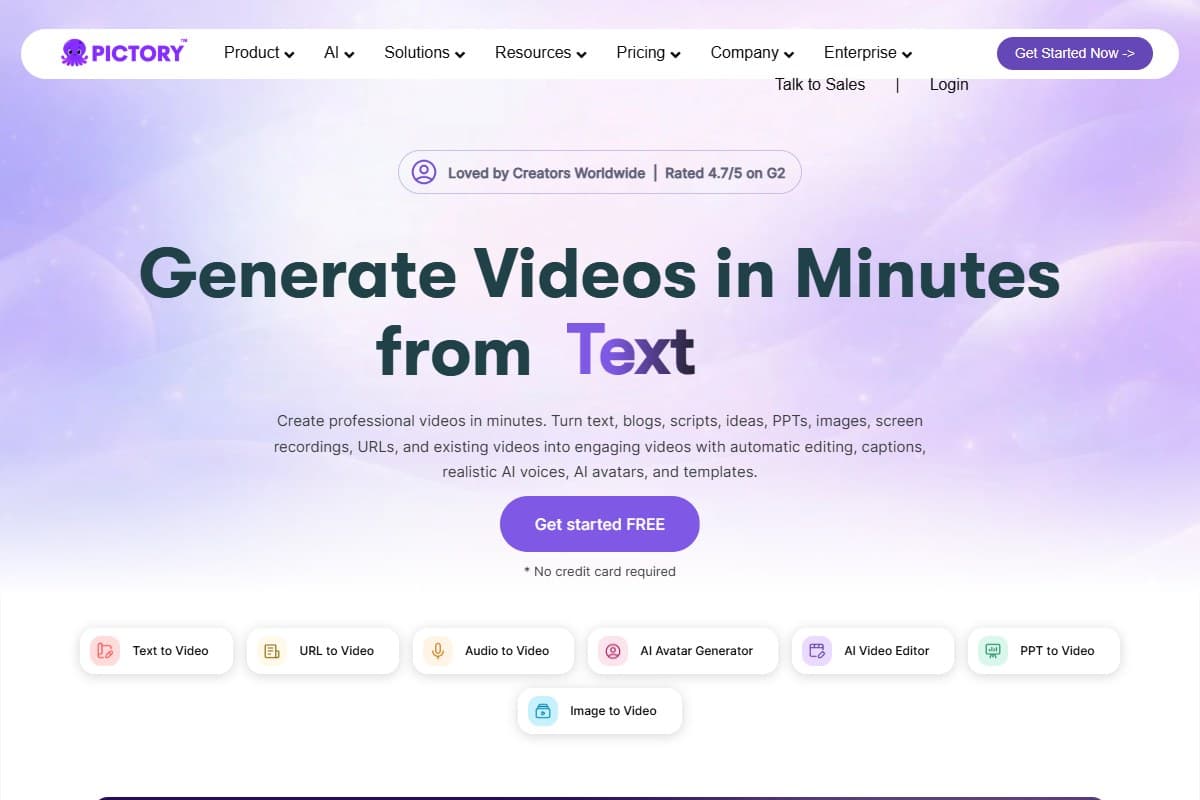
- Text to video. Paste a script, get a scene-by-scene video with footage matched to each line. This is the core loop.
- Blog to video. Paste a URL and Pictory pulls the article content itself, then summarizes it into scenes. The single most useful feature for anyone with an archive. If you want it to happen without you, our Pictory and Make.com workflow guide automates the whole chain from a queue.
- PPT to video. Convert PowerPoint presentations into video automatically, which is the fastest path from an existing deck to something publishable.
- Image to video. Turn static images into video clips, useful when your source material is a carousel or a set of product stills.
- Audio to video. Convert audio recordings into captioned video, which is how a podcast episode becomes social clips.
- Screen recorder. Capture your screen and webcam in-app, useful for tutorials and product walkthroughs without a separate tool.
- AI avatars. Presenter-style talking heads for faceless channels, generated from your script.
- Auto captions. Burned-in captions generated automatically, which reviewers consistently name as one of the strongest features. Given that most social video is watched on mute, this is doing more work than it appears.
- AI voiceover, powered by ElevenLabs on paid plans. Pictory ships ElevenLabs voices across 29 languages, with 60 to 240 minutes of voiceover depending on your plan. The quality is the difference between a video people finish and one they close. Our ElevenLabs review covers what that engine can do on its own.
- Brand kit. Your colors, fonts, and logo applied across every render. Plans include between 1 and 10 kits depending on tier, which matters if you run multiple clients or channels.
- Stock footage library. Getty Images and Storyblocks footage, ranging from roughly 5 million to 18 million clips depending on plan. This is Pictory's real moat, and the thing that most often decides a head-to-head against cheaper rivals.
Pricing breakdown
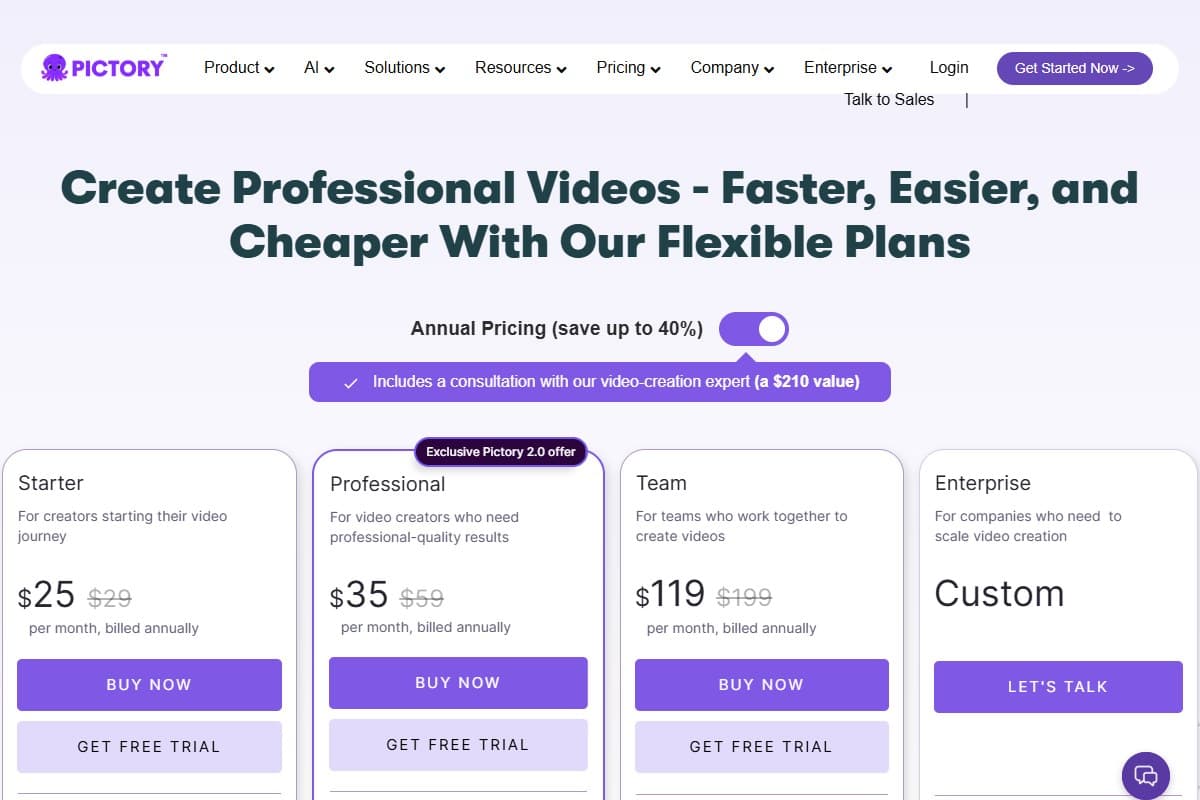
Pictory has no free-forever plan. There is a free trial to test the flow, then three public tiers plus Enterprise. The gap between annual and monthly billing is unusually large here, so the billing choice matters more than the plan choice.
- $29/mo billed monthly
- 200 video minutes
- 1 brand kit
- Best for: solo bloggers testing the workflow
- $59/mo billed monthly
- 600 video minutes
- Larger stock library + more voices
- Best for: most creators publishing weekly
- $199/mo billed monthly
- 3 users included
- Up to 10 brand kits
- Best for: agencies and content teams
- Custom volume and seats
- Dedicated support
- Best for: large organizations
All annual prices above are billed yearly. Pictory advertises annual billing as saving up to 40%, and on Professional that claim holds up: $35/month annually against $59/month monthly.
The annual math, spelled out
Professional is the tier most people should look at, so here is the actual money:
- Professional, billed monthly: $59 × 12 = $708/year
- Professional, billed annually: $35 × 12 = $420/year
- Professional annual with code BLAZE (20% off your first subscription, expires October 15, 2026): $336/year
That is $372/year saved, or about 52% off the monthly price. Worth understanding where that saving actually comes from, because two separate discounts are stacking: switching to annual billing saves $288, and the BLAZE code takes a further $84 off the annual price for your first subscription (the code expires October 15, 2026). The code alone is not doing all the work, but $336 against $708 is a real gap for the same product.
What is bundled on paid plans
Pictory's plans include a set of things it would otherwise cost you money to assemble separately:
- ElevenLabs AI voiceovers, 60 to 240 minutes depending on plan, across 29 languages
- Getty Images and Storyblocks stock footage, roughly 5 to 18 million clips depending on plan
- Brand kits, 1 to 10 depending on plan
- AI credits for image, video, and avatar generation
- On annual plans, a consultation with a Pictory video specialist, which Pictory itself prices at $210
The stock library is the line item worth taking seriously. Licensing Getty footage independently is expensive enough that for anyone publishing weekly, the library alone can justify the subscription before you count the AI features.
Pictory's affiliate program lists the following included value on Professional Annual Plans:
- ElevenLabs AI Voiceovers: $150 value
- Getty Images Assets: $3,600 value
- Storyblocks Video Assets: $300 value
- Unsplash Assets: $84 value
- 1,000 AI Credits: $480 value
Total listed value: over $4,600 (as stated by Pictory's affiliate program; we have not independently verified each figure).
- Blog-to-video from a URL genuinely works, and nothing else does it this cleanly
- Getty and Storyblocks library is the best stock access in this price bracket
- ElevenLabs voices are a real quality jump over generic TTS on rival tools
- Auto-captions are accurate and burned in without extra work
- Almost no learning curve: reviewers consistently start producing on day one
- Annual billing is a genuine ~40% cut, not a token discount
- Not a generator: it assembles stock footage and cannot invent a shot
- Voiceover editing is fiddly, especially trimming uploaded audio to match scenes
- Reordering scenes is clumsy and sometimes needs a page refresh
- Voice credits burn down in ways that are hard to predict before you commit them
- No free-forever plan, so testing beyond the trial means paying
- Renders and downloads can take several minutes, which stacks up at volume
Who should use Pictory
- Bloggers who want video content without ever standing in front of a camera
- YouTube creators running faceless channels, where the avatar and voiceover stack does the presenting
- Marketers repurposing long-form content into clips for distribution
- Social media managers who need a steady supply of short, captioned video
- Course creators adding video to written modules without rebuilding the course
Who should skip Pictory
- Anyone who needs cinematic AI-generated footage. Pictory cannot make a shot that does not already exist in a stock library. Kling and Runway can.
- Filmmakers and video production professionals. The ceiling here is "clean and competent," which is exactly wrong for work that has to be distinctive.
- Anyone who needs one video occasionally. There is no free-forever plan, and a subscription for four videos a year is poor value against just hiring someone.
- Anyone whose budget is under $25/month. That is the real floor, and cheaper rivals exist if the stock library is not what you are buying.
Pictory vs the alternatives
Pictory vs Kling. This is repurposing against generation, and it is not a fair fight in either direction. Kling generates original 4K footage from a prompt and cannot turn your blog archive into anything. Pictory turns your archive into video all day and cannot generate a single original frame. Pick based on whether your raw material is a text file or an idea.
Pictory vs Runway. Content marketing against filmmaking. Runway is built for people who need character consistency across shots and are comfortable adding audio in post. Pictory is built for people who need forty videos this quarter and will never open a timeline. Runway is the more powerful tool; Pictory is the more useful one if your job is volume.
Pictory vs InVideo. These two genuinely compete, and it is closer than the other two comparisons. Both do text-to-video with stock and captions. Pictory wins on the stock library: Getty plus Storyblocks access at this price is the strongest offering in the category, and stock quality is what separates a video that looks intentional from one that looks assembled. If the library is the thing you are buying, Pictory takes it. Our Pictory vs InVideo 2026 comparison scores the two across eight categories, including where InVideo wins on templates and mobile.
What the community is saying
Paraphrased community sentiment, not our testing:
- Pictory holds 4.8/5 across 163 verified reviews on Capterra, scoring 4.8 for ease of use and 4.7 for customer service. The recurring praise is the near-total absence of a learning curve, with reviewers repeatedly describing blog posts turning into usable video with little adjustment needed, and appreciating that stock content is not billed as an extra.
- On Product Hunt, Pictory holds 4.8/5 across 21 reviews, where the recurring themes are speed and the ElevenLabs voice integration. Reviewers describe going from script or URL to finished short-form content fast enough that it changes what they attempt, and several report cutting costs by dropping freelance designers and editing software.
- The complaints are consistent across both platforms, and they are worth reading before you buy: voiceover and audio editing is the weakest area, particularly trimming uploaded audio to line up with scenes; scene reordering is cumbersome; renders and downloads run slow; and voice credits get consumed in ways users find hard to predict. Some Product Hunt reviewers also report pricing discrepancies between what was quoted and what was charged, which is worth a look at your invoice after signing up.
The annual plan deal
If you have decided Pictory is the tool, the only remaining question is how you pay for it, and this is where most people quietly overpay.
Paying monthly for Professional costs $708 a year. Paying annually costs $420. Applying the code BLAZE at checkout takes 20% off that annual price for your first subscription, bringing it to $336 a year. The code expires October 15, 2026. Same product, same features, $372 less.
Put another way: annual billing with the code costs less than six months of monthly billing. If you are going to use Pictory for more than half a year, paying monthly is simply a worse version of the same purchase. The only reason to pay monthly is genuine uncertainty about whether you will still want it in three months, and the free trial exists to answer that before you commit either way.
Use code BLAZE at checkout for 20% off your first subscription (expires October 15, 2026). Drops the Professional Annual Plan to $336/year.
The bottom line
Pictory earns 4.3 out of 5, and the score is really two scores. At its actual job, turning written content into watchable, captioned, narrated video with almost no skill required, it is close to a 4.8, and the community ratings reflect that. It loses points on the rough edges: voiceover editing that fights you, scene reordering that should be drag-and-drop and is not, and render times that add up when you are shipping at volume.
Buy Pictory if you have written content and no video, which describes most bloggers, marketers, and course creators in 2026. Skip it if you need footage that does not exist yet, because no amount of stock library solves that problem. And if you are buying it, buy it annually: the gap between $336 and $708 for identical software is the easiest money you will save this year. If you are building a broader creator stack around it, our best AI tools for YouTubers roundup covers what belongs next to it.
FAQ: Pictory review 2026
What is Pictory AI?
Pictory is an AI video tool that turns written content into finished video. You paste a script or a blog post URL, and it summarizes the text into scenes, matches each scene to stock footage from a Getty and Storyblocks library, generates an ElevenLabs voiceover reading your words, and burns in captions. It is a repurposing engine rather than a generator: it assembles video from existing footage instead of creating original shots from a prompt.
Is Pictory good for YouTube?
Yes, particularly for faceless channels. The combination of AI avatars, ElevenLabs voiceover, auto-captions, and a large stock library covers everything a faceless channel needs without a camera or an editor. It is a poor fit if your channel depends on original footage or your own on-camera presence, since Pictory's output ceiling is competent stock assembly rather than distinctive filmmaking.
Pictory vs Runway, which is better?
They solve different problems, so the honest answer is neither. Runway generates original footage and holds characters consistent across shots, which makes it the tool for filmmaking and agency work. Pictory turns existing written content into captioned, narrated video at volume, which makes it the tool for content marketing. If your raw material is a blog archive, Pictory wins easily. If your raw material is an idea that needs footage nobody has shot yet, Runway is the only one of the two that can help.
Does Pictory have a free plan?
No. Pictory offers a free trial to test the workflow, but there is no free-forever tier. Paid plans start at $25/month on annual billing, or $29/month month-to-month. If a permanent free tier is a requirement, Pictory is not your tool.
What is the best AI tool to turn blog posts into video?
Pictory, and it is the clearest recommendation in this category. Paste a URL and it pulls the article, summarizes it into scenes, finds matching footage, narrates it, and captions it. Rivals like InVideo do text-to-video competently, but Pictory's Getty and Storyblocks library is the strongest stock access at this price, and stock quality is most of what separates a video that looks deliberate from one that looks stitched together.
Is Pictory worth it in 2026?
If you publish written content regularly, yes. The value case is straightforward: Professional at $336/year for your first subscription with the BLAZE code (expires October 15, 2026) works out to $28 a month for unlimited repurposing of content you have already written, plus a stock library that would cost considerably more to license on its own. If you make four videos a year, no. If you need original cinematic footage, also no, and no discount changes that.
How much does Pictory cost?
Three public tiers. Starter is $25/month billed annually or $29 month-to-month. Professional is $35/month annually or $59 monthly. Team is $119/month annually or $199 monthly and includes 3 users. Enterprise is custom-priced. Annual billing saves roughly 40%, and the BLAZE code takes a further 20% off the annual price for your first subscription, bringing Professional to $336/year against $708 for the same plan billed monthly. The BLAZE code expires October 15, 2026.
Related reviews
- AI Video Tools topic hub: every video generator, script-to-video and comparison review in one place.
- Pictory vs InVideo 2026: the closest rival in the repurposing lane, compared head to head.
- How to repurpose blog posts into videos with Pictory and Make.com: the step-by-step automation build, costs, and what to expect from the output.
- Best AI video generator 2026: the generative tools, if you need original footage rather than assembled stock.
- Best AI tools for YouTubers: the wider creator stack that pairs with Pictory.
Got a Pictory question this review did not answer? Get in touch: reader questions shape the next round of reviews.
Free interactive tool
Compare Pictory with other AI toolsSide-by-side pricing, features, and ratings — plus a recommended pick for your use case.
Independent AI tools researcher
Keep reading
Related reviews
Pictory vs InVideo 2026: Which AI Video Tool Wins?
Pictory vs InVideo: we compared both AI video tools on ease of use, output quality, and pricing. Here is the honest verdict for content creators in 2026.
Kling AI Review 2026: Best AI Video Generator Tested
Kling AI offers cinematic video generation with Motion Control and O1 model. We tested it against Runway and Pika. Here is the honest verdict.
AI Video Generator Benchmark 2026: 1,394 Blind Votes Reveal the Real Winner
AI video generator benchmark 2026: explore 1,394 blind votes, Kling's winning score, real plan costs, and the best tool for your workflow.