
Most video generator reviews are opinions. A reviewer likes one camera move, dislikes another interface, and turns that experience into a winner. This AI video generator benchmark 2026 starts with something more useful for comparing output: 1,394 blind human votes reported by LLM Stats Video Arena. Participants compare real clips without knowing which model made them.
The headline winner is Kling v3. The buying decision takes more work. A beautiful generated shot does not tell you whether a subscription will cover your monthly workload, whether an avatar can pronounce your product name, or whether your footage needs generating in the first place.
This is an analysis of an external benchmark, followed by our practical buying guidance. AIToolBlaze did not collect these votes or run this arena. For our separate product assessments, start with the best AI video generators comparison.
Source snapshot: captured September 26, 2026. The live LLM Stats page in the screenshot below displays Updated September 26, 2026, with 1,394 blind votes and the three scores reproduced here. An earlier retrieval displayed September 22; the screenshot records the newer visible update date. Live rankings can change after capture.
How the benchmark works
LLM Stats describes four anonymously generated clips per prompt, with voters selecting the best and worst. It uses TrueSkill, specifically a conservative score of μ − 3σ. See the primary benchmark and methodology.
In plain English, TrueSkill tracks both an estimated ability and uncertainty about that estimate. A conservative ranking subtracts an uncertainty allowance instead of treating an early estimate as settled. Results update the estimates as comparisons accumulate. This is the general statistical idea behind Microsoft Research's TrueSkill ranking system.
Blind voting removes the model name and provider identity from the immediate choice. That reduces the opportunity to vote for a familiar brand or a launch announcement. Marketing claims cannot substitute for what the viewer sees. It does not eliminate taste, prompt selection effects, or differences in how closely people watch the clips.
For example, imagine two anonymous shots of a cyclist turning a corner. One looks dramatic but the front wheel changes shape. The other is less spectacular but keeps the bicycle intact. The viewer has to choose between actual outputs. Whether they prioritize realism or drama still affects the vote, but the logo no longer supplies the answer.
Treat a score as a relative ranking signal. It is not a percentage, an export resolution, or a count of successful customer projects. Nor does a published lead prove that the first model will win every prompt you try. Your own creative brief can reward a different strength.
How I Tested This: source verification, not new model trials
For this article, I checked the published leaderboard against the supplied figures, read its methodology, and compared the pricing claims with existing AIToolBlaze reviews and accessible vendor pages. I did not generate a new test set or independently audit the underlying votes. The workflow recommendations and budget examples below are editorial analysis, not additional benchmark results.
Current leaderboard: September 2026
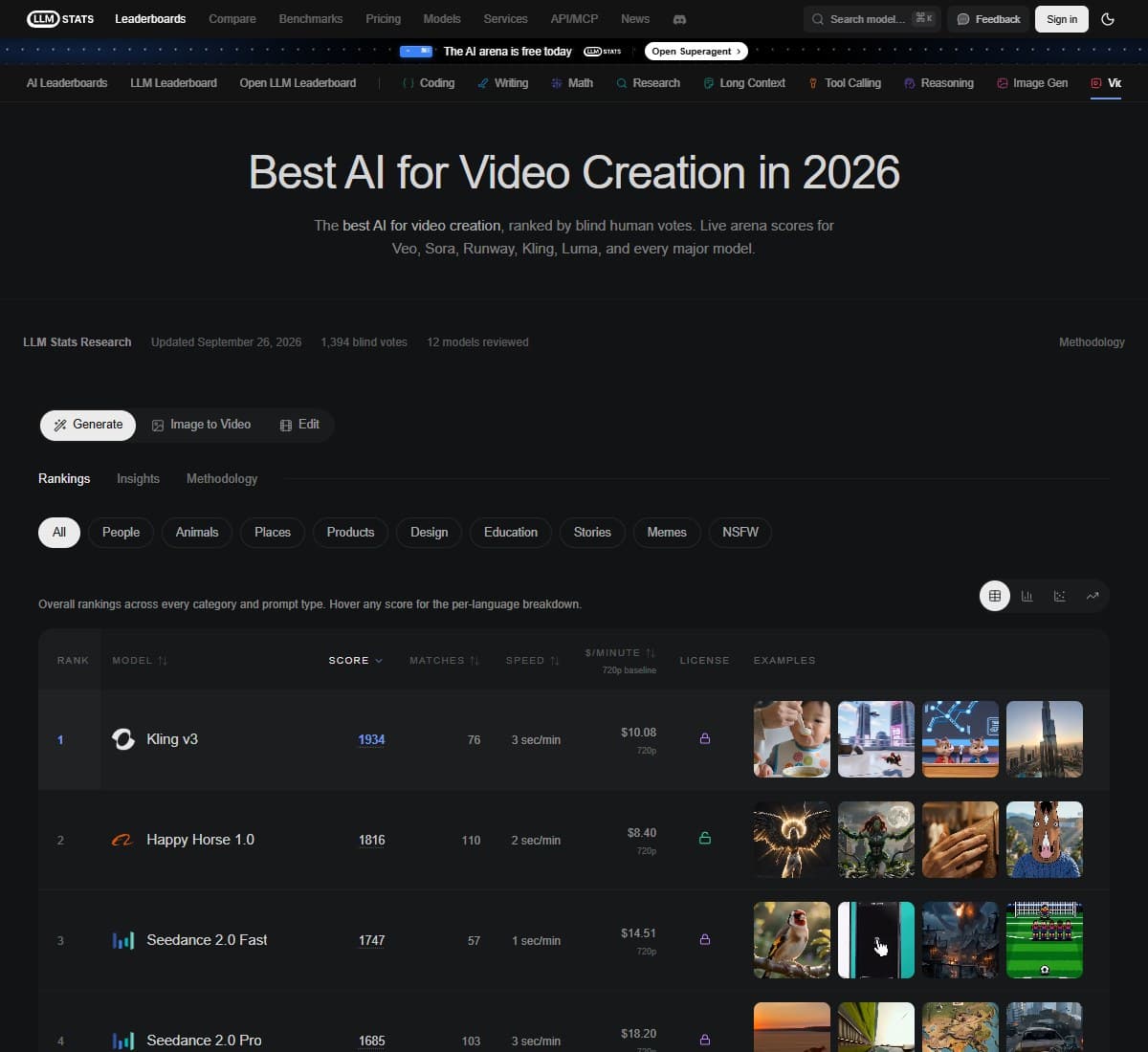
| Rank | Model | Arena score |
|---|---|---|
| 1 | Kling v3 | 1934 |
| 2 | Happy Horse 1.0 | 1816 |
| 3 | Seedance 2.0 Fast | 1747 |
Source: LLM Stats text-to-video leaderboard. The reported 1,394 votes span its video arenas; this is not 1,394 votes per model or necessarily 1,394 unique people.
For a creator starting from a written scene description, the practical response is to put Kling first in the trial queue and keep the other two on the comparison list. Starting with a leader saves research time. Buying it without checking your own shots gives away the benefit of doing that research.
Do not turn the score differences into invented performance percentages. A camera test, a product animation, and a stylized character scene could produce different preferences. Without the underlying comparisons and uncertainty information, the table cannot support a claim about how often one model will beat another on your work.
The cost-efficiency claim needs a boundary
LLM Stats lists Kling v3 at $0.17 per million input tokens. That is a source-reported input price, not a consumer subscription or cost per finished clip. It does not by itself establish a cost-efficiency lead. Source: LLM Stats model pricing labels.
To establish value for a buyer, you need the actual billing unit, output charges where applicable, chosen settings, and the number of retries. A low input rate can coexist with a higher production bill. Never multiply your script length by this figure and assume you have priced a video campaign.
What this means for your budget
The useful quality-versus-cost matrix combines two kinds of evidence: a model's benchmark position and a product's consumer pricing. They answer different questions, so the table labels missing benchmark evidence instead of inventing scores for workflow tools.
| Tool or model | Quality evidence | Consumer price reference | Budget decision |
|---|---|---|---|
| Kling v3 through Kling AI | Benchmark winner above | Existing review lists Standard from $6.99/month as a first-subscription offer | Check renewal price, model access, and credit burn before paying |
| Happy Horse 1.0 | Second in the table above | No verified comparable consumer plan used here | Obtain pricing for the provider you would actually use |
| Seedance 2.0 Fast | Third in the table above | No verified comparable consumer plan used here | Compare identical duration and resolution settings |
| Pictory Starter | Workflow recommendation, no score assigned here | $25/month equivalent billed annually; existing review lists $29 monthly | Budget for repurposing articles and scripts |
| Synthesia Starter | Avatar recommendation, no score assigned here | $29 monthly; annual pricing card displays $18/month equivalent | Budget for presenter-led business video |
| Cutroom Lite | Editing recommendation, no score assigned here | $19.99/month billed monthly | Budget for editing an existing short talking clip |
The Kling figure comes from our Kling AI review, which explicitly identifies introductory pricing and higher renewals. We could not independently retrieve its live membership pricing page for this update. Treat $6.99 as the existing review's reference offer, not a newly verified checkout quote or a promise that every generation mode is included.
Pictory's pricing page displays Starter at $25 per month on annual billing. Our Pictory review records the $29 monthly alternative. At the annual headline rate, the simple subscription calculation is $300 for twelve months. Paying for a year only makes sense after the workflow earns its place in your publishing schedule.
Synthesia's pricing page confirms $29 monthly and displays $18 per month on its annual Starter card. Its FAQ also lists a different annual total, $264, so confirm the checkout total before choosing annual billing. The $18 card matches our Synthesia review, but that inconsistency deserves to be visible rather than silently resolved in the vendor's favor.
Cutroom's published pricing lists Lite at $19.99 monthly. That is an editing budget, not a way to purchase the same generative output as Kling.
Compare the cost of work you can actually publish
Here is a hypothetical example, not an AIToolBlaze test result. You spend $30 generating twenty candidate shots. If six make it into the final edit, your generation spend is $5 per accepted shot. Another workflow costs $24 and produces four accepted shots, putting it at $6 each. The cheaper bill did not produce the cheaper usable result.
Keep editing time in a second column. If the accepted shots require extensive masking, trimming, or rebuilding, the subscription comparison understates the effort. You do not need a complex spreadsheet: record spend, attempts, accepted clips, and minutes spent fixing them.
For repurposing, measure finished deliverables instead. A narrated summary assembled from an article has a different purpose from a five-second cinematic insert. Dividing both subscriptions by a raw generation score would create a precise-looking number with no useful meaning.
How top models compare by use case
Best for cinematic quality: Kling v3
Kling is our first trial recommendation for original cinematic footage because of its benchmark position. Give it a shot that resembles your real work, including the intended movement, subject, lighting, and framing. Inspect the whole clip. An attractive opening frame is not enough if the product changes shape halfway through.
Use the Kling AI review to assess the product around the model. A good trial should also answer whether you can find the right controls, repeat a useful result, and export something suitable for your editor. Those practical checks decide whether a promising model becomes part of your routine.
Best for avatar and business video: Synthesia
Synthesia is the recommendation when the deliverable is a presenter explaining an onboarding process, a training topic, or a business update. That is a different category from the raw generation comparison. We are not assigning it a position beneath the three models in the table.
Use a script containing the names and terminology your audience actually hears. Ask a colleague to review clarity, pacing, pronunciation, and whether the presenter feels appropriate for the message. If your team publishes translated versions, include the review time for those versions in the trial. A polished avatar does not remove the need to check the script.
Best for content repurposing: Pictory
For this buying guide, Pictory is a workflow tool for turning existing content into video. It is not a separately ranked generation model in our table. Its broader product now includes AI generation features, but that does not give the whole application an arena score. Pictory's feature and plan listing makes that wider scope clear.
Our recommendation here is specifically the repurposing workflow covered in the Pictory review. Start with an article you know well. Check whether the video preserves its argument, uses relevant visuals, and makes sense without the original page beside it. A fast draft that distorts the point creates more editorial work than it saves.
Best for vertical video: Cutroom
Choose Cutroom when you already have a short spoken take and need a finished vertical edit. Its site describes captions, hooks, and b-roll for this workflow, with uploads up to three minutes. This recommendation concerns editing existing footage, not winning a generation benchmark. Source: Cutroom.
Judge the result on a phone. Check whether captions obscure your face, the hook matches what you actually say, and the b-roll supports the message. For a vertical campaign, those details can matter more than having a spectacular generated background. Define this job narrowly: editing one short take is different from finding highlights inside an hour-long webinar.
What the benchmark does NOT tell you
Blind votes measure perceived visual output quality in the comparison. They are not a complete product evaluation. That distinction matters most when a purchasing decision depends on something the viewer never sees.
- Consumer pricing: a voter cannot tell you what your plan includes, what renews at a higher rate, or how quickly your preferred settings consume credits.
- Ease of use: watching a finished clip does not reveal the time spent finding controls or correcting the input.
- API reliability: a good output is not an uptime measurement, a latency distribution, or evidence that a batch job will finish overnight.
- Workflow fit: the clips do not establish whether a product supports your review process, templates, export requirements, or team handoff.
- Audio suitability: do not read a visual ranking as a dedicated evaluation of speech intelligibility, pronunciation, or soundtrack editing.
- Audience response: visual preference is not proof of improved watch time, more sales, or better learning outcomes.
There is also a sampling question. Without a breakdown of the prompts and participation relevant to your niche, you cannot assume the average voter represents your client. Someone making stylized fantasy videos and someone illustrating a technical procedure may disagree for sensible reasons.
Use the benchmark to reduce the number of tools you need to investigate. Keep the acceptance criteria for your own project separate. If a scene must preserve an exact label, show a particular sequence, or match an approved reference, failure on that requirement should outweigh a general reputation for attractive output.
How to read these scores when choosing a tool
First, write the job in one sentence. “I need three original shots for a product teaser” points toward a generator. “I need a presenter to explain a policy” points toward avatar video. “I need an article turned into a narrated summary” points toward repurposing. “I need this phone take edited for Reels” points toward a vertical editor.
Second, choose a small shortlist. For original generation, start with the ranked models and check access through the product or provider you plan to pay. For the other jobs, use the relevant workflow review. Our AI Video Tools hub groups the available reviews, while the full video generator comparison covers a wider set of choices.
Third, prepare three representative briefs before opening the tools. Include an ordinary job, a demanding job, and a job with a strict requirement. Keep the requested duration and output format comparable. Decide in advance what would make each result unusable so that an impressive surprise does not distract you from the assignment.
Fourth, record every attempt. Save failed candidates alongside successful ones. Note the settings and count the retries. If one model needs five attempts and another needs two, that difference belongs in the buying decision even when their best clips look equally good.
Fifth, check the whole delivery path. Download the file, bring it into your normal editor, review it on the intended screen, and ask whoever approves the work to inspect it. For recurring business video, make one revision after that feedback. Revision cost is part of the workflow, not an exceptional inconvenience.
Finally, buy for the next month of actual work. Estimate the number of accepted clips or finished videos you need. Add a realistic allowance for revisions based on your trial. Only then compare monthly and annual plans. An annual discount cannot rescue a subscription for the wrong job.
What the Community Is Saying
The LLM Stats Video Arena provides the anonymous output preferences discussed above. That is community evidence about clips, rather than evidence about the experience of being a paying customer.
The Kling customer reviews on Trustpilot raise a different set of concerns. Individual reviewers report problems with renewals, cancellation, credit handling, and obtaining useful results. These are customer allegations, not independently verified findings from our benchmark analysis. The page also warns that its reviews may not represent all customers.
The contrast is useful without treating either source as a universal verdict. A viewer can prefer a model's output while a subscriber dislikes the service around it. Read recent, specific accounts that describe the plan and workflow involved. A complaint about renewal belongs in your billing checks; a complaint about inconsistent characters belongs in your generation trial.
Do not infer a consensus from one enthusiastic demo or one angry comment. Look for details you can test yourself. That gives community feedback a practical role while keeping anecdotal reports separate from measured comparisons.
Bottom Line
Kling v3 is the winner of the LLM Stats snapshot reproduced here, and it deserves the first trial for cinematic generation. The scores do not make it the answer to every video job. Choose Synthesia for an avatar-led business workflow, Pictory for repurposing written content, or Cutroom for editing a short vertical talking clip. Let the benchmark narrow the shortlist, then let your own accepted outputs, revision time, and actual bill decide what earns a subscription.
FAQ: AI video generator benchmark 2026
Which AI video generator wins this benchmark?
Kling v3 leads the reproduced LLM Stats table. Treat that result as a reason to test it first for original footage. It does not establish the best subscription for every budget or the best application for every video workflow.
Did AIToolBlaze collect the 1,394 votes?
No. The votes and arena results belong to LLM Stats. This article checks and interprets the published information, then adds buying guidance. Our existing product reviews are separate from that external benchmark.
What does TrueSkill mean in a video benchmark?
TrueSkill estimates relative ability while tracking uncertainty. The conservative form used here discounts uncertain estimates. Think of it as a way to order competitors from comparative results, not a direct measure of how much visual quality you receive per dollar. Method background: Microsoft Research.
Does the highest score guarantee the best result for my prompt?
No. A general ranking cannot guarantee a particular shot. Test a few briefs that reflect your real work, including one with a difficult requirement, and count failed attempts as well as the results you keep.
Is $0.17 the price of generating a Kling video?
No. The figure above is labeled per million input tokens. To price your work, use the charges and allowances shown by the provider or subscription you actually choose, including the selected mode and output settings.
Which tool should I choose for company training videos?
Start with Synthesia if the format needs an avatar presenter delivering a script. Read our Synthesia review, then trial a module with your own terminology. Review the delivery and the revision process before estimating the plan you need.
Should I choose Pictory or Kling for turning articles into videos?
Start with Pictory for assembling a narrated video from an article. Start with Kling when you need original generated footage. You may eventually use both, but validate the primary workflow before paying for a second subscription.
Which tool fits an existing talking-head clip for Reels or Shorts?
Cutroom is the workflow pick here for a short take that needs editing. Test whether its captions, framing, and b-roll suit your style. If the footage is already recorded, a raw generation leaderboard is only indirectly relevant to that decision.
Can I compare these scores with another site's Elo leaderboard?
Do not compare the numerical values directly. Different systems can use different scales, participants, prompts, and model pools. Compare what each evaluation measures and whether it is relevant to your task before interpreting differences in the ordering.
How should I compare monthly and annual subscriptions?
Calculate the full amount you commit to, then estimate cost per accepted deliverable. Check introductory offers, renewal prices, and usage allowances separately. A short monthly trial may cost more per month while requiring less total money to discover whether the product fits.
Related reviews
- Best AI video generators 2026: the broader product comparison.
- Kling AI review 2026: controls, plans, and practical limitations.
- Synthesia review 2026: avatar-led business video.
- Pictory review 2026: the content repurposing workflow.
- AI Video Tools hub: explore the full video cluster.
Free interactive tool
Compare AI tools side-by-sideSide-by-side pricing, features, and ratings — plus a recommended pick for your use case.
Independent AI tools researcher testing what actually works.
Keep reading
Related reviews

Best AI Video Generator 2026: I Tested Kling, Veo, Pictory, Runway & Pika After Sora Died
Sora's consumer app is gone. I generated real clips on Kling, Runway, Veo and Pika, then added Pictory and Synthesia for the jobs a generator cannot do.
Synthesia Review 2026: Is It Worth It?
Synthesia turns a script into a presenter-led video in 160+ languages. I tested it on a real onboarding module. Here is the honest verdict.
How to Automatically Repurpose Blog Posts into Videos Using Pictory and Make.com
The exact Make.com scenario to repurpose blog posts into videos automatically with Pictory: setup steps, real costs, time saved, and output quality.