
Most AI presentation tools in 2026 are racing to solve the same problem: get you from a prompt to a stack of clean rectangles as fast as possible. Prezi is the one tool in the category that refuses to play that game. It does not make slides. It makes one enormous canvas, then flies your audience around it.
That difference is the entire review. If you only care about producing a competent deck quickly, there are faster options and I cover them in our best AI presentation tools 2026 roundup. If you care about the moment where an audience actually leans in, Prezi is doing something nobody else in this category is doing, and the AI layer finally makes it accessible to people who do not have three hours to learn a spatial editor.
I built a real workflow presentation with it. Here is what held up and what did not.
How I Tested This
The headline finding is worth stating plainly before anything else.
Minutes, not hours. The AI structured the workflow sensibly on the first pass and the design needed no cleanup before it was presentable.
Limited on the free plan. Full export, the desktop app, and offline access all require Plus at $19/month, which turns the free tier into an evaluation rather than a usable tier for client work.
Get the weekly AI tools digest. No hype, just honest reviews.
One short email each Friday. Unsubscribe anytime. We will never share your address.
What Is Prezi AI 3.0
Prezi has been around far longer than the current AI presentation wave, and it has always been the odd one out. Instead of a linear sequence of slides, Prezi gives you a single zoomable canvas. Your content lives at different scales and positions on that canvas, and presenting means moving the camera: zooming into a detail, pulling back to show the whole picture, panning across to the next region.
The AI layer is what changed in 2026. Prezi AI 3.0 takes a prompt, a document, or a URL and generates the entire structure for you: the canvas layout, the zoom path, the copy, the backgrounds, and the imagery. Per Prezi's own 2026 feature notes, it can also pull brand colors, fonts, and logos straight from your website, read an attached PowerPoint or PDF for context, and generate quizzes from a finished presentation for classroom use.
This matters more for Prezi than for any other tool in the category. The historical knock on Prezi was never the output, it was the effort. Building a good zoomable canvas by hand means planning a narrative in space, and that is genuinely harder than typing bullets into a template. The AI removes exactly that barrier. You describe what you want and it makes the spatial decisions for you.
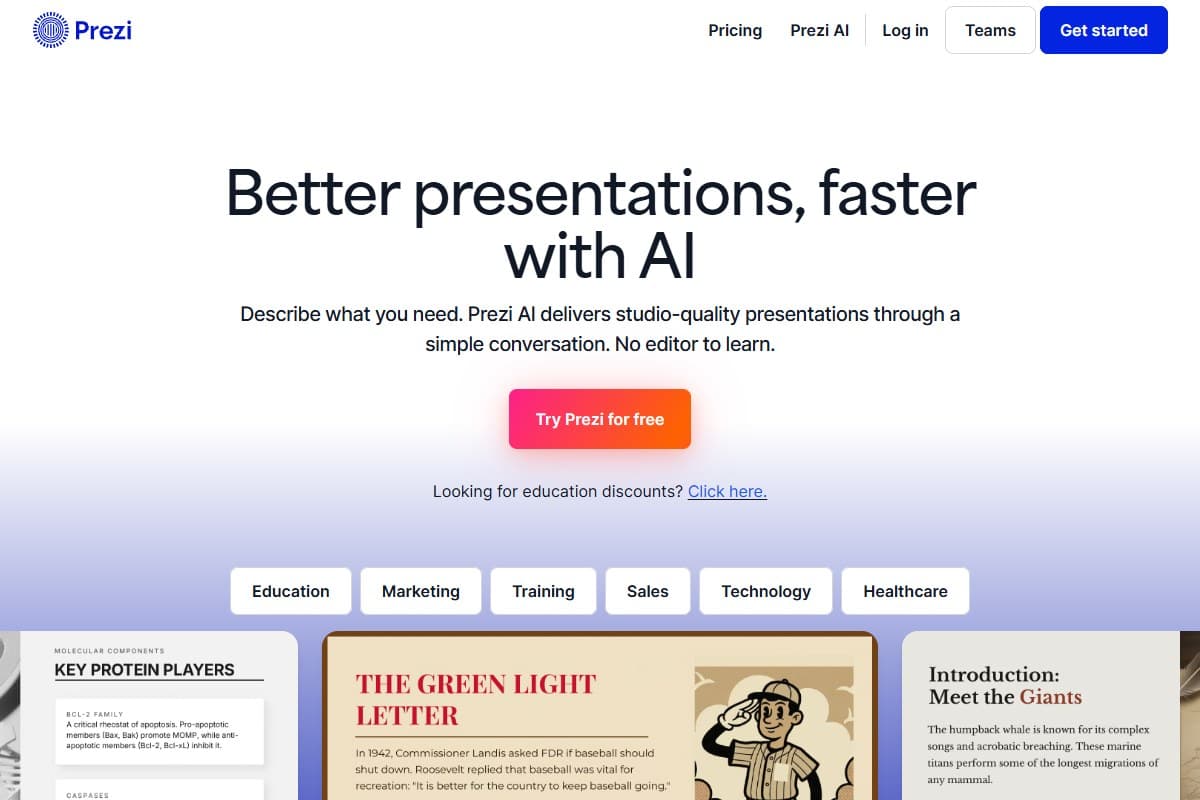
The zoom canvas is the whole point
I want to spend real time here because it is the only reason to choose Prezi over the alternatives, and most reviews reduce it to a bullet point.
When you present a Prezi, the camera moves. You start pulled back on the full picture, then the view flies in to the first section, then out and across to the second. It reads less like clicking through slides and more like watching a short film about your own content. Sitting in the audience for the workflow presentation I built, the difference was obvious: people could see how step three related to step seven because both were visible on the same canvas before the camera dove into either one.
That is the genuine, non-marketing case for Prezi. Slides are good at sequences. A zoomable canvas is good at systems. If your content is a process, a hierarchy, a map, a timeline with branches, or anything where the relationship between parts is the message, Prezi communicates it in a way a linear deck structurally cannot. You are not describing the structure, you are showing it.
The honest counterweight: motion is not free. This is the single most consistent criticism of Prezi across every review platform, and it is not a small one. Constant zooming and panning genuinely makes some people queasy, and it disproportionately affects older audiences and anyone with vestibular sensitivity. If you present to large mixed audiences, that is a real accessibility consideration, not a nitpick. Prezi lets you tone the movement down, but the entire aesthetic reason to use the tool works against restraint.
The second counterweight: the zoom effect only exists inside Prezi. Export the presentation and the motion disappears. More on that below, because it is the most important buying consideration in this review.
Key Features
- Prompt to presentation. Type a short description and Prezi AI 3.0 generates the full canvas: structure, layout, zoom path, copy, and visuals. This is the feature that makes Prezi viable for people who bounced off it before.
- Videos and Infographics, both new. This is the update most people have missed, and it is the clearest structural advantage Prezi AI 3.0 now holds over its rivals. Presentations are no longer the only output: you can generate Videos and Infographics from the same AI layer and the same source material. That matters because Gamma, the tool most people compare Prezi against, is presentations only. One prompt and one set of content can now become a deck for the meeting, a video for the channel, and an infographic for the social post, without moving between three subscriptions. If you produce content across formats rather than just presenting, this is the single biggest reason to look at Prezi over a slides-only competitor.
- Zoomable canvas. The core differentiator. One continuous space rather than a slide stack, with a camera path you can follow or deviate from mid-presentation.
- Non-linear navigation. You are not locked to a sequence. If someone asks about the thing three sections ahead, you can jump there and zoom back out, which makes Prezi unusually good for Q&A-heavy and consultative presentations.
- Brand extraction from a URL. Paste your website and Prezi pulls colors, fonts, and logos into the generated presentation without manual setup.
- Document import as AI context. Attach a PowerPoint, PDF, or Word file and the AI reads it, extracts the content, and uses it as the source material rather than making things up.
- AI-generated quizzes. Prezi can read a finished presentation and produce interactive quizzes from it, which is squarely aimed at educators and onboarding.
- Prezi Video. Your content appears alongside you on screen during a video call rather than replacing you with a shared screen. Underrated for remote teaching and webinars.
- Analytics. Paid tiers report who viewed a shared presentation and how far they got, which is the feature that justifies the upgrade for sales teams.
- Templates. A large library of pre-built canvases, which matters because the AI's visual quality depends heavily on which template it picks as a starting point.
Prezi AI 3.0 vs Gamma vs Beautiful.ai
This is the comparison that decides most purchases, so here is the direct read.
Prezi vs Gamma. Gamma is faster to a conventional deck and easier to hand off, and it is the tool I recommend first to most people for exactly that reason. Gamma's card-based output is clean, editable, and exports without drama. Prezi is slower to learn and harder to export, but it does two things Gamma structurally cannot. The first is showing relationships in space. The second is format range: Gamma makes presentations and only presentations, while Prezi AI 3.0 now generates Videos and Infographics from the same AI layer. If all you ever ship is decks, that difference is irrelevant and Gamma wins on speed. If you also need a video for the channel and an infographic for the social post, Prezi covers three formats on one subscription and Gamma covers one. If your content is a linear pitch, take Gamma. If your content is a system, or if it needs to exist in more than one format, Prezi earns its place.
Prezi vs Beautiful.ai. Beautiful.ai's promise is that you cannot make an ugly slide, enforced through smart templates that auto-adjust the moment you add content. It is the safest choice for anyone with no design confidence. Prezi is the riskier, higher-ceiling choice: the output can be more memorable, but it can also be a dizzying mess if you overuse the movement. Beautiful.ai guarantees a floor. Prezi raises the ceiling.
Prezi vs PowerPoint. Worth stating because it is the real competitor for most of Prezi's audience. PowerPoint is universal, exports everywhere, and nobody has to learn anything. Prezi wins on attention and loses on portability. If your deck has to survive being emailed to someone who will open it in Office, that is a genuine argument against Prezi that no feature list overrides.
| Tool | Rating | Price | Best for | Verdict |
|---|---|---|---|---|
| Prezi | 4.3/5 | Free / $19/mo+ | Non-linear canvas, plus video and infographics | Best when relationships between ideas are the message |
| Gamma | 4.5/5 | Free / $10/mo+ | Fastest prompt-to-deck | Best overall for most people |
| Beautiful.ai | 4.1/5 | From ~$12/mo | Guaranteed-clean design | Most design-disciplined |
| What matters most to you | Best pick |
|---|---|
| Showing how ideas connect | Prezi |
| Speed from prompt to finished deck | Gamma |
| Never producing an ugly slide | Beautiful.ai |
| Exporting to PowerPoint cleanly | Gamma |
| Live, question-driven presenting | Prezi |
The full four-way test against Pitch and Canva lives in our best AI presentation tools 2026 comparison, where I built the same pitch deck in each tool.
Pricing
Prezi runs a free Basic tier plus three paid tiers. Basic is free and permanent, giving you 350 AI credits and limited exports, which is enough to build something real and decide whether the canvas suits you. It is not enough to work professionally, and the reason is exports.
- Unlimited projects
- Privacy control
- PowerPoint import and PDF export
- Desktop app and offline access
- Best for: anyone presenting off a laptop or sending files
- Everything in Plus
- Advanced analytics
- Online training
- Best for: sales teams tracking engagement
- Everything in Premium
- Team collaboration
- Custom brand kit
- SSO
- Best for: agencies and organizations with a brand guide
All three paid prices above are per user per month billed annually; month-to-month costs more. Verify the current numbers on Prezi's pricing page before you buy, since this category adjusts pricing frequently.
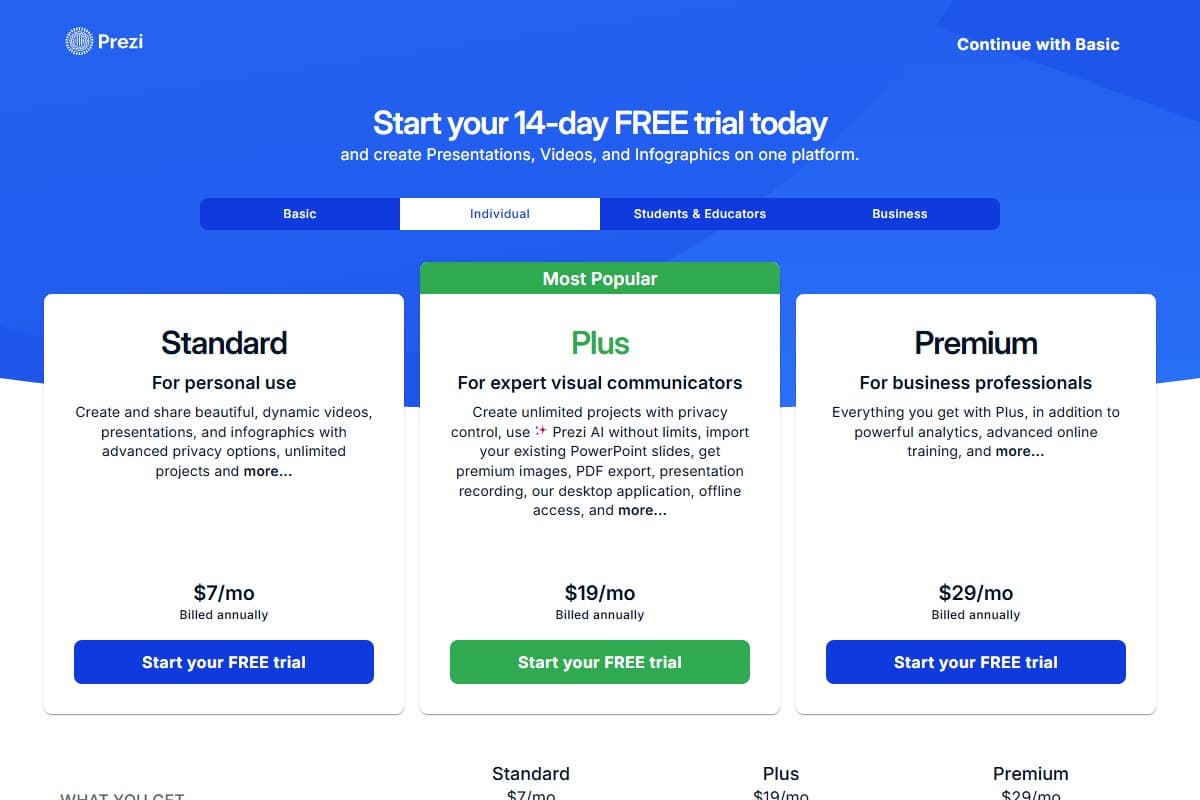
One thing the pricing page makes clear that the plan comparison above does not: Prezi splits its plans across Basic, Individual, Students and Educators, and Business tabs, and the tiers differ between them. The Individual tab carries a Standard plan at $7/month billed annually, positioned "for personal use," which sits below Plus and is the cheapest paid way into the product. It gets you advanced privacy options and unlimited projects, but not the PowerPoint import, PDF export, desktop app, or offline access that make Plus the working tier. If you are a solo user who only presents from a browser and never needs to export, Standard is worth knowing about before you pay $19. If you are buying for work, Plus remains the honest entry point.
The export restriction is the thing to understand before you sign up. The free Basic plan gives you 350 AI credits, which is a genuinely usable allowance for testing the AI generation, but exports are limited and you get no privacy control, no desktop app, and no offline access. That is a bigger deal than it sounds. It means the free tier is fine for evaluating whether the zoom canvas fits your material, and unsuitable for anything you need to hand to a client, present from a conference laptop with unreliable wifi, or keep off the public web. In practice, the moment Prezi becomes professionally useful is the moment you are paying for it.
My read on which tier to actually buy: Plus at $19 is the real entry point, and I would treat it as the true price of the product rather than an upsell. PowerPoint import, PDF export, the desktop app, and offline access are not luxuries once you present in the real world, and they all live behind that one tier. Premium at $29 is worth the extra ten dollars only if you specifically want the advanced analytics, which matter most to sales teams tracking who actually opened the deck. Teams at $39 per user earns its price on the custom brand kit and SSO rather than on anything about the presentations themselves, so it is an organizational purchase, not a creative one.
- AI generation is fast and the first draft looks professional with no cleanup
- The zoom canvas genuinely feels cinematic and holds audience attention
- Non-linear navigation makes live Q&A and consultative presenting far easier
- Brand extraction from a URL removes the usual manual brand setup
- Best-in-class for showing systems, processes, and how parts relate
- Videos and Infographics ship alongside Presentations, so one subscription covers three formats
- Free plan is permanent and includes 350 AI credits, so evaluating it costs nothing
- Free plan limits exports and withholds privacy control, the desktop app, and offline access
- Exports flatten the zoom effect into static slides, losing the main feature
- Motion causes genuine discomfort for some audience members
- Steeper learning curve than slide tools once you edit beyond the AI draft
- Performance can lag on visually heavy presentations and weak connections
- Billing and cancellation complaints are a recurring theme in public reviews
Who Should Use Prezi AI 3.0
Business professionals presenting strategies, org structures, roadmaps, or anything where the shape of the thing matters as much as the content. The zoom-out-then-drill-in move is genuinely persuasive in a room.
Educators teaching interconnected concepts. This is arguably Prezi's strongest fit: a canvas showing how topics relate is a better teaching artifact than 40 slides, and the AI quiz generation is aimed directly at this audience.
Visual storytellers and anyone whose job includes being memorable. Consultants, keynote speakers, agency pitches. If your presentation competes with three others the same week, Prezi is the one people describe afterward.
Skip it if your deck has to be emailed as a PowerPoint, your audience skews toward motion sensitivity, or you simply need a clean linear deck fast. In those cases Gamma or Beautiful.ai are the better buy, and I would not talk you out of it.
If Prezi is one piece of a wider stack, our best AI tools 2026 guide covers what else is worth paying for this year, and our best AI writing tools 2026 roundup covers the tools I use to draft the copy that goes into a presentation before Prezi ever sees it. A sharp outline is still the biggest single lever on how good the AI-generated result turns out.
What the Community Is Saying
Paraphrased community sentiment from public review platforms, not our own testing:
- Prezi holds 4.2/5 across more than 5,700 reviews on G2, where the recurring praise is exactly what our testing found: the zoomable canvas is repeatedly described as a real advantage rather than a gimmick, specifically for the ability to pull back to the big picture and then drill into specifics mid-conversation.
- On Capterra, Prezi carries thousands of verified reviews with consistent praise for ease of use and for turning material that would look flat in PowerPoint into something visually interesting. The most common criticism there is a learning curve for team members used to traditional slides, plus occasional rendering issues during live presentations.
- TrustRadius scores Prezi around 7.4/10 across roughly 144 reviews, a more muted result that tracks with the split we found: strong on engagement and design, weaker on performance and export.
- Trustpilot tells a very different story at 2.9/5 across roughly 616 reviews, and the gap is worth understanding rather than dismissing. Almost none of the anger there is about the product. It is about billing: auto-renewal charges after trials, refunds denied after the 14-day window, and difficulty cancelling. That pattern is consistent enough across platforms that you should set a calendar reminder before any trial ends and cancel through the account settings rather than by deleting the account.
- The two complaints that show up everywhere are the ones to weigh before buying. First, motion sensitivity: multiple reviewers and educators report audience members getting dizzy from constant zooming and panning. Second, exports:
.pptxand PDF exports flatten the presentation into static slides, dropping the zoom effects and the non-linear flow entirely, and layouts sometimes break in the process.
That last point deserves emphasis because it is the structural limitation of the product. Prezi's best feature does not survive leaving Prezi. If your workflow ends with sending a file to someone, you are shipping a degraded version of what you built. Plan to present it yourself, live or via a share link.
Bottom Line
Prezi AI 3.0 earns 4.3 out of 5, and the score is really two separate judgments.
On the thing it uniquely does, the zoom canvas, it is close to a 5. Nothing else in the AI presentation category shows relationships between ideas the way Prezi does, and the 2026 AI layer finally removes the setup cost that kept people away. Generating a full workflow presentation in minutes and having it look professional without cleanup is a genuine result, not a demo trick. Presenting it felt cinematic in a way that clicking through rectangles does not.
On everything around that, it loses points fairly. The free plan gives you 350 AI credits but limits exports, which makes it an evaluation tier rather than a working one. Exports strip out the one feature you came for. The motion that makes it memorable makes some of your audience uncomfortable. And the billing complaints across Trustpilot are numerous and specific enough that you should treat the trial with care.
So the honest recommendation: buy Prezi if the zoom canvas fits your material, and skip it if it does not. That is a content question, not a budget question. Presenting a system, a process, a map, or a set of connected ideas to a live audience is where Prezi beats everything else in the category. Producing a linear deck to email to a client is where Gamma wins comfortably, and no amount of zoom fixes that.
Start on the free Basic plan and build one real presentation. The 350 AI credits are enough to know within an afternoon whether the canvas suits how you think. If it does, Plus at $19/month is the tier that actually makes it usable, because PDF export, the desktop app, and offline access are not optional once you present outside a browser tab. And if you also make video or infographic content, the fact that Prezi AI 3.0 now generates all three formats from one subscription changes the value calculation against a presentations-only tool like Gamma.
Related reviews
- Best AI presentation tools 2026: the same pitch deck built in Gamma, Pitch, Beautiful.ai, and Canva.
- Best AI tools 2026: the full tested-and-ranked guide across every category.
- Best AI writing tools 2026: draft the copy before it reaches the canvas.
- ChatGPT vs Claude vs Gemini: which model to use for presentation scripting and outlines.
FAQ: Prezi AI 3.0 review 2026
What is Prezi AI 3.0?
Prezi AI 3.0 is the generative layer inside Prezi that builds a complete presentation from a prompt, a document, or a URL. Unlike slide-based AI tools, it generates a single zoomable canvas rather than a stack of slides, laying out your content in space and creating the camera path that moves between sections. It can also extract brand colors and fonts from your website, read attached PowerPoint or PDF files for context, and generate quizzes from a finished presentation.
Is Prezi AI 3.0 worth it in 2026?
Yes, if your content benefits from the zoom canvas. Prezi is the only tool in this category that shows how ideas relate rather than presenting them in sequence, and that is genuinely valuable for processes, systems, hierarchies, and teaching. It is not worth it if you need a conventional linear deck fast or if your presentation has to be handed off as a PowerPoint file, because the zoom effect does not survive export.
Does Prezi have a free plan?
Yes, the Basic plan is free and permanent, and it includes 350 AI credits, which is a genuinely usable allowance for testing the AI generation. The catch is what it restricts: exports are limited, and you get no privacy control, no PowerPoint import, no desktop app, and no offline access. That makes it good for evaluating whether the canvas suits your material and unsuitable for client work. The cheapest paid route is the Individual tab's Standard plan at $7/month billed annually, but the tier most people actually need is Plus at $19, because that is where export, the desktop app, and offline access begin.
Why can't I download my Prezi presentation?
Downloading is a paid feature. The free Basic plan limits exports, so a free account can build and present online but cannot reliably take the file anywhere. PDF export, PowerPoint import, the desktop app, and offline access all arrive together on the Plus tier at $19/month billed annually, which is why Plus is the realistic entry point for anyone using Prezi professionally rather than an upsell you can skip.
Prezi vs Gamma, which is better?
Gamma is better for most people and Prezi is better for a specific job. Gamma is faster from prompt to a finished, presentable deck, easier to edit, and exports cleanly, which makes it the safer default. Prezi wins when the relationships between your ideas are the actual message, because a zoomable canvas can show a system in a way a linear deck cannot. Our best AI presentation tools 2026 comparison tests both against Pitch, Beautiful.ai, and Canva.
Does the zoom effect survive exporting to PowerPoint?
No, and this is Prezi's biggest structural limitation. Exporting to .pptx or PDF flattens the presentation into static slides, dropping the zoom transitions, the camera path, and the non-linear navigation entirely. Reviewers also report layouts breaking during the conversion. If your workflow ends with emailing a file, you are sending a degraded version of what you built, so plan to present Prezi yourself, live or through a share link.
Does Prezi make people dizzy?
For some audience members, yes. Motion sickness from the constant zooming and panning is the single most consistent complaint across G2, Capterra, and Trustpilot, and educators report it particularly with older audiences and viewers with vestibular sensitivity. You can reduce the intensity of the movement in the editor, but the effect that makes Prezi distinctive is the same one causing the problem. For large mixed audiences, treat it as a real accessibility consideration.
How much does Prezi cost?
Prezi splits pricing across Basic, Individual, Students and Educators, and Business tabs, so the answer depends on which you land on. Basic is free with 350 AI credits and limited exports. On the Business side, Plus is $19 per user per month billed annually and adds unlimited projects, privacy control, PowerPoint import, PDF export, the desktop app, and offline access. Premium is $29 and adds advanced analytics and online training. Teams is $39 per user and adds team collaboration, a custom brand kit, and SSO. The Individual tab also carries a cheaper Standard plan at $7/month for personal use, which lacks export and offline access. Month-to-month billing costs more than all the annual rates above. Check Prezi's pricing page for current figures before buying.
Is Prezi good for teachers?
It is one of Prezi's strongest use cases. A single canvas showing how topics connect is a better teaching artifact than a long linear deck, the non-linear navigation makes it easy to jump wherever a student's question leads, and the AI quiz generation is aimed squarely at classroom use. The caveat is the same one everywhere else: keep the motion restrained, because a subset of any classroom will find heavy zooming uncomfortable.
Presenting something that does not fit into slides and not sure which tool suits it? Get in touch: reader questions shape the next round of reviews.
Free interactive tool
Compare Prezi with other AI toolsSide-by-side pricing, features, and ratings — plus a recommended pick for your use case.
Independent AI tools researcher
Keep reading
Related reviews

Best AI Meeting Assistant 2026: Krisp vs Wave vs Mina (Tested)
Krisp, Wave AI Note Taker, and Mina tested head-to-head. Noise cancellation, bot-free recording, live meeting AI: which one saves you time in 2026?
Best AI Project Management Tool 2026: Tested & Ranked
We tested the best AI project management tools in 2026. Taskade leads for AI agents, automation, and solo founders. Here's the honest verdict.

Wispr Flow Review 2026: The AI Voice Dictation Tool That Actually Works? (Hands-On Test)
Wispr Flow just raised $81M to build a 'Voice OS.' I dictated this whole review with it to find out if it's the rare voice tool that actually works.