
Here's the thing almost every Google Antigravity 2 pricing explainer gets wrong: the headline number, $20/mo for Pro, is the least important figure on the page. What actually decides whether Antigravity 2 is worth the cost is whether you already pay for Google AI Pro, and how Google meters the credits you burn once you're inside a long multi-agent mission. Get those two things right and the price is genuinely fair. Get them wrong and you'll be surprised by the bill.
I've spent the last month living inside Antigravity 2: the same shipping work behind my full Google Antigravity 2 review, and tracking what it actually costs versus Cursor 3 and GitHub Copilot at a realistic workload. This post is only about the money: what you pay, what you get for free, where the hidden costs hide, and who should open their wallet. No spec-sheet padding.
Short version: worth it if you're already in the Google ecosystem. A harder sell if you're not.
How I Tested This
What Antigravity 2 actually costs: the quick summary
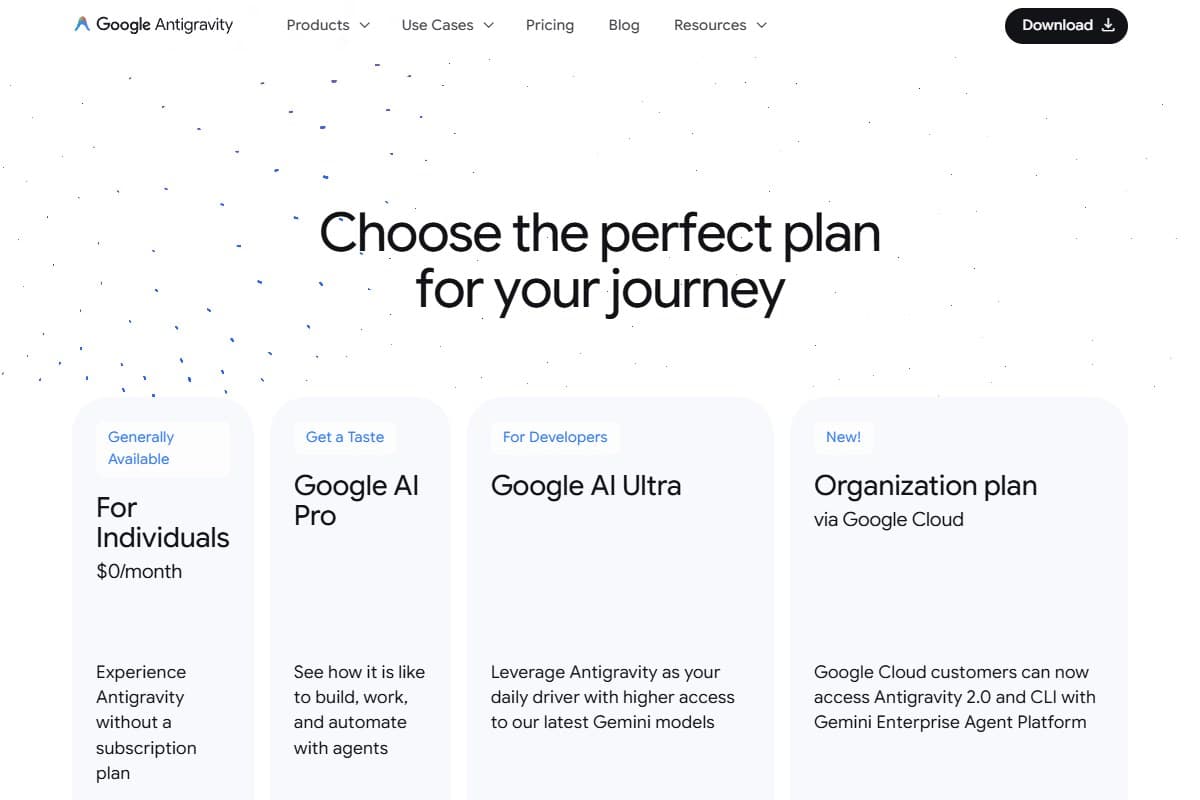
Antigravity 2 has four tiers, and the spread is wide:
- Free: $0, capped at 20 requests per day, single-agent mode only.
- Pro: $20/mo, bundled into Google AI Pro. Multi-agent missions, the Chromium browser agent, the full IDE.
- Ultra: $100/mo, roughly 5x Pro's request limits plus priority queue access.
- Ultra Premium: $200/mo, roughly 20x Pro's limits with Managed Agents API quota included.
The number that matters most is the second one, and the word that matters most in that line is bundled. Antigravity Pro isn't a separate $20 charge. It's included in the $20/mo Google AI Pro subscription that also gives you Gemini Advanced, NotebookLM Pro, and 2TB of Google One storage. If you already pay for that, and a lot of people do, your marginal cost to start using Antigravity 2 is zero. That single fact reframes the entire "is it worth it" question.
Free tier: what you actually get
Let me be blunt: the free tier is a demo, not a daily driver.
When Antigravity launched, the free tier gave you 250 requests a day. Google has since cut that cap four separate times, and it now sits at 20 requests per day: a 92% reduction in about six months. On top of the cap, the free tier is locked to single-agent mode, which means you don't get the thing that makes Antigravity special: the parallel Manager-view missions where a planner, a coder, a test writer, and the browser agent all work at once.
So what's the free tier actually good for? Exactly one thing: seeing the interface and deciding whether the workflow clicks for you before you pay. In my first week I burned through 20 requests well before lunch on any real task. A single multi-file feature can eat that cap in one mission. Treat the free tier as a test drive around the block, not a car you can commute in.
If your plan was to run Antigravity 2 for free indefinitely, drop it now. That's not the product Google is selling, and the repeated cuts suggest the free cap will keep shrinking, not growing.
Paid plans breakdown: the exact pricing
- 20 requests per day
- Single-agent mode only
- No parallel missions
- Best for: trying the interface
- Bundled with Google AI Pro
- Multi-agent parallel missions
- Chromium browser agent
- Best for: indie devs & solo builders
- ~5x Pro request limits
- Priority queue access
- Best for: full-time heavy users
- ~20x Pro request limits
- Managed Agents API quota included
- Best for: small teams sharing a seat
Here's how I'd actually pick between them after a month.
Pro at $20/mo is the right tier for almost everyone. You get the full IDE, parallel missions, and the browser agent: the entire reason to use Antigravity. The one real constraint is a daily request cap that you can hit during a long refactor. I hit it once in 30 days, mid-mission, with no warning. Annoying, but rare at a normal workload.
Ultra at $100/mo is for people who hit the Pro cap regularly: full-time engineers running missions back-to-back all day. If you're not bumping the Pro ceiling a few times a week, you're lighting $80/mo on fire. I spent a week on Ultra and genuinely could not feel the difference on my workload, because I wasn't a heavy enough user to need it.
Ultra Premium at $200/mo is a team play. The 20x limits and the Managed Agents API quota only make sense if multiple people share the seat or you're embedding agents into your own product. For a solo developer it's overkill.
The honest read: 95% of individuals want Pro. The higher tiers are real, but they're for a specific heavy-use profile, not the default buyer.
How Antigravity 2 pricing compares to Cursor 3
On the sticker, Antigravity Pro and Cursor 3 Pro are a dead heat: both $20/mo. The difference is in what that $20 buys and where each one can surprise you.
Cursor 3's $20 Pro gives you a monthly credit pool worth roughly $20 at API rates, plus an Auto mode that's free and unlimited and handles maybe 70% of everyday tasks. The trap is the pool: the moment you hand-pick a premium model or spin up cloud-VM agents, you're billed per token and per minute, and heavy users have reported monthly bills spiking into the $300–$1,400 range. It's predictable only if you watch the usage dashboard.
Antigravity's $20 is bundled: that's its structural edge. If you already pay for Google AI Pro, Antigravity costs you nothing on top, while Cursor is a fresh $20 line item. But Antigravity's billing unit is murkier than Cursor's. Cursor at least tells you it's credits-at-API-rates; Antigravity's "request" is defined inconsistently across Google's own docs.
So the comparison nets out like this: already paying for Google AI Pro? Antigravity is cheaper: effectively free. Starting cold and disciplined about model selection? Cursor's pricing is easier to predict. I broke down the full head-to-head in my Antigravity vs Cursor 3 vs Copilot comparison.
How Antigravity 2 pricing compares to GitHub Copilot
GitHub Copilot used to be the easy value answer: a flat $10/mo Pro plan (about $8.33 billed annually), half the price of Antigravity or Cursor. For pure per-dollar value on autocomplete-plus-light-agent work, it still often is.
But Copilot's pricing got more complicated in mid-2026. GitHub moved its plans to usage-based token billing, rebranded as "GitHub AI Credits", and developers have posted screenshots of bills jumping well past the old flat rate once they blow through their included credits. I covered that shift and the cheaper escape routes in my GitHub Copilot alternatives post. The base prices still look low ($10 Pro, $39 Pro+), but "low base plus a meter" is exactly the pricing shape that bites heavy users.
Against that, Antigravity's bundling actually looks competitive in a way it didn't six months ago. If you're choosing purely on predictability and you already pay for Google AI Pro, Antigravity's flat-feeling bundle can beat a metered Copilot bill. If you want the lowest possible base price and you mostly want inline autocomplete, Copilot is still the cheaper entry point: just keep an eye on the credit meter.
Hidden costs to watch out for
The sticker price isn't where Antigravity 2 surprises you. These are:
- The opaque billing unit. This is the big one. Pro is "included with Google AI Pro," but the unit you're actually metered in, request? token? agent-minute?, shifts depending on which doc you read. Until Google publishes it in one place, you can't model your real cost, and that uncertainty is itself a cost.
- Hitting the daily cap mid-mission. There's no live meter in the Manager view warning you that you're close to the Pro cap. I discovered the ceiling by slamming into it during a refactor, with the mission half-done. Budget for the occasional hard stop on big days.
- The shrinking free tier as a planning risk. If any part of your workflow leans on free-tier headroom, know that Google has cut that cap four times already. Don't build a process around a number that keeps dropping.
- The "do I really need Google AI Pro?" question. If the only reason you'd pay $20/mo for Google AI Pro is Antigravity, then you're paying full freight, and the bundle math that makes Antigravity look free no longer applies. Be honest about whether you'd use Gemini Advanced and the 2TB of storage anyway.
- Ecosystem friction as a time cost. Antigravity's agents get visibly less confident on non-Google stacks (Stripe, Supabase, AWS), needing more prompts and rollbacks. That's not on your invoice, but it's a real productivity tax if your stack lives outside Google's world.
Who should pay for Antigravity 2
Open your wallet if you are:
- An existing Google AI Pro subscriber: Antigravity Pro is bundled, so your marginal cost is $0. This is the clearest yes in the whole post.
- A solo developer or indie hacker doing frontend-heavy work, where the browser agent's UI verification genuinely saves you review time.
- Sold on Manager-style multi-agent orchestration over chat-style assistance, and running enough missions to use it.
- A full-time engineer hitting the Pro cap several times a week: that's the specific profile Ultra at $100/mo is built for.
Who should stick with the free tier (or skip it)
Stay free, or look elsewhere, if you are:
- Just kicking the tires: the free tier is fine for seeing the interface, and that's all it's good for.
- A casual or hobby coder who writes a few functions a week. You won't come close to justifying $20/mo, bundle or not.
- Working primarily on non-Google stacks, where the agents stumble and you'd get smoother mileage from Cursor 3.
- On a tight, fixed budget where the lowest base price wins: start cheaper and revisit once multi-agent orchestration is something you actually need. Our compare tool is a quick way to line the options up side by side.
FAQ: Google Antigravity 2 pricing
How much does Google Antigravity 2 cost?
There are four tiers: a free plan capped at 20 requests/day, Pro at $20/mo (bundled into Google AI Pro), Ultra at $100/mo, and Ultra Premium at $200/mo. For most individual developers, Pro is the relevant number, and if you already subscribe to Google AI Pro, it's included at no extra cost.
Is Antigravity 2 Pro really free if I have Google AI Pro?
Effectively, yes. Antigravity Pro is bundled into the $20/mo Google AI Pro subscription, which also includes Gemini Advanced, NotebookLM Pro, and 2TB of Google One storage. If you already pay for Google AI Pro, your marginal cost to start using Antigravity 2 is zero: that's the single strongest argument for it.
Is the free tier of Antigravity 2 enough for daily coding?
No. The free tier is capped at 20 requests per day (down from 250 at launch) and is locked to single-agent mode, so you don't get the parallel missions or browser agent that make Antigravity worth using. A single multi-file feature can exhaust the daily cap in one mission. Treat it as a demo, not a daily driver.
Is Antigravity 2 cheaper than Cursor 3 or GitHub Copilot?
It depends on your situation. Antigravity Pro and Cursor 3 Pro are both $20/mo, but Antigravity is effectively free if you already pay for Google AI Pro. GitHub Copilot has a lower $10/mo base but moved to usage-based token billing in 2026, so heavy use can push the bill past the flat tiers. If you're already in the Google ecosystem, Antigravity usually wins on cost.
What are the hidden costs of Antigravity 2?
The biggest one is the opaque billing unit: Google hasn't clearly published whether you're metered per request, per token, or per agent-minute, which makes your real cost hard to predict. The other gotchas are hitting the Pro daily cap mid-mission with no warning, a free tier that keeps shrinking, and extra prompts (a time cost) when working on non-Google stacks.
Is Antigravity 2 worth paying for in 2026?
If you already pay for Google AI Pro, yes: it's bundled, so the upside is free. If you do frontend-heavy work, the browser agent that verifies its own UI changes is worth the Pro tier on its own. If you're starting cold with no Google subscriptions and a tight budget, the value is less obvious, and a cheaper entry point may serve you better until you genuinely need multi-agent orchestration.
Final verdict: is it worth the cost?
The honest answer to "is Antigravity 2 worth the cost" is a question right back at you: do you already pay for Google AI Pro?
If yes, this is one of the easiest buying decisions in AI coding right now. Antigravity Pro is bundled, your marginal cost is zero, and you get a genuinely novel multi-agent IDE with a browser agent no competitor matches. Install it today.
If no, the calculus is tighter. At a true $20/mo, Antigravity goes up against Cursor 3 at the same price and a cheaper (if now-metered) GitHub Copilot. It wins on frontend work and on bundling; it loses on billing transparency and on non-Google stacks. The single thing keeping me from a wholehearted "buy it regardless" is that Google still won't tell you, in plain English and in one place, what a credit actually costs. Until that changes, you're trusting the meter, and a meter you can't read is the most expensive thing on any pricing page.
For where to go next, my full Google Antigravity 2 review covers the hands-on experience, and the three-way comparison lays out which tool fits which developer.
Related reviews
- Google Antigravity 2 Review 2026: Better Than Cursor?
- Antigravity 2 vs Cursor 3 vs GitHub Copilot Which Wins in 2026?
- Cursor 3 Review: Are Parallel Agents Worth It?
- 7 GitHub Copilot Alternatives 2026 That Actually Work
Got a Google Antigravity 2 pricing question I didn't cover? Get in touch: reader questions shape the next round of reviews.
Free interactive tool
Compare AI tools side-by-sideSide-by-side pricing, features, and ratings — plus a recommended pick for your use case.
Independent AI tools researcher
Keep reading
Related reviews
Best AI Coding Assistants 2026: I Tested 7 Tools and Ranked Them
I tested 7 of the best AI coding assistants in 2026 on the same three jobs: build, refactor, debug. Here is what each one costs and which one wins.

7 GitHub Copilot Alternatives 2026 That Actually Work
GitHub Copilot hitting its limits? I tested 7 alternatives that are faster, cheaper, or just better. Here's the honest comparison.
Lovable Just Launched AI Subagents: Here's Why It Could Change Vibe Coding Forever (May 2026)
Lovable shipped AI subagents: the main build agent now spawns parallel workers to research, review, and synthesize. My honest first-look.