
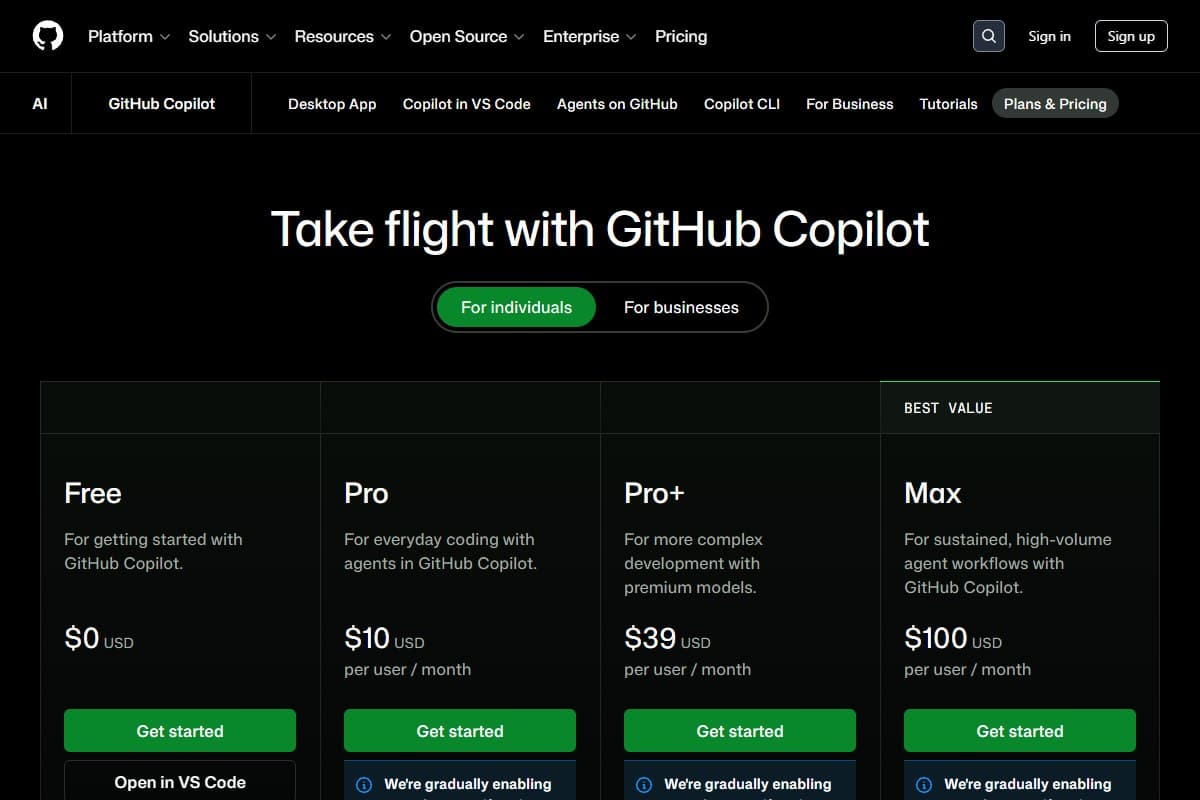
GitHub just confirmed what a lot of developers were dreading: starting June 1, 2026, Copilot moves every plan to usage-based token billing: rebranded as "GitHub AI Credits." The base prices look unchanged on paper (Pro stays $10, Pro+ $39, Business $19, Enterprise $39), but the moment you go past your included credits, you're metered by token consumption. And the early receipts are ugly: developers on Reddit and Hacker News are posting screenshots of bills jumping from $29 to $750, and one heavy user reported a $3,000 month at the same workload they used to pay $50 for.
I've been doing something useful with that panic: I took the same real Next.js codebase I use for every coding-tool test and ran it through five Copilot alternatives to find out which ones actually save you money without making your day worse. This is a hands-on GitHub Copilot pricing reality check, not a spec table.
Short version: if you code every day, you almost certainly have a cheaper, more predictable option than metered Copilot. Here's what I found.
How I Tested This
One thing that slowed me down across the board: every tool wanted me to re-authorize my GitHub account separately, and with Windsurf I had to retry the sign-in twice before the editor actually saw my repo.
What actually changed with GitHub Copilot pricing in 2026
Here's the part the announcement buries. Copilot used to be gloriously simple: $10 a month, code as much as you want, the worst case was hitting a soft rate limit. That model is gone.
From June 1, 2026, every Copilot plan includes a monthly allotment of GitHub AI Credits, and once you burn through them, you pay per token at the underlying model's rate. The premium models (Claude, GPT-5, Gemini) cost dramatically more credits than the base model. Agent mode, which runs multi-step tasks, is the fastest way to drain the pool, because every tool call and every retry spends tokens.
The base prices didn't change, and GitHub is leaning on that fact in its messaging. But "the price is the same" is only true if you never exceed your credits, and the entire reason people upgraded to Copilot's agent features is to use them heavily. The developers getting four-figure bills aren't doing anything exotic. They're using agent mode the way the marketing told them to.
This is the same trap that hit Cursor users in 2025, and I wrote about how that played out in my Cursor 3 review. The difference is that Copilot was the safe, boring, predictable default. That's exactly what people paid for, and it's exactly what's changing.
The 5 best GitHub Copilot alternatives in 2026
I ranked these by the thing that actually matters now: predictable cost for daily coding work, balanced against output quality.
1. Cursor 3: the best all-around switch
Cursor 3 is the tool I'd hand most Copilot refugees. It's a full VS Code fork with parallel agents, so every extension you rely on still works, and the agent UX is the cleanest in the category. The catch, and I want to be honest because I got burned by it myself, is that Cursor also runs on a credit model. The difference is that Cursor's Auto mode is unlimited and free, picks a cheaper model under the hood, and handles maybe 70% of real tasks fine.
In my refactor test, Cursor 3 on Auto shipped the auth extraction and the import sweep without touching my paid credits. I only spent credits when I manually reached for Claude Sonnet on the hard billing-logic bug. The one annoyance was that the model picker reset to Auto every time I opened a new chat, so I kept having to re-select the premium model on the bug I was chipping away at. If you live in Auto and reserve premium models for genuinely hard problems, Pro at $20/mo is more predictable than metered Copilot. I covered the full breakdown in my Cursor 3 review.
2. Claude Code: best value for heavy reasoning
If most of your day is hard problems (debugging tangled logic, working across a big codebase, reasoning about architecture) Claude Code is the best value on this list. It's terminal-first, it comes bundled with the $20/month Claude Pro subscription, and its single-agent reasoning is the strongest I tested. There's no per-token surprise on the Pro plan for normal use; you hit a usage limit and wait, you don't get a surprise invoice.
In my test, Claude Code took the longest to set up (it's a CLI, not a polished IDE) but produced the cleanest fix for the billing bug on the first try. For developers who think "I just want the model to be smart and the bill to be flat," this is the pick. If you're weighing which underlying model to trust, my ChatGPT vs Claude vs Gemini comparison breaks down where each one wins.
3. Google Antigravity 2.0: best free tier
This was the surprise of the test. Google Antigravity 2.0 is an agent-first IDE with a genuinely usable free tier running on Gemini, and for a lot of developers that free tier alone can replace a paid Copilot seat. It's the newest tool here and the roughest around the edges, the multi-agent orchestration occasionally over-engineers a simple task, but "free and good enough" beats "metered and unpredictable" for a huge number of people.
I gave it the same refactor and it completed two of the three tasks on the free tier before I'd have needed to upgrade, though the first agent run errored out partway and I had to kick it off a second time before it finished cleanly. For students, hobbyists, and anyone cost-sensitive, start here. I tested it in depth in my Google Antigravity 2.0 review, and put it head-to-head with the others in my Antigravity vs Cursor 3 vs Copilot comparison.
4. Windsurf: closest direct competitor
Windsurf is the most Copilot-like of the bunch in feel: an AI-native editor with a strong agent (Cascade) and a bundled CLI. Pricing runs from a free tier up through paid plans in the $20–$200 range. It's a solid, no-drama switch if you want something that feels familiar and doesn't make you relearn your workflow. In testing it landed right between Copilot and Cursor on both quality and cost: never the best at anything, never bad at anything.
5. Tabnine: cheapest predictable flat rate
If your real priority is "never get a surprise bill again," Tabnine is the safe harbor. It's a flat-rate AI coding assistant with strong privacy controls (it can run on self-hosted models), and it's the most predictable spend on this list. The trade-off is that its agents are weaker than Cursor's or Claude Code's: it's closer to "very good autocomplete" than "autonomous teammate." For a lot of working developers, that's exactly what they actually used Copilot for anyway.
Side-by-side: the 5 alternatives compared
| Tool | Rating | Price | Best for | Verdict |
|---|---|---|---|---|
| Cursor 3 | 4.2/5 | $20/mo | All-around daily coding | Best switch for most people |
| Claude Code | 4.6/5 | $20/mo (Claude Pro) | Hard reasoning, big codebases | Best value, flat pricing |
| Google Antigravity 2.0 | 4.1/5 | Free / $20/mo | Cost-sensitive developers | Best free tier |
| Windsurf | 4.3/5 | $20–$200/mo | Copilot-like familiarity | Closest drop-in feel |
| Tabnine | 4.0/5 | Flat-rate plans | Predictable spend + privacy | No surprise bills |
| What you care about most | Best pick |
|---|---|
| One tool that just works for daily coding | Cursor 3 |
| Smartest reasoning at a flat price | Claude Code |
| Spending nothing while you evaluate | Google Antigravity 2.0 |
| A familiar Copilot-style editor | Windsurf |
| Never seeing a surprise invoice again | Tabnine |
What it costs to leave Copilot
Here's the honest money math, laid out as plainly as I can.
- Base plan metered after credits
- Premium models cost more credits
- Agent mode drains credits fast
- Real risk: $100s in overage
- Unlimited free Auto mode
- Credit pool for premium models
- Predictable if you use Auto
- Best all-around switch
- Bundled with Claude Pro
- Flat price, usage limits not bills
- Strongest single-agent reasoning
- Terminal-first workflow
- Genuinely usable free tier
- Runs on Gemini
- Newest, slightly rough
- Best for cost-sensitive devs
- No token metering
- Self-host option
- Weaker agents
- Most predictable spend
The pattern is simple: the alternatives that win are the ones where your worst-case month is knowable in advance. Copilot's new model fails that test for heavy users, and that's the whole reason this post exists.
Pros and cons of switching away from Copilot
- Predictable monthly cost instead of token roulette
- Cursor 3 and Antigravity have free tiers you can evaluate at zero risk
- Claude Code's reasoning beats Copilot's base model on hard problems
- Most alternatives are VS Code-compatible, so your extensions survive
- Auto/free modes cover the majority of routine coding without spending credits
- Switching costs you a day or two of muscle-memory relearning
- Cursor also uses credits: you have to use Auto mode deliberately
- Google Antigravity is the newest and occasionally over-engineers simple tasks
- Tabnine's agents are weaker than Cursor's or Claude Code's
- If you barely use Copilot, the new pricing may not actually affect you
Who should actually switch, and who shouldn't
Switch away from Copilot if you are:
- A daily developer using agent mode heavily: you're the one who'll get the big bill
- Cost-sensitive and want a free tier to fall back on (Antigravity or Cursor Hobby)
- Someone who values predictable spend over the absolute newest features
- Already frustrated by the lack of a live cost meter while agents run
Stay on Copilot if you are:
- A light user who rarely touches agent mode: your bill may not move much
- Deeply embedded in GitHub's ecosystem and willing to monitor usage closely
- On a team plan where the included credits genuinely cover your workload
Start with the free options if you are:
- A student or hobbyist: Google Antigravity's free tier or the free AI tools in my roundup will carry you a long way before you pay anything.
Not sure which to commit to? You can line them up side by side in our free AI tools comparison tool and see pricing, ratings, and a recommendation for your use case.
Final verdict
GitHub Copilot's token-billing switch isn't the end of the world, but it does end Copilot's biggest selling point, which was boring, flat-rate predictability. For daily developers, that changes the math enough to look elsewhere.
If I had to pick one for most people, it's Cursor 3: the cleanest all-around tool, as long as you live in Auto mode. For heavy reasoning at a flat price, Claude Code is the smarter value. And if you just want to stop paying entirely while you figure it out, Google Antigravity 2.0's free tier is genuinely good enough to ship real work.
Test one for a week before June 1. The switching cost is a day. The cost of ignoring this could be a four-figure surprise.
Related reviews
- AI Coding Tools topic hub: every coding-tool review in one place.
- Cursor 3 review: the full breakdown of my top pick.
- Google Antigravity 2.0 review: the best free-tier alternative.
- Antigravity vs Cursor 3 vs Copilot: the three-way head-to-head.
- Top 5 free AI tools: free options before you pay for anything.
Before replacing Copilot with another subscription, compare the workflow you actually need in our best AI coding assistants for 2026, which covers IDE assistants, terminal agents, and app builders.
FAQ: GitHub Copilot pricing and alternatives
What is changing with GitHub Copilot pricing in 2026?
Starting June 1, 2026, GitHub Copilot moves all plans to usage-based "GitHub AI Credits" billing. The base monthly prices stay the same (Pro $10, Pro+ $39, Business $19, Enterprise $39), but once you exceed your included credits you're charged per token, with premium models and agent mode consuming credits fastest. Heavy users have reported bills jumping from tens of dollars to hundreds or thousands at the same workload.
Is GitHub Copilot still worth it after the price change?
For light users who rarely touch agent mode, Copilot may still be fine: your included credits could cover your usage. For developers who use agent mode daily, the new model introduces real cost unpredictability, and alternatives like Cursor 3, Claude Code, or Google Antigravity 2.0 offer more predictable spending.
What is the best free alternative to GitHub Copilot?
Google Antigravity 2.0 has the best free tier of any Copilot alternative in 2026: a genuinely usable agent-first IDE running on Gemini. Cursor 3's free Hobby tier is also solid for evaluation. Both let you replace a paid Copilot seat at zero cost if your usage is moderate.
Cursor 3 vs GitHub Copilot, which is cheaper?
It depends on how you use them. Cursor 3 Pro is $20/month versus Copilot Pro's $10 base, but Cursor's Auto mode is unlimited and free, so light-to-moderate users may never touch their paid credits. Copilot's new token billing means heavy agent users can pay far more than $20 in a single month. For predictable cost, Cursor 3 on Auto mode wins for daily developers.
Will switching away from Copilot break my setup?
Mostly no. Cursor 3 and Windsurf are VS Code-based, so your extensions, keybindings, and themes carry over. Claude Code is terminal-first, so it's a bigger workflow change. Budget a day or two to rebuild muscle memory: the switching cost is small compared to a potential four-figure overage bill.
Switching tools and want a second opinion on which fits your stack? Get in touch: reader questions shape the next round of reviews.
Free interactive tool
Compare AI tools side-by-sideSide-by-side pricing, features, and ratings — plus a recommended pick for your use case.
Independent AI tools researcher testing what actually works.
Keep reading
Related reviews

Google Antigravity 2.0 vs Cursor 3 vs GitHub Copilot: Which AI Coding Tool Wins in 2026?
Google Antigravity 2.0, Cursor 3, and GitHub Copilot compared head-to-head. Same refactor run through all three: here's which one wins and who it's for.

Google Antigravity 2 Review 2026: Better Than Cursor?
I tested Google Antigravity 2 for 30 days against Cursor and GitHub Copilot. Here's whether it's actually worth switching.

Lovable Just Launched AI Subagents: Here's Why It Could Change Vibe Coding Forever (May 2026)
Lovable shipped AI subagents: the main build agent now spawns parallel workers to research, review, and synthesize. My honest first-look.