
I have been using Cursor 3 every working day since I got access. This Cursor 3 review is built on real shipping work across four projects: not a press kit summary, not a Twitter hot take, not a YouTuber rushing out a launch-day reaction. Daily hands-on use, one real codebase migration, and one mildly alarming credit bill later, here is what I actually think.
Short version: Cursor 3 is impressive. The new parallel agents are the first time AI-assisted coding has felt qualitatively different from "autocomplete with vibes." But the way Cursor bills you for that power is, politely, confusing. Less politely: I burned through my Pro credits in five days the first week. I am not the only one. More on that in a minute.
If you read nothing else, read this: Cursor 3 is worth $20 a month. You just have to know what you are doing before you let agents loose on cloud VMs.
How I Tested This
What Cursor 3 actually is
Cursor has always been a fork of VS Code with AI baked into the editor. Versions 1 and 2 were essentially "ChatGPT in your IDE plus very good tab completion." Useful, but not magic.
Cursor 3, which shipped on April 2, 2026, is a from-scratch rebuild around a different premise. The team's pitch, and I am paraphrasing here: most code in 2026 is going to be written by AI agents, and the developer's job is to orchestrate the agents rather than write every line. So they rebuilt the UI around that idea.
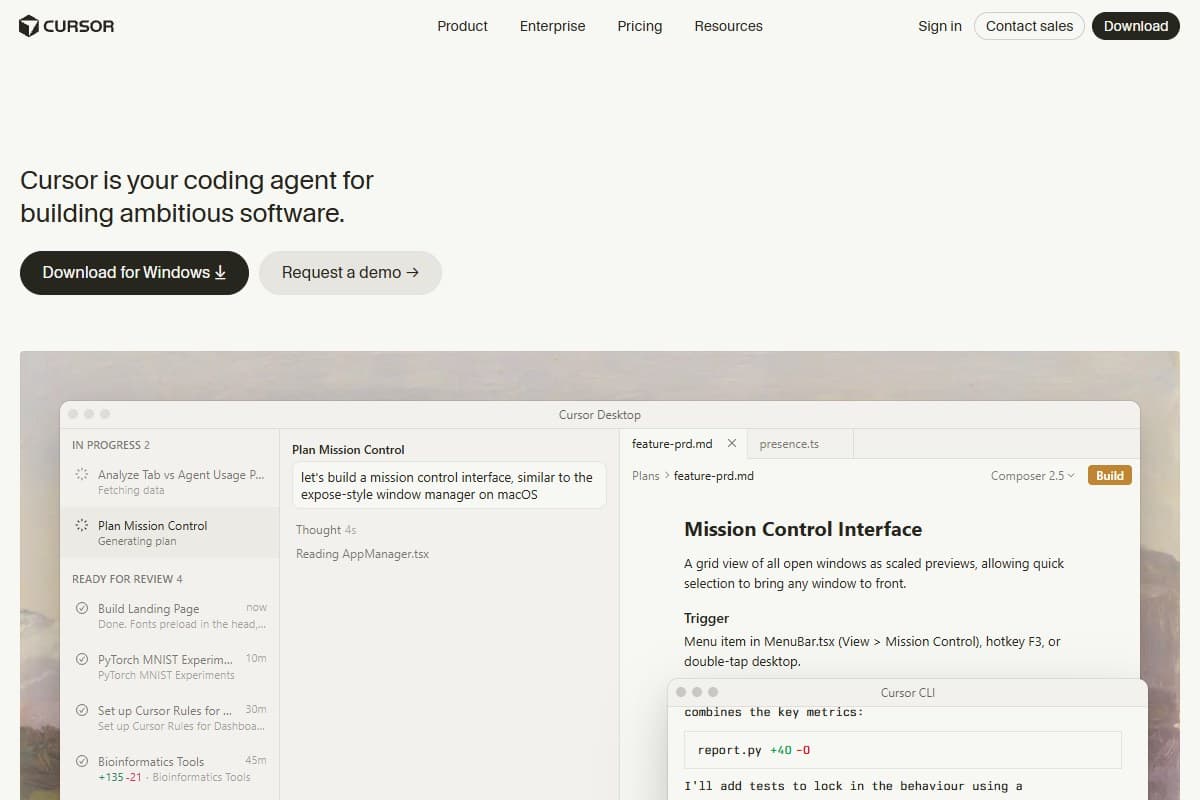
The headline feature is parallel agents. You can now run up to eight AI agents at the same time, each in its own isolated Git worktree, each working on a different part of your codebase. One agent refactors your auth module. A second writes tests. A third fixes a bug in the billing logic. A fourth drafts the migration. All in parallel. Then you review the diffs and merge what works.
That is the headline. The rest of the rebuild is the Agents Window (a left panel that lists every active agent and their progress), Composer 2 (multi-file edits with diff preview), cloud VMs for running agents on machines you don't own, and a mobile launch flow that lets you kick off agents from your phone.
It is, and I do not say this often about an IDE, a real product redesign, not a marketing one.
Why Cursor 3 is trending right now
Three things turned Cursor 3 into the most-searched AI coding tool of May 2026.
First, the launch itself was massive. Cursor reportedly hit around $2 billion in annual recurring revenue in early 2026, making it one of the fastest-growing developer tools ever shipped. When the company at the top of the AI-IDE category drops a numbered major version, the whole industry pays attention.
Second, the parallel agents architecture is genuinely novel. Competitors like Windsurf and Claude Code shipped agentic features last year, but Cursor 3 is the first to make running eight at once feel like a normal workflow rather than a stunt.
Third, and this is the awkward one, there is a viral cost-blowup controversy unfolding right now on Hacker News and dev Twitter. One commenter reported $350 in overage in a single week, which annualizes to a ~70× jump from the old "$20-ish" Cursor mental model. A small team of five reportedly spent $4,600 in six weeks, more than double their entire 2025 spend. Cursor 3's pricing page does not loudly advertise per-minute cloud VM charges, and people are finding out the hard way.
That combination (huge launch, real innovation, real billing pain) is why "Cursor 3 review" is everywhere right now.
My honest hands-on experience
I want to start with what surprised me, because I went in skeptical.
Day one, I ran the classic test. I gave Cursor 3 a 4,000-line Next.js codebase and asked it to extract the authentication logic into its own package, write unit tests, and update every import. With Cursor 2 this would have been a thirty-minute orchestration session of me babysitting prompts. With Cursor 3, I spun up three agents (one for the extraction, one for the tests, one to sweep the imports) and walked away to make coffee.
Eleven minutes later I came back to a clean PR with passing tests and one merge conflict I had to resolve manually. The conflict was real (two agents both touched a shared types file), but Cursor surfaced it clearly. Honestly, this was the first time AI coding has felt closer to managing a team than to typing with help.
Day three, the receipts arrived. My Pro credit balance, which is supposed to last a month, was down to 18%. I had been using Auto mode mostly (which doesn't draw from the credit pool), but every time I manually selected Claude Sonnet 4.6 or GPT-5 for a hard problem, the credits drained fast. The cloud VM agents are the real surprise: they bill per minute, and a long-running test fixer can eat $4 to $6 without you noticing. The balance only seemed to update after a run had fully finished, so I caught myself refreshing the dashboard a couple of times before the new number actually showed.
By day five my Pro credits were gone. I switched to Auto mode for everything for the rest of the week and the experience dropped from "magic" to "good." Auto picks a cheaper model under the hood, which mostly works fine for routine tasks but visibly underperforms on hard reasoning.
Was I surprised by this? Yes and no. The pricing controversy was already public when I signed up. But seeing it on my own dashboard, knowing I was being careful, made me realize that the gap between "what the marketing implies" and "what real usage costs" is wider than Cursor wants to admit.
That said, the work I shipped during the test was real. A migration I had been putting off for months. A test suite I had been promising to write. A refactor I would never have started on a Tuesday afternoon. The output was net positive. The bill, with discipline, was manageable.
How parallel agents actually feel to use
There is a screenshot moment that sums it up.
You open the Agents Window. You see three rows: "Refactor auth," "Write tests for billing," "Fix the flaky checkout test." Each one has a little status dot (running, waiting, done) and a live progress feed. You can click into any of them to see the streaming chain of thought, the files they are touching, the commits they have proposed.
You stop being a coder for a minute. You become a tech lead.
This is the thing the screenshots do not convey. The shift in your role is bigger than the shift in the tool. I caught myself doing things I would do for a junior engineer: leaving review comments, asking for a different approach, telling an agent to "stop, the architecture is wrong, let me explain."
That is also the thing that goes wrong. Agents do not always notice when they are doing something stupid. Two of mine, given overlapping responsibilities, produced contradictory edits to the same module. Without me catching it, that would have shipped. Parallelism is not free: it costs you review time.
If you are a senior engineer, you have the judgment to spot bad agent output quickly. If you are still learning the codebase you are working in, parallel agents can confidently merge nonsense.
I tried the mobile launch flow once too, kicking an agent off from my phone while I was away from my desk. It worked, but it felt a beat slower and laggier than starting the same agent on the desktop, enough that I'd only reach for it when I genuinely wasn't at my machine.
Pricing breakdown (what you are actually paying)
This is where most reviews get vague. Let me be specific.
- Limited Agent requests
- Limited Tab completions
- No cloud agents
- Best for: trying it out
- Monthly credit pool worth $20 at API rates
- Frontier models (Claude, GPT-5, Gemini)
- Cloud agents enabled
- Best for: solo devs shipping weekly
- 3x usage on all premium models
- Same features as Pro
- Best for: full-time devs
- 20x usage on all premium models
- Priority access to new features
- Best for: heavy daily users running parallel agents
- Pooled credits
- Admin controls and SSO
- Privacy mode default on
- Best for: 3+ person engineering teams
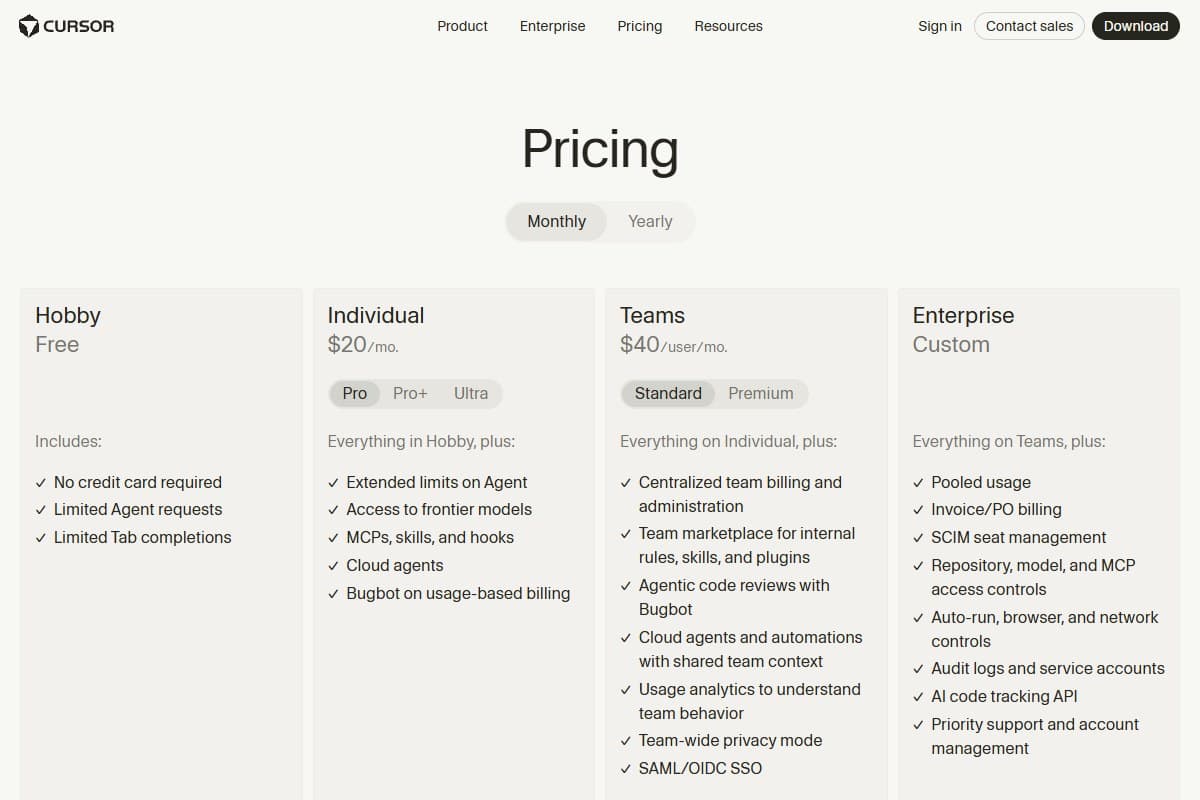
The thing the pricing page does not say loudly: every paid plan now includes a monthly credit pool roughly equal to the plan price, and you spend those credits at the underlying LLM's API rate. Auto mode is unlimited and free. Manually picking a premium model bills per token. Cloud VM agents bill per minute on top of the model cost.
The math that catches people out: if you run a cloud agent for two hours doing a real refactor with Claude Sonnet 4.6 underneath, that single run can cost $8 to $15. Do that three times in a week and your Pro credits are gone before Friday.
Practical advice: if you are evaluating Cursor 3, start on Pro for one month. Set a personal weekly credit budget. Use Auto for everything routine. Save manual model selection for the hard problems where it earns its cost. If you blow through Pro consistently, Pro+ at $60 is the next stop. Most working developers do not need Ultra.
The cost controversy: what is actually going on
Cursor's pricing was simple in 2024. You paid $20 a month for unlimited reasonable use. That changed in June 2025, when they shifted to a credit-based model tied to actual token consumption. Cursor 3 doubled down on that model by making cloud agents, which burn minutes plus tokens, a flagship feature.
The community response has been loud. The wearefounders.uk timeline calls it a "pricing disaster" and the Hacker News threads are full of devs comparing receipts. The most-quoted line is from a team that said their bill went from "$20-ish a month" to "$1,400 a month at the same workload."
To be fair to Cursor: the underlying model APIs really are expensive, and the legacy pricing was unsustainable as users discovered they could chain agents indefinitely. But the transparency is the problem, not the prices themselves. You do not see a meter ticking when an agent runs. You see a balance dropping in a dashboard, after the fact.
If you sign up for Cursor 3, the single most important habit is checking your usage dashboard daily for the first two weeks. After that you will know your baseline and the surprises stop.
Pros and cons (after real daily use)
- Parallel agents are not a gimmick: they genuinely change how you ship
- The Agents Window UI is the cleanest agent orchestration I have used in any IDE
- Composer 2 multi-file edits with diff preview are best-in-class right now
- Auto mode is good enough for 70% of tasks and does not eat credits
- VS Code compatibility means every extension I rely on just works
- Mobile launch flow is a real productivity unlock for on-call work
- Credit consumption is opaque: no live meter while agents run
- Cloud VM minutes can drain a Pro plan in a single bad afternoon
- Pro tier credits do not last a month under realistic agent use
- Parallel agents will produce conflicting edits if you do not split work cleanly
- Documentation has not caught up to the new pricing model
- Hobby tier is too limited to fairly evaluate parallel agents
Cursor 3 vs the alternatives
| Tool | Rating | Price | Best for | Verdict |
|---|---|---|---|---|
| Cursor 3 Pro | 4.2/5 | $20/mo+ | Parallel agent workflows | Best agent UX, watch your credits |
| Claude Code | 4.6/5 | $20/mo (Claude Pro) | Hard reasoning & 1M context | Best for big-codebase work |
| Windsurf | 4.3/5 | $20–$200/mo | Devin CLI bundled in | Closest direct competitor |
| GitHub Copilot | 4.0/5 | $10–$39/mo | Cheap inline autocomplete | Cheapest, weakest agents |
| Use case | Winner |
|---|---|
| Parallel multi-agent refactors | Cursor 3 |
| Long-context reasoning on huge codebases | Claude Code |
| Cheapest reliable AI autocomplete | GitHub Copilot |
| All-in-one IDE plus CLI agent | Windsurf |
| Daily writing-heavy work in your editor | Cursor 3 |
If you are comparing flagship AI assistants more broadly, not just for coding, my separate ChatGPT vs Claude vs Gemini write-up covers which one to pair with your IDE. For non-coding work, my best AI writing tools 2026 post covers the writing side.
Who should use Cursor 3, and who shouldn't
Buy Cursor 3 Pro if you are:
- A senior or mid-level developer shipping real features weekly
- Working on a codebase you already understand well enough to spot bad agent output
- Comfortable monitoring usage and adjusting habits based on a dashboard
- Already paying for Cursor 2: the upgrade is genuinely worth it
Buy Pro+ ($60) if you are:
- Working in Cursor more than four hours a day
- Routinely running parallel agents on real production code
- Tired of running out of Pro credits in week three
Skip Cursor 3 if you are:
- A junior developer still building intuition: agents will out-confident you
- A hobbyist who codes a few hours a week (Hobby tier or free AI tools are a better starting point)
- Cost-sensitive without a clear budget for monthly variability
- Working in a regulated environment that cannot send code to external VMs
Use Claude Code instead if you are:
- Working on a single very large codebase where 1M context matters more than parallelism
- Comfortable in a terminal-first workflow
Final honest verdict
Cursor 3 is the most impressive AI coding tool I have used. It is also the one most likely to surprise you with a bill. Both of those things are true at the same time.
Across the test period I shipped more real code than I would have without it. The parallel agents are not a marketing trick: they actually changed how I plan a workday. I now think in terms of "what three agents can I run in parallel" rather than "what is the next file I need to open." That is a genuinely new mental model and it took me about four days to adapt to it.
But the billing transparency problem is not solved, and Cursor knows it. If you sign up, sign up with your eyes open. Set a budget. Use Auto mode by default. Treat manual model selection as a tool you reach for, not a default. Check your dashboard daily for two weeks.
Do that, and Cursor 3 Pro at $20 a month is the best deal in AI tooling right now. Skip those habits and you will be the next Hacker News thread.
Bottom Line
Cursor 3 is the most impressive AI coding tool I've used, and at $20/month for Pro it's the best deal in AI tooling: if you manage it. The parallel cloud agents genuinely change how you plan a workday, but billing transparency still isn't solved: a two-hour cloud refactor can quietly burn $8–$15, so you have to set a budget, default to Auto mode, and check your dashboard daily for the first two weeks. Buy it if you'll build those cost habits and want the most capable agentic editor available; skip it if you want predictable flat-rate pricing and won't watch your credit burn.
Related reviews
If you found this Cursor 3 review useful, these are the next stops:
- AI Coding Tools topic hub: every coding-tools review in one place.
- ChatGPT vs Claude vs Gemini, which language model to pair with Cursor.
- Top 5 free AI tools: what to use before paying for Pro.
- AI Agents topic hub: Gemini Spark, Claude Cowork, and other agent platforms.
- SpaceX just bought Cursor for $60B: the acquisition news and what it means for the tool.
What I'd change about Cursor 3
I like Cursor 3 enough to be picky about it. If I ran product there, here is what I would ship next, in order.
-
A live credit meter in the editor chrome. The single biggest fix. Right now you see a balance dropping in a dashboard after the fact, and that dashboard is buried a couple of clicks deep under the account menu, not in the editor where I kept looking. Put a ticking meter next to the Agents Window so I watch credits drain while a cloud agent runs, not the morning after.
-
Per-minute cloud VM cost shown before I launch. A two-hour refactor on Sonnet 4.6 can quietly cost $8 to $15, and that is how a Pro plan dies in five days. Show me the projected per-minute burn the moment I kick off a cloud agent, not in a Hacker News thread later.
-
Conflict detection across parallel agents. Two of my agents touched a shared types file and produced contradictory edits. Cursor surfaced the merge conflict, but only after the fact. Warn me when two agents are about to write the same file.
-
Be honest about Auto mode. It is genuinely good for routine work but visibly drops off on hard reasoning. Tell me that in the model picker instead of letting me discover it on day five.
Fix the meter and the per-minute preview and most of the cost controversy evaporates.
If you are still deciding whether an IDE, a terminal agent, or an app builder fits your work, our best AI coding assistants for 2026 compares those workflows before you commit to Cursor.
FAQ: Cursor 3 review
Is Cursor 3 worth $20 a month?
Yes, for any developer shipping real code regularly. Cursor 3 Pro at $20 a month is the best value in AI coding tools right now: if you use Auto mode by default and reserve premium model selection for hard problems. Where Pro stops being worth it is for users who run cloud agents constantly without monitoring usage. Those users should upgrade to Pro+ at $60 or set a strict weekly budget.
How is Cursor 3 different from Cursor 2?
Cursor 3 is a from-scratch UI rebuild around parallel AI agents. You can now run up to eight agents at the same time in isolated Git worktrees, each handling a different part of your codebase. The Agents Window, Composer 2 multi-file edits, cloud VM agents, and a mobile launch flow are all new. The underlying VS Code compatibility and your existing extensions still work.
Why are people complaining about Cursor 3 pricing?
The Pro plan is still $20 a month, but Cursor moved from request-based billing to usage-based credits in 2025, and Cursor 3 made the most expensive workflow, cloud VM agents, a flagship feature. Real-world bills for heavy users have spiked to $300–$1,400 a month. The price did not technically change, but the way you use Cursor 3 spends credits much faster than Cursor 2 did. The transparency is the problem more than the prices themselves.
Cursor 3 vs Claude Code, which one should I pick?
Pick Cursor 3 if you want a full IDE with parallel agent orchestration, multi-file edits, and a visual diff workflow. Pick Claude Code if you live in the terminal, work on a single very large codebase where 1M-token context matters, and want the strongest single-agent reasoning. Many developers I know now pay for both: Cursor 3 for daily editor work, Claude Code for the hardest debugging sessions.
Can Cursor 3 replace a junior developer?
No, and please do not try. Cursor 3 can replace a lot of the typing a junior developer does (boilerplate, tests, repetitive refactors, migrations) but it cannot replace the judgment, the context, the code review intuition, or the architectural thinking a real engineer brings. Where Cursor 3 shines is making a senior developer's day feel like running a team of three. Where it fails is when no senior is reviewing the output.
Have a question I did not cover, or a Cursor 3 horror story of your own? Get in touch: I read everything, and the questions readers send shape the next round of reviews.
Free interactive tool
Compare Cursor 3 with other AI toolsSide-by-side pricing, features, and ratings — plus a recommended pick for your use case.
Independent AI tools researcher. Testing and reviewing the tools that matter for creators and businesses.
Keep reading
Related reviews

Google Antigravity 2.0 vs Cursor 3 vs GitHub Copilot: Which AI Coding Tool Wins in 2026?
Google Antigravity 2.0, Cursor 3, and GitHub Copilot compared head-to-head. Same refactor run through all three: here's which one wins and who it's for.

7 GitHub Copilot Alternatives 2026 That Actually Work
GitHub Copilot hitting its limits? I tested 7 alternatives that are faster, cheaper, or just better. Here's the honest comparison.

Lovable Just Launched AI Subagents: Here's Why It Could Change Vibe Coding Forever (May 2026)
Lovable shipped AI subagents: the main build agent now spawns parallel workers to research, review, and synthesize. My honest first-look.