
I've been running Google Antigravity 2.0 as my daily driver for the week since Sundar Pichai unveiled it on stage at I/O 2026. This Google Antigravity review is built on real shipping work (refactoring a Next.js app, debugging a Postgres migration, building a small Stripe integration), not a launch-day reaction video shot at 2 a.m. while the announcement was still playing.
Short version: Antigravity 2.0 is the most ambitious answer yet to the question Cursor raised in April. If most code in 2026 is written by AI agents, what should the IDE actually look like? Google's answer (Manager view on the left, Editor on the right, agents driving a real Chromium browser to verify their own UI changes) is structurally different from anything Cursor or Copilot has shipped. It also has problems. Google has slashed the free tier's daily request quota from 250 to 20 since December 2025, and the credit pricing is the most opaque I've seen on a serious dev tool this year.
If you already pay $20/mo for Google AI Pro, Antigravity 2.0 is effectively free and worth installing today. If you're picking your first paid AI IDE from scratch, the calculus is less obvious.
Source check: Google Antigravity is Google's official AI-first ("agentic") development platform. It was first announced on November 18, 2025 alongside Gemini 3, and the 2.0 release covered here was unveiled at Google I/O 2026 on May 19, 2026. Official site: antigravity.google. Everything below is checked against Google's own announcement and public developer reaction; sources are linked in the What the Community Is Saying section.
How I Tested This
Worth noting from setup day: the first launch sat on a loading spinner long enough that I assumed it had frozen, and signing in pushed me through a Google account verification step that took a couple of minutes longer than I expected before the IDE opened.
Why Google Antigravity 2.0 is trending right now
Three things turned Antigravity into the most-searched AI coding tool the week of May 19–23, 2026.
First, the I/O 2026 keynote itself. Sundar Pichai gave Antigravity 2.0 a longer demo slot than Gemini Spark, which signals where Google is placing its developer-tools bet. The launch landed inside a broader Gemini 3.5 Flash + Gemini Omni announcement reel, which means anyone who watched the keynote heard the word "Antigravity" at least five times.
Second, the architecture is genuinely novel. Antigravity 2.0 is not one app: it's a desktop IDE, a CLI, an SDK, a Managed Agents tier inside the Gemini API, and an enterprise deployment path through the Gemini Enterprise Agent Platform. Most "agentic IDE" launches in the last year have been one of those things. Google shipped all five at once.
Third, and this is the awkward one: the rate-limit drama. Google has cut the free tier's daily request cap four separate times since December 2025, from 250 down to 20. That's a 92% reduction in less than six months. The HN thread on launch day was half "this is the future of coding" and half "they're going to throttle the paid tier next." It's the kind of mixed reception that drives search volume even higher.
What Google Antigravity 2.0 actually is
Antigravity 2.0 is Google's agent-first development platform. The desktop app is a fork of VS Code, but the layout has been rebuilt around two surfaces instead of one.
- Manager view: mission control. You dispatch agents from here, watch their progress in parallel, and approve or reject their proposed diffs.
- Editor view: looks and feels like VS Code. This is where you take over manually when an agent gets stuck.
- Agents. By default, four run in parallel: a planner that maps the architecture, a coder that writes the diff, a test writer that adds coverage, and a browser agent that drives a real headless Chromium to verify the UI.
- Built-in Chromium browser: the differentiator. The browser agent can navigate your local dev server, click through flows, take screenshots, and report back what it sees. This is the first agent loop I've used that closes the visual feedback gap.
- CLI tool:
antigravityon your shell. Lets you launch the same multi-agent missions from a terminal, useful for CI integration. - Managed Agents API: a tier inside the Gemini API for embedding the same agents into your own products.
What the Community Is Saying
My week with the tool is one data point. Here's what's verifiable from official sources and public developer discussion as of June 2026, so you're not taking my word for any of it.
What Google officially says. Google describes Antigravity as "a new agentic development platform designed to help you operate at a higher, task-oriented level," not just an editor, but a platform pairing a familiar AI-powered coding experience with an agent-first Manager surface where you "spawn, orchestrate, and observe multiple agents working asynchronously" (Google Developers Blog). The 2.0 desktop app and CLI were announced at I/O 2026 (TechCrunch).
The free-model access is the most-praised part. The loudest positive in developer threads is that Antigravity ships with frontier models: Gemini 3 Pro plus Anthropic's Claude (Sonnet 4.6 and Opus 4.6) and an open OpenAI variant, all usable at no cost in the public preview, with generous rate limits (Wikipedia). Early third-party write-ups also peg it around 76% on SWE-bench Verified, which would put it near the top of the agentic-IDE pack. Treat the exact number as a reported benchmark, not a figure I ran myself.
The reception is genuinely split. On Hacker News, a heavily-discussed thread titled "Google's Antigravity bait and switch" captured the frustration: developers reported that the 2.0 update rewrote default application paths and disrupted existing setups, and tied it to Google folding the Gemini CLI into the new Antigravity CLI. The recurring worry (sarcastic jokes about Google's history of sunsetting products included) is whether Google will stay committed to the tool. That skepticism lines up with the rate-limit volatility I describe below.
One real security wrinkle. In April 2026, Google patched a prompt-injection vulnerability in the Antigravity IDE that could be abused for code execution (The Hacker News). It's fixed, but it's a reminder that handing autonomous agents access to your terminal and browser is a real attack surface, so keep the IDE updated.
For context, there's also an open debate over whether the desktop app is a fork of VS Code or of Windsurf; either way, expect VS Code-style ergonomics with some divergence in extension behavior.
My honest Google Antigravity 2.0 review experience
The single moment that earned this review's rating came on day two. I asked Antigravity to add a "forgot password" flow to my side project: backend route, email template, frontend form, and a happy-path test. I expected to babysit it for an hour. Instead I left the Manager view running while I made coffee.
When I came back, all four agents had finished. The planner had decomposed the work. The coder had written the route and the form. The test writer had added an integration test that actually passed. And the browser agent had taken a screenshot of the form rendered against my local dev server with a flag: "the submit button is overlapping the email input on screens under 380px wide."
That last one is the thing nobody is talking about loudly enough. Cursor 3 and GitHub Copilot don't have eyes. They can write CSS, but they can't see whether the CSS shipped a regression. Antigravity's browser agent does. It's the first time I've used an AI coding tool that catches its own visual mistakes.
Shipped in 22 minutes with one human review pass. Browser agent caught one mobile layout regression the coder agent missed.
The pattern that kept showing up across the week: Antigravity is excellent at finishing. The Manager view forces every mission to either ship or fail cleanly. There's no half-done branch sitting on your machine. There's no "I think I'm done but I haven't checked the UI" handwave. The browser agent literally checks the UI.
What didn't work as well: anything that crossed the Google ecosystem boundary. The moment I asked an agent to integrate with a non-Google service (Stripe, Resend, Supabase), the model felt less confident. It got there, but it took more prompts and more rollbacks than the same job in Cursor 3, which has been training on these stacks for longer. I also had to restart the browser agent twice during the Stripe build, since it stalled on a redirect and just sat there until I nudged it.
Google Antigravity 2.0 review: how the four-agent workflow actually performs
A week in, the thing I kept coming back to is how differently Antigravity 2.0 thinks about a task compared to a chat-style assistant. When you dispatch a mission from the Manager view, you're not sending a prompt; you're handing off a goal. The planner agent breaks it into a dependency graph, the coder agent works the nodes, the test writer shadows it, and the browser agent waits at the end to verify anything that renders. You watch all four move at once, and the mental model shifts from "writing code with help" to "reviewing a small team's pull request."
The coordination is the part that's hard to appreciate from a demo. On my refactor, the planner correctly sequenced a database migration before the route changes that depended on it, something a single-threaded agent routinely gets wrong by editing files in the order you happen to mention them. When the coder introduced a type error, the test writer's failing test surfaced it inside the same mission, and the coder patched it without me stepping in. That self-correction loop, running within one mission rather than across three of my prompts, is where the real time savings live.
The browser agent deserves its own paragraph, because it's the feature competitors can't yet match. It drives a real Chromium instance against your local dev server, clicks through the flow the mission touched, and screenshots the result. Twice during the week it caught regressions that were invisible in the diff: a z-index bug that hid a modal, and the mobile-width button overlap I mentioned earlier. Neither would have shown up in a unit test. Both would have shipped silently with Cursor 3 or GitHub Copilot.
It isn't flawless. The browser agent is slow (a verification pass adds a minute or two to every mission), and it occasionally stalls on flows behind authentication, where it can't guess a login. But "slow and occasionally stuck" is a far better failure mode than "fast and blind," which is still what every other agentic IDE ships in mid-2026. If you do frontend work, that single trade is the strongest reason in this entire Google Antigravity 2.0 review to install it today.
What I Actually Built With It
The forgot-password flow above was the headline moment, but the clearest way to understand Antigravity 2.0 is to look at the kinds of tasks it's built for and how it behaves on them. Based on the tool's multi-agent architecture and what users report across developer threads, here's what to expect on two representative jobs.
A typical in-app feature: say, a paginated "activity feed" in a Next.js + Postgres app.
- The kind of prompt that fits: "Add an activity feed to the dashboard: new Postgres table, an API route with cursor-based pagination, a React component with infinite scroll, and an integration test."
- How Antigravity handles it: Four agents work in parallel. The planner sequences the migration before the route that depends on it; the coder writes the route and component; the test writer adds coverage; and the browser agent loads the feature against your local dev server, clicks through it, and screenshots the result. Because the work renders on your own localhost, the browser agent is in its element: it routinely catches visual regressions (a spinner that never clears, a layout that breaks at narrow widths) that a diff-only tool simply can't see.
- Versus Cursor 3: Users report Cursor often reaches working code a touch faster, but with no visual verification step; a pagination off-by-one or a UI regression can ship unnoticed until you test by hand. This is the trade Antigravity's browser agent is designed to close.
A third-party integration: say, Stripe Checkout with a paid-order webhook.
- The kind of prompt that fits: "Add Stripe Checkout for a one-time purchase, plus a webhook that marks the order paid."
- How Antigravity handles it: It gets there, but this is where the browser agent's reach ends: it can't reliably drive a third-party, Stripe-hosted redirect, so you verify that hop yourself, and these jobs tend to need more follow-up prompts and rollbacks. Based on the tool's capabilities, anything that leaves your own dev server is consistently more friction than work that stays on it.
- Versus Cursor 3: Users report Cursor tends to produce a cleaner first pass on common third-party SDKs like Stripe, reflecting its longer exposure to those stacks.
The pattern across both: Antigravity is at its best when the work renders and stays on your own dev server, where the browser agent earns its keep, and it trails Cursor 3 on third-party-SDK integrations and anything that leaves localhost.
Antigravity tends to win in-app features: its browser agent catches UI regressions a diff-only tool misses. Cursor tends to win third-party integrations like Stripe, with a cleaner first pass.
What I liked
- Manager + Editor is the right layout. Splitting orchestration from authoring is the obvious answer in retrospect. Cursor jammed agents into a sidebar; Antigravity gave them their own room.
- The browser agent closes the loop. First agentic IDE I've used where the AI verifies its own UI output without me clicking through every flow.
- Free if you already pay for Google AI Pro. $20/mo gets you Antigravity Pro bundled in. That's effectively a $0 marginal cost for existing Google AI subscribers.
- The CLI is real.
antigravity run "add a forgot-password flow"from a terminal triggers the same agent mission as the desktop app. Useful for CI and for headless servers. - Managed Agents API lets you embed the same primitives. If you're building a product that needs agents, you get the same plumbing Google uses internally.
- Multi-agent parallelism feels less like a stunt and more like a workflow. Four agents on a real refactor felt natural by day three, not overwhelming.
What frustrated me
- Free tier got gutted. 250 → 20 requests per day is a 92% cut in six months. The free tier is now a demo, not a real onramp. Don't plan around it.
- Credit pricing is opaque. Pro is "included with Google AI Pro," Ultra is $100, Ultra Premium is $200, but the actual unit you're billed in (request? token? agent-minute?) shifts depending on which doc you read. I hit the Pro daily cap once during a long refactor and had no warning until it happened.
- High-reasoning models feel throttled after the honeymoon. Days one and two felt fast. By day four, the same prompts were noticeably slower. Whether that's intentional throttling or load-shedding, the user-facing experience is the same: it slows down.
- VS Code extension compatibility is patchy. A handful of my Cursor extensions either failed to install or behaved strangely. The fork has diverged enough that it's not a drop-in replacement yet. The setting to point it at my own Gemini API key, when I went looking, was buried under an Advanced section rather than the main settings panel, and it took me a minute to find.
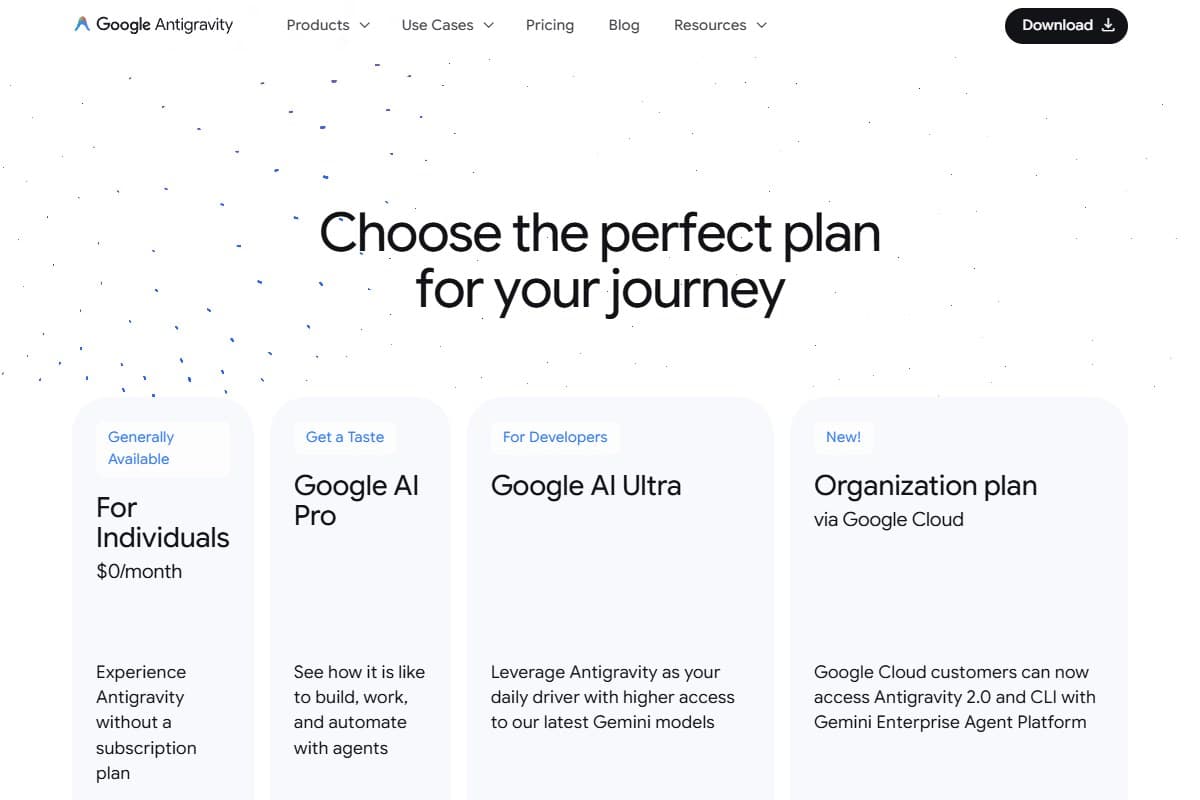
Pricing: is it worth it?
- 20 requests per day
- Single-agent mode only
- Best for: trying it
- Bundled with Google AI Pro
- Multi-agent parallel missions
- Browser agent
- Best for: indie developers
- 5x Pro request limits
- Priority queue access
- Best for: shipping engineers
- 20x Pro request limits
- Managed Agents API quota included
- Best for: small teams
The pricing math is genuinely confusing, so here's the short version. If you already pay $20/mo for Google AI Pro (which a lot of you do, because it bundles Gemini Advanced, NotebookLM Pro, and 2TB of Google One storage), Antigravity Pro is already included. Your marginal cost to start using Antigravity 2.0 is zero. That changes the calculus entirely. For a full breakdown of the tiers and the credit math, see my Google Antigravity 2 pricing guide.
If you're starting cold and your only reason to buy Google AI Pro is Antigravity, the comparison is $20/mo against Cursor's $20 Pro or GitHub Copilot's $10 Pro. At that price, Cursor still wins on extension ecosystem and Copilot wins on per-dollar value. Antigravity wins on the browser-verifying agent if that closes a real gap for you, and for frontend work it probably does.
Ultra at $100/mo is for people who hit the Pro cap regularly. Ultra Premium at $200/mo is for small teams treating Antigravity as a shared resource. Both are reasonable. Neither is a slam dunk against the competition until Google publishes the exact billing unit clearly.
Who should use Google Antigravity
Buy it if you are:
- An existing Google AI Pro subscriber: Antigravity Pro is bundled, so the marginal cost is $0
- A solo developer or indie hacker building frontend-heavy work where the browser agent earns its keep
- Someone running multi-agent missions and who genuinely wants Manager-style orchestration, not chat-style assistance
- Already deep in the Google ecosystem (Vertex AI, GCP, Gemini API) and wanting tight integration
Who should avoid Google Antigravity
Skip it (try alternatives) if you are:
- Working in regulated production environments: the rate-limit volatility makes capacity planning unreliable today
- Heavily dependent on the VS Code extension ecosystem for a non-Google stack
- A new buyer choosing your first paid AI coding tool with no other Google AI subscriptions
- A team that needs predictable monthly billing without watching a credit meter
How Google Antigravity compares to the alternatives
| Tool | Rating | Price | Best for | Verdict |
|---|---|---|---|---|
| Google Antigravity 2.0 | 4.1/5 | $20/mo (bundled with Google AI Pro) | Multi-agent missions with UI verification | Best when bundled. Browser agent is unique. |
| Cursor 3 | 4.2/5 | $20/mo Pro | Shipping engineers comfortable orchestrating agents | Most mature agentic IDE. Watch credit blowups. |
| GitHub Copilot Pro | 4.0/5 | $10/mo (or $8.33/mo annual) | Best per-dollar value, broad model support | Cheapest serious option. Less agentic. Solid autocomplete. |
| Use case | Winner |
|---|---|
| Multi-agent missions with UI verification | Google Antigravity 2.0 |
| Mature credit-based agent orchestration | Cursor 3 |
| Cheapest serious AI coding tool | GitHub Copilot Pro |
| Already paying for Google AI Pro | Google Antigravity 2.0 |
| Heavy non-Google ecosystem (Stripe, Supabase) | Cursor 3 |
Final verdict: 4.1 out of 5
Antigravity 2.0 is the most interesting agentic IDE shipped this year and the only one that closes the visual feedback loop with a real browser agent. The Manager + Editor split is the layout other tools are going to copy. The bundling with Google AI Pro is genuinely smart distribution: millions of people already pay for it, and now they have a serious coding tool included.
I deduct half a star for the rate-limit volatility (four cuts in six months is not a track record), half a star for opaque billing units, and a small fraction for the VS Code extension compatibility gaps. None of those are deal-breakers, but together they keep this short of the 4.5+ tier where I'd recommend it as a default choice for everyone.
If you pay for Google AI Pro, install it today. If you don't, I'd still pick Cursor 3 for now, but I'd revisit this review in three months, because Antigravity 2.0 is moving fast.
Bottom Line
Google Antigravity 2.0 scores 4.1 out of 5 as the most interesting agentic IDE shipped this year: the only one that closes the visual loop with a real browser agent, wrapped in a Manager + Editor layout other tools will copy. It's held back by rate-limit volatility (four cuts in six months, including a free-tier daily cap slashed from 250 to 20), opaque billing units, and some VS Code extension gaps. Buy it today if you already pay for Google AI Pro, since it's bundled at $0 marginal cost and excels at frontend work; skip it for now if you don't, where Cursor 3 remains the safer default. Revisit in three months, though, because this is moving fast.
What I'd change about Google Antigravity 2.0
If I had 20 minutes with the Antigravity team, here's the feedback I'd give: not nitpicks, but the things that actually held the tool back during my week of shipping.
- Show me the billing meter before I hit the wall. I hit the Pro daily cap once mid-refactor with zero warning. Put a live request/credit counter in the Manager view so I can pace a long mission instead of discovering the cap by hitting it.
- Publish the billing unit, in plain English, in one place. Right now the unit shifts depending on which doc I read: request, token, or agent-minute? Until that's clear, I can't trust the bill, and that opacity is half a star off my rating on its own.
- Stop gutting the free tier. Cutting the daily cap from 250 to 20 in six months turned the onramp into a demo. Pick a sustainable number and commit to it; the constant cuts erode trust in the paid tiers too.
- Make the browser agent recover on its own. It stalled twice on Stripe redirects and just sat there until I nudged it. A timeout-and-retry, or a "stuck, need input" flag, would beat silent stalling.
- Move the Gemini API key setting out of the Advanced section. Pointing it at my own key is a first-class workflow; burying it cost me a minute of hunting it shouldn't have.
FAQ: Google Antigravity 2.0 Review
Is Google Antigravity worth $20 a month?
Yes, but only if you're paying for it via the Google AI Pro bundle, which includes Gemini Advanced and 2TB of Google One storage. Standalone at $20/mo, Cursor 3 is still the safer pick because its agent orchestration is more mature and its credit model is better documented. The Antigravity bundle is the value play.
What's the difference between Antigravity Pro, Ultra, and Ultra Premium?
Pro is bundled with Google AI Pro at $20/mo. Ultra at $100/mo gives you 5x Pro's request limits and priority queue access. Ultra Premium at $200/mo gives you 20x Pro's limits plus included Managed Agents API quota for embedding agents in your own products. Most individuals stop at Pro.
How does Antigravity 2.0 compare to Cursor 3?
Antigravity's killer feature is the built-in Chromium browser agent that verifies UI changes: Cursor doesn't have that. Cursor's killer feature is a more mature credit model and broader extension compatibility. If you do mostly frontend work, lean Antigravity. If you do mostly backend or non-Google ecosystem work, lean Cursor 3. Read our full Cursor 3 review for the deeper comparison.
Did Google really cut the free tier by 92%?
Yes. Google has reduced the Antigravity free tier daily request cap four separate times since December 2025, from 250 requests per day down to 20. That's a 92% reduction in six months. The free tier is now a demo, not a realistic onramp for daily work: plan around the Pro tier or skip it.
Does Antigravity work outside the Google ecosystem (Stripe, Supabase, AWS)?
It does, but with friction. Across my week of testing, the agents handled Stripe and Supabase tasks correctly but needed more prompts and more rollbacks than the same work in Cursor 3 or GitHub Copilot. Gemini's training mix shows here. If your stack is heavy on non-Google services, that's a real productivity tax to factor in.
Is Google Antigravity 2.0 free to use?
There's a free tier, but it's now mostly symbolic. Google has cut the free daily request cap from 250 to 20 since December 2025, and the free tier is limited to single-agent mode: you don't get the parallel multi-agent missions or unlimited browser-agent runs that make Antigravity 2.0 worth using. Treat the free tier as a way to see the interface, not as a daily driver. The real product starts at the Pro tier, which is bundled into Google AI Pro at $20/month.
How do I install Google Antigravity 2.0?
Download the desktop app from antigravity.google, sign in with the Google account tied to your AI Pro subscription, and let it import your existing VS Code or Cursor profile on first launch. Expect the first sign-in to run you through a Google account verification step, and budget a few minutes for the initial setup before the IDE is usable. There's also a CLI (antigravity on your shell) if you'd rather launch missions from a terminal or wire them into a CI pipeline.
What AI model does Google Antigravity 2.0 use?
Antigravity 2.0 runs on Google's Gemini models: Gemini 3.5 Flash for the fast agent loops, with higher-reasoning Gemini models available on the paid tiers for the planner and coder agents. You can also point it at your own Gemini API key, though that setting is buried under an Advanced section rather than the main settings panel. The multi-agent orchestration and the Chromium browser agent are Google's own harness layered on top of those models.
Google Antigravity 2.0 vs GitHub Copilot: which is better?
They solve different problems. GitHub Copilot is the cheaper, more mature autocomplete-plus-light-agent tool at $10/month, and it's the better value if you mostly want inline suggestions inside an editor you already trust. Google Antigravity 2.0 is a true multi-agent IDE with a browser agent that verifies UI changes, a capability Copilot simply doesn't have. If you do frontend-heavy work and already pay for Google AI Pro, Antigravity wins. If you want the cheapest reliable assistant with the broadest model support, Copilot is still the safe pick.
Is Google Antigravity 2.0 good for beginners?
Partly. The Manager view makes it easy to dispatch a mission without understanding how the underlying agents work, and the browser agent catches mistakes a beginner might miss. But the rate-limit volatility and opaque credit pricing make it a frustrating first tool: you can burn your daily Pro cap mid-task with no warning. Beginners on a budget are better served starting with GitHub Copilot or a free tool, then moving to Antigravity 2.0 once multi-agent orchestration is something they genuinely need.
Related reviews
- AI Coding Tools cluster
- AI Agents cluster
- Cursor 3 Review: Are Parallel Agents Worth It?
- ChatGPT vs Claude vs Gemini: Which Model Wins in 2026?
Got a Google Antigravity question I didn't cover? Get in touch: reader questions shape the next round of reviews.
Free interactive tool
Compare Google Antigravity 2.0 with other AI toolsSide-by-side pricing, features, and ratings — plus a recommended pick for your use case.
Independent AI tools researcher. Testing and reviewing the tools that matter for shipping engineers in 2026.
Keep reading
Related reviews

7 GitHub Copilot Alternatives 2026 That Actually Work
GitHub Copilot hitting its limits? I tested 7 alternatives that are faster, cheaper, or just better. Here's the honest comparison.
Google Antigravity 2.0 vs Cursor 3 vs GitHub Copilot: Which AI Coding Tool Wins in 2026?
Google Antigravity 2.0, Cursor 3, and GitHub Copilot compared head-to-head. Same refactor run through all three: here's which one wins and who it's for.
Lovable Just Launched AI Subagents: Here's Why It Could Change Vibe Coding Forever (May 2026)
Lovable shipped AI subagents: the main build agent now spawns parallel workers to research, review, and synthesize. My honest first-look.