The first time I read Mina's pitch, I had to re-read it. Every other "AI meeting assistant" I've tested — Otter, Fireflies, Fathom, Granola — does the same fundamental thing: it sits quietly, transcribes, and hands you a summary after everyone's hung up. Mina's whole pitch is that it doesn't sit quietly. You can say "Hey Mina, quick summary of the week so far?" mid-call and it answers out loud, pulling from your actual tools. Then it files the Jira ticket, updates the HubSpot deal, and books the follow-up — before you've closed the tab.
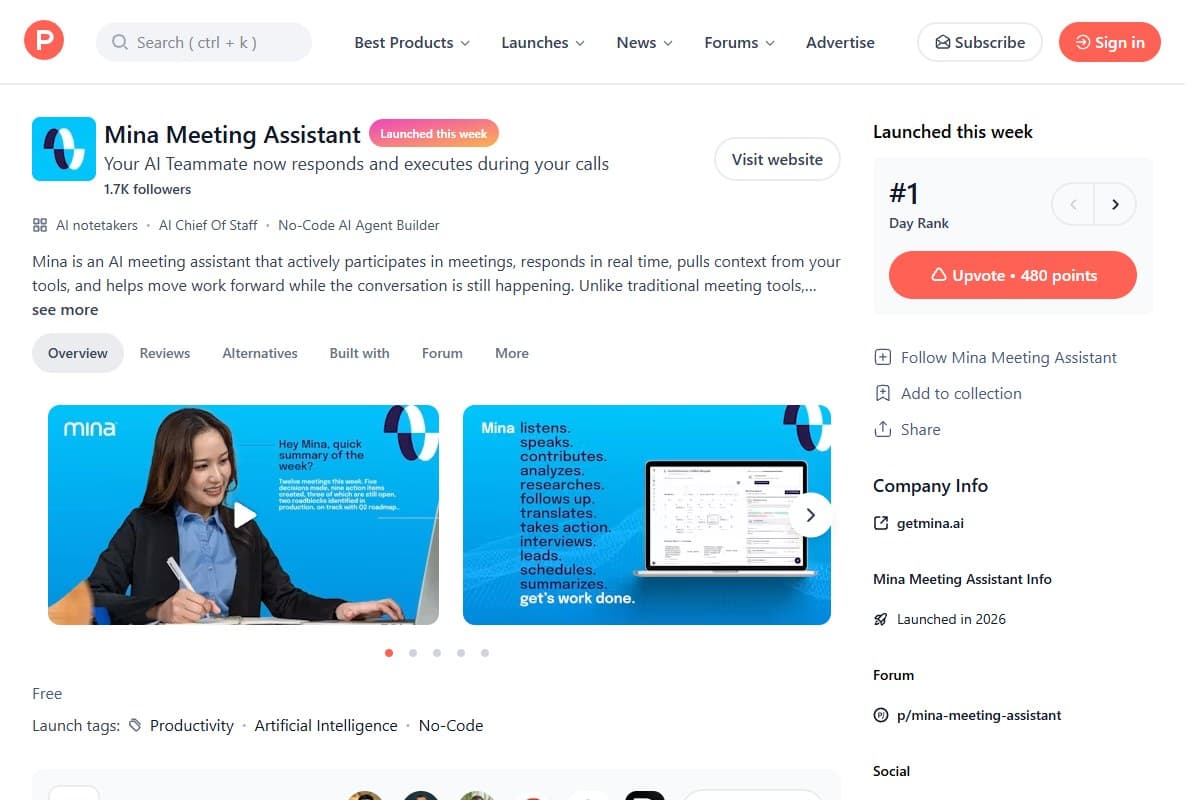
That's the line nobody had credibly crossed yet, and it's why Mina Meeting Assistant launched straight to #1 Product of the Day on Product Hunt in the first week of June 2026, picking up 480 upvotes and 1.7K followers in its first couple of days. I want to be upfront about what this review is: a launch first-look built on the live product at getmina.ai, its Product Hunt listing, and a careful read of where it sits against the established meeting-AI crowd — not six months of daily standups. But there's enough here to tell you who it's for, where the catch is, and whether it's worth dropping into your next call this week.
How I Tested This
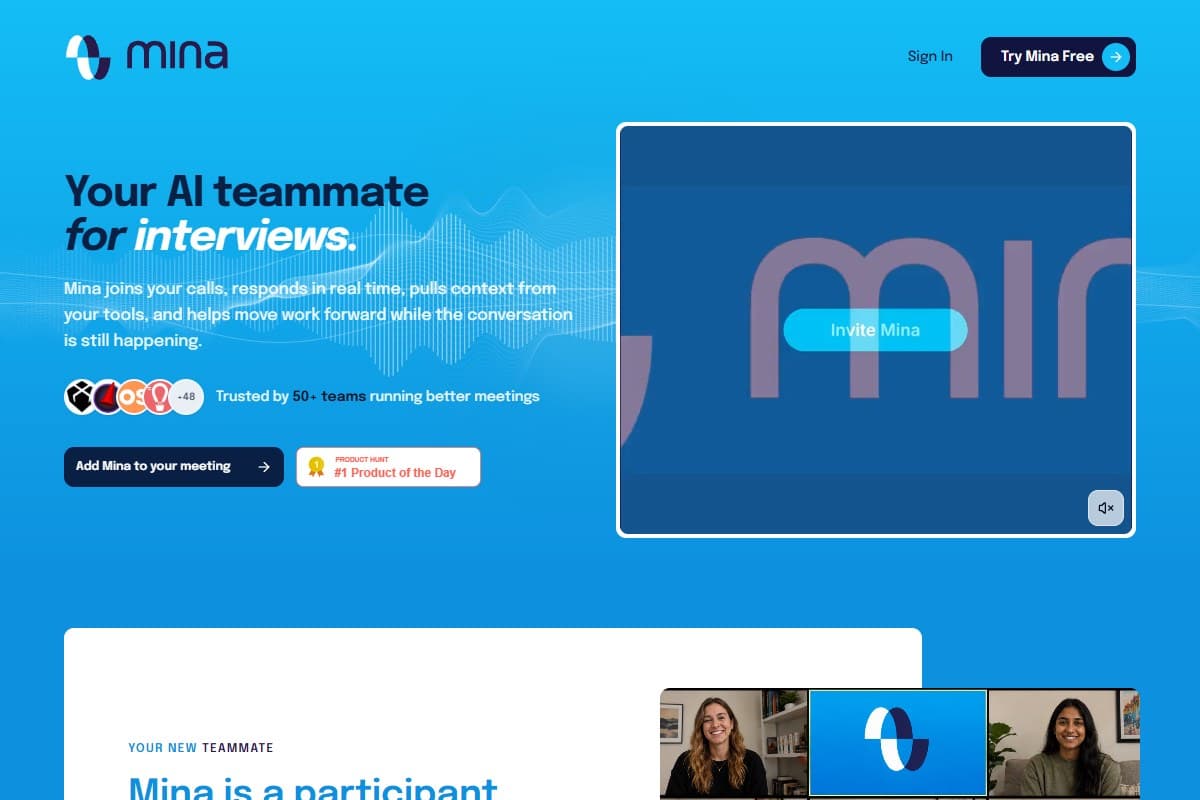
Why Mina is trending right now
Two things put this launch at the top of the leaderboard.
First, it reframes a crowded category. Meeting AI has felt finished for a year — pick Otter, Fathom, or Fireflies, get your transcript, move on. The interesting micro-detail in Mina's demo is the moment that broke through on launch day: someone asks "Hey Mina, quick summary of the week?" and it replies, out loud, "Twelve meetings this week. Five decisions made, nine action items created, three still open, two roadblocks identified in production, on track with Q2 roadmap." That's not a transcript. That's a teammate reading back the state of your work mid-conversation. People share that because it feels different, not because of a spec sheet.
Second, it rides the 'AI agent that does the work' wave. The whole center of gravity in AI tooling through 2026 has shifted from "summarize this for me" to "go do this for me." Mina's Product Hunt categories say it out loud: it's listed under AI notetakers, AI Chief of Staff, and No-Code AI Agent Builder at the same time. That positioning — a notetaker that's also an agent — is exactly the zeitgeist, and it's why the launch got attention beyond the usual notetaker crowd.
What Mina actually is
In plain English: Mina is a meeting participant, not a meeting recorder.
- It joins the call as an attendee — Zoom, Google Meet, or Microsoft Teams — and appears as its own tile, not a hidden bot.
- It listens and speaks — in reactive mode you summon it with "Hey Mina"; in proactive mode it's always listening and can chime in or act without being called.
- It pulls live context from your stack — so when a name, deal, or ticket comes up, it can answer from the real data instead of guessing.
- It takes actions during or right after the call — creating action items, filing tickets, updating the CRM, sending follow-ups, and booking the next step.
- It's role-configurable — you can run it as a quiet assistant, a meeting moderator, a Scrum facilitator, or a customer-facing copilot, which changes how chatty and how autonomous it is.
The mental model that helped me: most meeting tools are a camera pointed at the conversation. Mina is pitched as a person in the conversation. That's a much bigger claim, and it's the reason the upside and the risk are both larger than a normal notetaker.
My honest first-look take
The thing that genuinely impressed me is the category jump. I've tested enough notetakers that they blur together — the differentiation is usually "ours has 95% accuracy and a slightly nicer summary." Mina is competing on a different axis entirely. An AI that can answer "what did we decide about pricing last week?" out loud, mid-meeting, from your real records, is a fundamentally more useful thing than one that emails you a transcript at 5pm. On paper, that's a real leap.
The thing that gave me pause is everything that comes with an AI that talks and acts. And I want to be straight about it, because the launch glow tends to skip past it.
Mina is days old, its own site says 'trusted by 50+ teams,' there's no published pricing page, and the headline feature is an AI that speaks aloud and takes autonomous actions in live meetings. The capability is real; the track record is not there yet.
An always-listening assistant that can speak and execute is exactly as useful as it is risky. The same autonomy that books your follow-up can also interject at the wrong moment, take an action you didn't intend, or make a confidently wrong statement to a customer on a live call. Mina lets you disable recording on request and dial it down to a "quiet assistant," which tells me the team knows this — but it also means the safe default is the less impressive mode. You adopt the headline feature on purpose, after you trust it. Not on day one with a prospect on the line.
What I liked
- A genuinely new capability. Live, spoken, context-aware answers mid-meeting is something the established notetakers simply don't do. This isn't a feature gap — it's a different product.
- The "Chief of Staff" framing is the right one. Action items, tickets, CRM updates, and follow-ups created during the call kill the after-meeting admin tax that every other tool leaves on your plate.
- 200+ integrations out of the gate. Slack, HubSpot, Salesforce, Jira, Notion, Linear, GitHub — the live-context promise only works if it's wired into your real stack, and the breadth is there.
- Role presets are smart. Moderator, Scrum facilitator, quiet assistant, customer-facing copilot — matching Mina's behavior to the meeting type is the difference between "helpful" and "annoying," and it's built in.
- It's free to try right now. Launch-week pricing is free with extra credits for early users, so the cost of forming your own opinion is basically your time.
What frustrated me
- No published pricing. There's no pricing page (the URL 404s today), and the always-listening proactive mode is described as the premium tier. "Free at launch" with an unknown paid ceiling is a real planning problem for teams.
- It's brand new and unproven. "Trusted by 50+ teams" is honest, but it's tiny. You're an early adopter, with all that implies for reliability, support, and roadmap risk.
- The autonomy cuts both ways. An AI that can speak and act in a customer call is one wrong interjection away from an awkward — or expensive — moment. The risk scales with how much you let it do.
- Privacy needs a deliberate policy. An assistant that's always listening and pulling from your CRM is a data-governance conversation, not a checkbox. Disabling recording helps, but you'll want internal rules before rollout.
Pricing — is Mina worth it?
Here's the honest state of play: Mina is free at launch, with extra credits handed out to early Product Hunt users, and there is no public pricing page yet. The site distinguishes a reactive mode (you invoke it with "Hey Mina") from a more expensive proactive, always-listening mode — so it's safe to assume the autonomous, always-on behavior is the paid ceiling, but the actual numbers aren't published.
That makes a clean "is it worth it?" verdict impossible today. What I can do is anchor it against the established meeting-AI tools, all of which have transparent pricing — so you know what the market rate for "just notes" looks like before you pay a premium for "notes plus an agent."
| Tool | Rating | Price | Best for | Verdict |
|---|---|---|---|---|
| Mina | 4.0/5 | Free at launch (paid TBA) | An AI that speaks and acts live during the call | New category, real autonomy, unproven and unpriced. |
| Fathom | 4.6/5 | Free · ~$15/user/mo | Best all-round free notetaker | Unlimited recording, fast summaries, huge review base. |
| Fireflies | 4.4/5 | Free · $10/user/mo | Sales teams needing broad CRM coverage | Strong integrations, mature, transcript-first. |
| Otter | 4.2/5 | Free (300 min) · $16.99/mo | Live transcription + meeting chat | Established, but recording-and-summary, not action. |
| Granola | 4.3/5 | Free · $14/user/mo | Bot-free local notes on Mac | No visible bot, clean notes — but post-meeting only. |
| Use case | Winner |
|---|---|
| An AI that answers and acts during the meeting | Mina |
| Best free, proven notetaker for most people | Fathom |
| Sales pipeline + deep CRM sync | Fireflies |
| Bot-free, local-only note capture | Granola |
| Live transcription you can chat with afterward | Otter |
If your pain is the after-meeting admin pile — the tickets, the CRM updates, the follow-ups nobody does — Mina is aiming squarely at it in a way the others aren't. If you just want reliable notes from a tool that's been battle-tested by millions of calls, one of the incumbents is the safer pick today. If you want help wiring any of this into a wider automated workflow, my Make.com review covers the automation layer, and the Databox MCP first-look is a close cousin — another tool letting AI act on your real business data. You can also line Mina up against other tools in our AI tools comparison.
Who should use Mina
Try it if you are:
- A sales or customer-success team drowning in post-call admin — Mina's whole point is doing that work live
- An engineering or product lead who wants standup decisions and action items captured and filed in Jira/Linear automatically
- An early adopter who's comfortable trialing days-old software to get a capability nobody else has yet
- Someone who lives in Slack, HubSpot, Salesforce, or Notion and wants meeting outcomes pushed there without a second step
Who should avoid Mina
Skip it (for now) if you are:
- A team that just needs dependable notes and transcripts — a proven tool like Fathom or Fireflies does that better today
- In a regulated or privacy-sensitive environment where an always-listening, action-taking AI is a non-starter without heavy review
- Budget-planning a rollout — you can't, because paid pricing isn't published yet
- Allergic to early-adopter rough edges; this is a launch-week product, not a settled one
Final verdict — 4.0 out of 5
Mina is the most genuinely new meeting tool I've looked at in a long time. The established notetakers have been iterating on the same "record and summarize" loop for years; Mina jumps to a different question — what if the AI is a participant that does the work in the room? When it lands, that's a categorically more useful thing, and the #1 Product Hunt finish reflects how many people felt that jump the moment they saw the demo.
I'm holding back a full point for three honest reasons: it's days old with a tiny, unproven customer base; there's no published pricing, so you're buying into an unknown ceiling; and an AI that speaks and acts autonomously in live meetings is a trust-and-privacy bet that demands a deliberate rollout, not a casual install. None of those are dealbreakers — they're the normal cost of being early.
Net: if the after-meeting admin tax is your real problem, start Mina this week as a quiet assistant, watch how it behaves, and graduate it to the active role once you trust it. If you just want solid notes from something proven, pick an incumbent and check back on Mina in a few months once the pricing and the track record exist.
FAQ: Mina Meeting Assistant
What is Mina Meeting Assistant and how is it different from Otter or Fireflies?
Mina is an AI meeting assistant that actively participates in your calls rather than just recording them. Where Otter, Fireflies, Fathom, and Granola transcribe a meeting and send a summary afterward, Mina listens in real time, can speak when summoned (or proactively), pulls live context from your connected tools, and takes actions — creating action items, filing tickets, updating your CRM, and booking follow-ups — while the conversation is still happening. It launched at #1 Product of the Day on Product Hunt in the first week of June 2026.
How much does Mina cost?
At launch it's free, with extra credits given to early Product Hunt users. There is no public pricing page yet (the pricing URL currently 404s). Mina distinguishes a reactive mode — you invoke it by saying "Hey Mina" — from a more expensive proactive, always-listening mode, so the autonomous always-on behavior is expected to be the premium tier once paid plans are published. Budget cautiously until those numbers are official.
Which meeting platforms and tools does Mina work with?
On the meeting side: Zoom, Google Meet, and Microsoft Teams, where it joins as its own participant. On the integration side, Mina advertises 200+ tools, including Slack, HubSpot, Salesforce, Jira, Notion, Linear, and GitHub — which is what powers its ability to answer from live data and push outcomes back into your stack.
Is it safe to let an AI speak and take actions during a live meeting?
That's the central trade-off. The autonomy that makes Mina useful — answering aloud, filing tickets, updating records — is also what makes it risky, since a wrong interjection or unintended action on a customer call has real consequences. Mina mitigates this with role presets (you can run it as a silent "quiet assistant"), and recording can be disabled on request. The sensible approach is to start in the least autonomous mode, build trust, and only enable proactive/speaking behavior once you've seen how it performs.
Should I switch from my current notetaker to Mina right now?
For most teams, not as a wholesale switch yet. Mina is days old and "trusted by 50+ teams," so it's early-adopter software. If your main need is dependable notes and transcripts, a proven tool like Fathom or Fireflies is the safer choice today. If your real pain is the post-meeting admin pile — the tasks and CRM updates nobody does — Mina is worth running alongside your current tool to see whether its action-taking earns a permanent spot.
Does Mina have an affiliate or partner program?
Not that I could find at launch. Mina is brand new (company: getmina.ai, launched 2026) and there's no public affiliate, referral, or partner program listed yet. If you're evaluating it to recommend, you'd need to contact the team directly — but as of this first look, there's no published program.
Related reviews
- AI agents — topic hub — every AI agent and autonomous-assistant review on the site in one place.
- Make.com Review 2026 — the automation layer for pushing meeting outcomes across your whole stack.
- Databox MCP First Look — a close cousin: letting AI assistants act on your real business data.
- AI Tools Comparison — put Mina side-by-side with other tools and get a pick for your use case.
Tried Mina on a real call, or want me to test a specific workflow — like whether it actually files a clean Jira ticket from a messy standup? Get in touch — reader questions shape the next round of reviews.
Free interactive tool
Compare Mina Meeting Assistant with other AI toolsSide-by-side pricing, features, and ratings — plus a recommended pick for your use case.
Independent AI tools researcher testing what actually works.
Keep reading
Related reviews

Best AI Presentation Tools 2026: Gamma vs Pitch vs Beautiful.ai vs Canva (Tested)
I built the same pitch deck in Gamma, Pitch, Beautiful.ai, and Canva to find the best AI presentation tool in 2026 — and which to skip.
Databox MCP Review 2026: Chat With Your Analytics From Claude and ChatGPT (First Look)
Databox MCP lets you query your dashboards in plain English from Claude, ChatGPT and Cursor. I dug into the launch, the pricing, and the catch.
Anthropic IPO 2026: What the $965B Filing Means for Claude Users (and the AI Race)
Anthropic confidentially filed for an IPO on June 1, 2026 at a reported ~$965B valuation. Here's what's confirmed, what isn't, and what it means for Claude.