
Here's what nobody tells you about password managers: the encryption is almost never the deciding factor. They're all effectively unbreakable. What actually decides it is price, autofill reliability, and whether the free tier is a real product or a trap. NordPass (Nord Security's password manager, the same company behind NordVPN) gets two of those three right in 2026. This is an honest NordPass review based on running it head-to-head against the two managers it's really competing with: 1Password and Bitwarden.
So the question isn't "is NordPass secure?" (it is). It's "should you pick NordPass over 1Password or Bitwarden?" The answer depends entirely on what you value, and on one feature NordPass quietly puts behind a paywall. Good password manager. Read the caveats first.
How I Tested This
One small thing from setup: on my iPhone, NordPass autofill didn't kick in until I dug into the phone's own Passwords settings and switched it on there: it wasn't enabled just by installing the app, which tripped me up for a few minutes.
Why NordPass is trending right now
The password-manager market got more expensive in 2026, and that's NordPass's moment.
In March 2026, 1Password raised its Individual plan from $35.88 to $47.88 a year: a 33% jump. In January, Bitwarden roughly doubled its Premium tier from about $10 to $19.80 a year (its first-ever increase). While the two biggest names were hiking prices, NordPass stayed cheap: Premium lands around $1.49–$1.99/month depending on term, which works out to roughly $17 a year. When the established players raise prices, the value pick gets a lot more attention.
There's a second reason: passkeys finally went mainstream. Every serious manager now supports them, and NordPass added passkey storage and autofill across its apps. The thing that used to differentiate managers, "do they support passkeys?", is now table stakes, which pushes the decision back to price and polish. Both of those favor NordPass.
What NordPass actually is
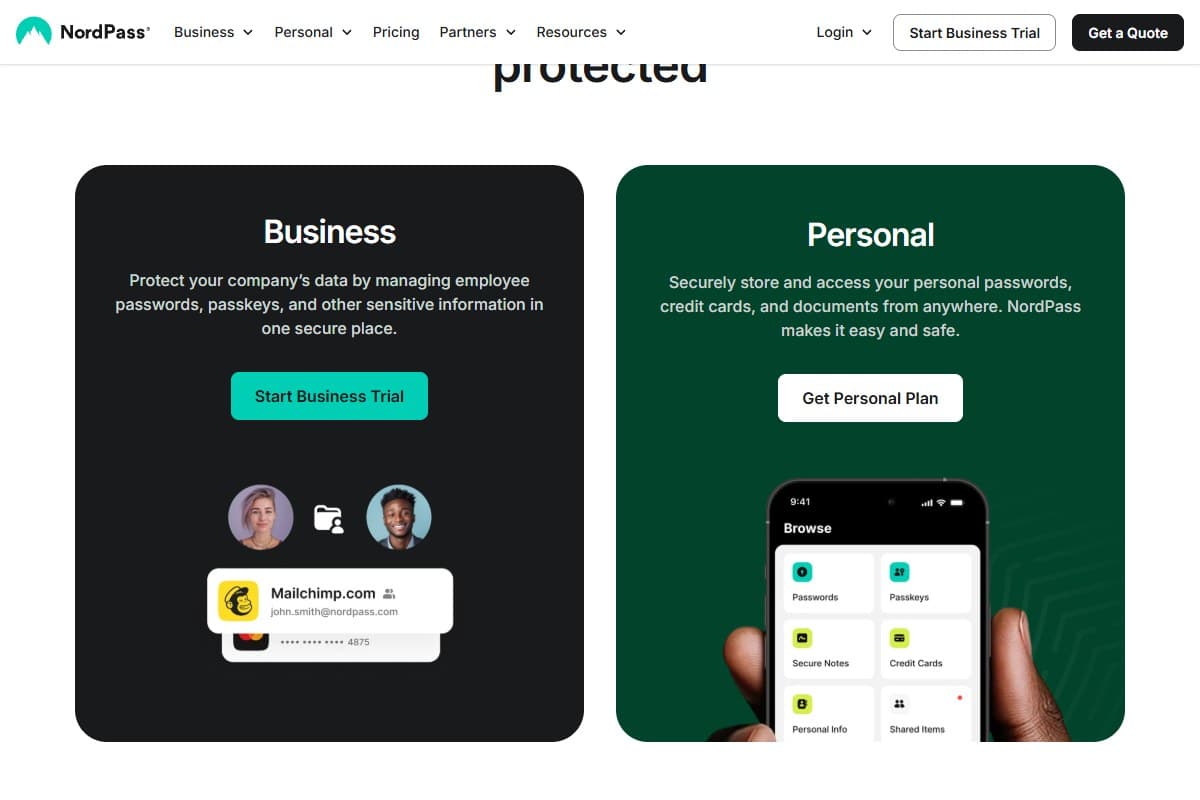
NordPass is a zero-knowledge password manager: it stores your logins, passkeys, credit cards, and secure notes in an encrypted vault that only you can unlock. "Zero-knowledge" means NordPass itself can't read your data: the encryption and decryption happen on your device.
- XChaCha20 encryption: NordPass uses XChaCha20 rather than the AES-256 most rivals use. It's a newer algorithm, faster on mobile hardware, and considered equally secure.
- Autofill + password generator: browser extensions and mobile apps that fill credentials and generate strong passwords.
- Passkey support: store and autofill passkeys, the passwordless standard that's now everywhere.
- Premium extras: data breach scanner, password health reports, email masking, and emergency access for a trusted contact.
It's built by Nord Security (the NordVPN company, based in Panama), passed a SOC 2 Type 2 audit, and has never been breached. NordPass Premium is also bundled into NordVPN's Plus tier and up, so if you already pay for NordVPN, you may already have this.
My honest testing experience
The thing that won me over in week one was the onboarding, and I say that as someone who's migrated vaults more times than I'd like.
Importing my logins, a couple hundred of them, took a single screen and barely a minute, though I did have to export a CSV from my old manager first and then hunt for the right import option, which sat under a menu I didn't expect. The interface is clean in a way 1Password is and Bitwarden genuinely isn't; nothing felt cluttered, and the password-health report immediately called out all the reused passwords I already knew, deep down, that I had. Autofill on the sites I use every day (Google, Amazon, my bank) was instant and correct every single time.
Then week two showed me the edges.
Flawless on common desktop login forms. But it occasionally just opened the app instead of filling, missed a couple of updated passwords (kept offering the old one), and was noticeably weaker at filling native mobile-app forms than 1Password.
The other thing that started to bite: there are no folders on personal plans. Once you're past ~100 items, a flat list with only search gets old fast, and folders are a Business-plan-only feature. 1Password has had nested folders and shared vaults for years. For a tidy 50-login vault you won't care. For a sprawling one, you will. Small annoyance, but a daily one.
What I liked
After the head-to-head, the honest list:
- The cleanest interface of the three. NordPass looks and feels modern. Onboarding and daily use are friction-free in a way Bitwarden isn't.
- It's cheap and stays cheap. Around $17/year for Premium while 1Password is now $47.88 and Bitwarden doubled to $19.80: NordPass is the value play.
- XChaCha20 is a genuinely modern choice. Faster on phones, equally secure, and a sign the product isn't coasting on legacy crypto.
- Password health and breach scanning are actually useful. The health report surfaced my reused passwords on day one and the breach scanner flagged two old accounts in real leaks.
- Family plan is good value. Six separate encrypted vaults with all Premium features for roughly $2.79/month on a 2-year term undercuts 1Password Families comfortably.
- The Nord bundle. If you already pay for NordVPN Plus or above, NordPass Premium is included: effectively free.
What frustrated me
The honest gripes:
- The free tier is the catch. NordPass Free only works on one device at a time: you can't stay logged in on your laptop and your phone together. That's the exact thing Bitwarden's free tier does for $0, and it's the single biggest reason to think twice.
- No folders on personal plans. Only the Business plan gets folder organization. Past ~100 items, the flat list is a real friction point.
- Autofill isn't bulletproof. It sometimes opens the app instead of filling, occasionally clings to an outdated password, and is weak at native mobile-app forms compared with 1Password.
- No shared folders/vaults like 1Password. Sharing is per-item rather than a shared space, which is clunkier for couples and teams.
- Cancelling is a chore. Like the rest of the Nord ecosystem, closing your account means an online form plus an email confirmation: not a one-click cancel. Support is chat/email only, no phone.
Pricing: is it worth it?
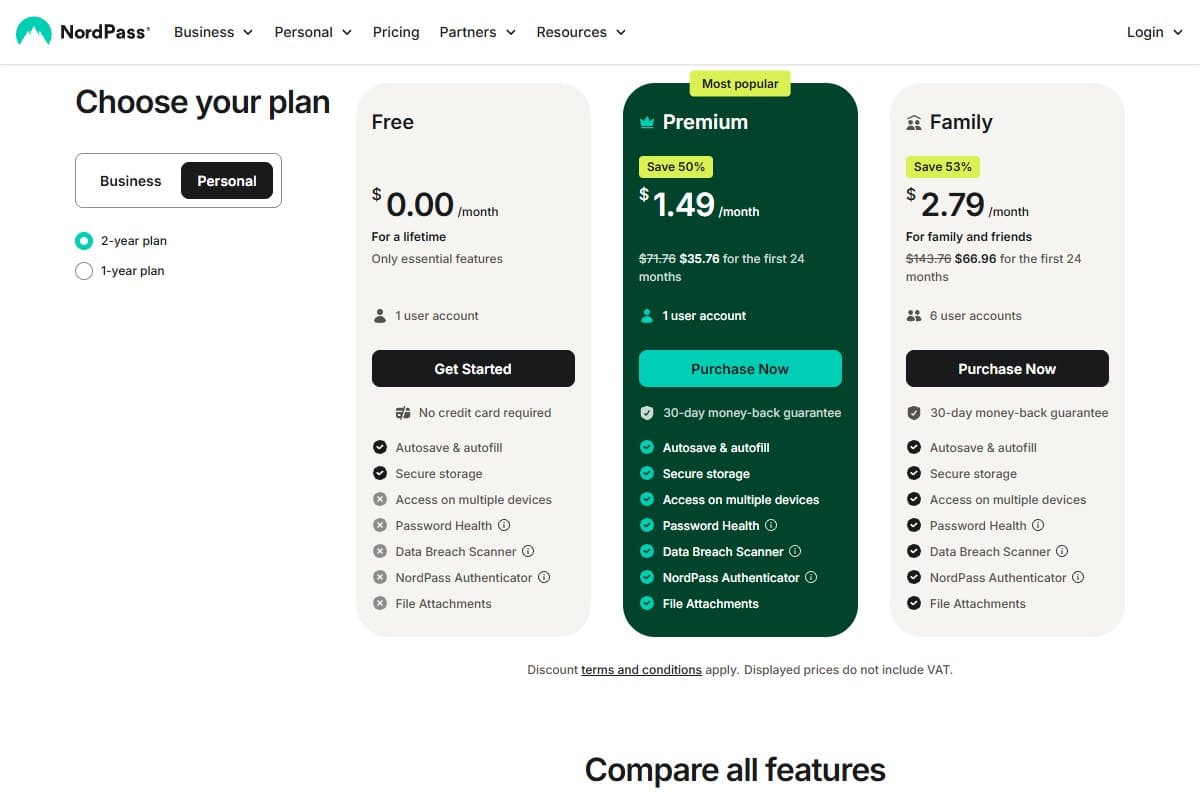
NordPass keeps it simple: a free tier, Premium, and Family. The numbers below are current 2026 promotional rates (the base Premium price is $2.99/mo, Family $5.99/mo: paid terms discount heavily).
- Unlimited passwords, passkeys & notes
- ONE device at a time
- No breach monitoring or password health
- Best for: trying it on a single device
- Unlimited devices + sync
- Password health + breach scanner
- Email masking + emergency access
- Best for: most individuals
- Up to 6 separate vaults
- All Premium features for everyone
- Best for: households
The honest read: NordPass Free is not the deal it looks like, because the one-device limit makes it nearly useless for normal life (your passwords need to be on your phone and your laptop). For free, Bitwarden is the better choice. But NordPass Premium at ~$17/year is the best value in paid managers: meaningfully cheaper than 1Password's $47.88 and now cheaper than Bitwarden Premium too. If you're paying, NordPass is hard to beat on price-to-polish. And if you already subscribe to NordVPN Plus, you have it already.
Who should use NordPass
Buy it if you are:
- Someone who wants a clean, modern password manager without paying 1Password money
- A family wanting six vaults for under $3/month
- Already a NordVPN Plus subscriber (you've already got Premium: use it)
- A normal user with a tidy vault who values looks and price over power-user organization
Who should avoid NordPass
Skip it (try alternatives) if you are:
- Looking for the best free manager: Bitwarden's free tier syncs across unlimited devices; NordPass Free won't
- A power user with hundreds of logins who needs folders and nested organization: 1Password wins
- A team or couple who shares lots of credentials: 1Password's shared vaults beat per-item sharing
- Someone who wants open-source, self-hostable software you can audit yourself: that's Bitwarden
How NordPass compares to the alternatives
| Tool | Rating | Price | Best for | Verdict |
|---|---|---|---|---|
| NordPass | 4.1/5 | ~$17/yr | Value + clean UI | Best polish-per-dollar; weak free tier, no personal folders |
| 1Password | 4.5/5 | $47.88/yr | Power users + families | Most polished and feature-rich; now the priciest |
| Bitwarden | 4.4/5 | Free / $19.80/yr | Free tier + open source | Best free plan, self-hostable; clunkier UX |
| Use case | Winner |
|---|---|
| Best free password manager | Bitwarden |
| Cleanest interface / easiest to live in | NordPass |
| Best value paid plan | NordPass |
| Power-user folders & shared vaults | 1Password |
| Open-source / self-hosting | Bitwarden |
| Families wanting the most features | 1Password |
NordPass is also bundled with NordVPN's higher tiers: if you're weighing the whole Nord ecosystem, my NordVPN review 2026 covers whether the VPN (and its included NordPass) is worth it. For the broader picture, see the Privacy & Security Tools hub. And if you're assembling a low-cost software stack, the top 5 free AI tools round-up pairs well with a free password manager. If you want to compare password managers side-by-side, the tool comparison page has a quick overview.
Final verdict: 4.1 out of 5
Here's the breakdown.
As a paid product, NordPass is a 4.5. It's the cleanest interface in the category, it's the cheapest of the three serious options, the encryption is modern, and the family plan is genuinely good value. If you're going to pay for a password manager in 2026 and you don't need power-user features, NordPass is the one that gives you the most polish for the least money.
I dock the score for two real things. First, the free tier's one-device limit: it's a paywall dressed as a free plan, and Bitwarden does that part better for nothing. Second, the missing folders on personal plans and the imperfect autofill, which power users and big-vault owners will feel daily.
That nets out to 4.1 out of 5. Pick NordPass if you want clean and cheap and your vault is normal-sized. Pick Bitwarden if "free" is the priority. Pick 1Password if you're a power user or a sharing-heavy family with the budget. There's no wrong answer here: only the right one for how you actually use it.
What I'd change about NordPass
If I had the NordPass team in a room, here's the honest feedback I'd give after daily use.
- Give the free tier two devices, not one. The single-device limit is the thing I dock the score for hardest. Your passwords need to be on your phone and your laptop: that's not a power-user ask, it's the baseline. Right now Free reads as a trap, and Bitwarden eats your lunch for $0. Even two devices would make it an honest plan.
- Put folders on the personal plans. Locking folder organization behind the Business plan is the wrong call. My vault started feeling cramped around login #120, stuck with a flat list and search. Folders aren't a team feature; a solo user with 200 logins needs them just as much.
- Fix the autofill misses. It sometimes opened the app instead of filling, and it kept offering the old password after I'd updated one. Clinging to a stale credential is worse than not filling at all: it actively wastes time. Native mobile-app forms also need to catch up to 1Password.
- Smooth the onboarding edges. The iPhone autofill that wasn't on until I dug into the phone's Passwords settings, the email-verification step, the extension wanting a re-login: each is small, but together they cost me minutes the clean UI promised I wouldn't lose.
- Make cancelling one click. An online form plus an email confirmation, chat-only support: that's friction by design, and it's beneath an otherwise polished product.
FAQ: NordPass review
How much does NordPass cost in 2026?
NordPass has a free tier (unlimited passwords but only one device at a time), Premium at roughly $1.49–$1.99/month on a paid term (about $17/year; base price $2.99/mo), and Family at roughly $2.79–$3.69/month for up to six people. Premium is also bundled into NordVPN's Plus tier and above, so NordVPN subscribers may already have it.
Is NordPass better than 1Password?
It depends on what you value. NordPass wins on price ($17/year vs 1Password's $47.88) and has an equally clean interface. 1Password wins on features: folders, nested organization, shared vaults, and slightly more reliable autofill. For a normal individual, NordPass is the better value; for a power user or a sharing-heavy family, 1Password earns its higher price.
Is NordPass or Bitwarden better?
For a free password manager, Bitwarden: its free tier syncs across unlimited devices, while NordPass Free is one device at a time. For a paid manager, NordPass is cheaper than Bitwarden Premium (now $19.80/year) and has a much nicer interface. Bitwarden also wins if you want open-source, self-hostable software you can audit yourself. For the full head-to-head, read NordPass vs Bitwarden 2026.
Is NordPass safe to use?
Yes. NordPass uses XChaCha20 encryption with a zero-knowledge architecture (it can't read your vault), passed a SOC 2 Type 2 audit, and has never been breached. It's built by Nord Security, based in privacy-friendly Panama. As with any zero-knowledge manager, the one real risk is you: lose your master password and recovery code and your vault is unrecoverable, by design.
Does NordPass support passkeys?
Yes: NordPass stores and autofills passkeys across its browser extensions and mobile apps, alongside traditional passwords. Passkey support is now standard across all the major managers in 2026, so it's no longer a differentiator, but NordPass's implementation works as expected.
Related reviews
For more honest privacy and security reviews:
- Privacy & Security Tools topic hub: every VPN and password-manager review in one place.
- NordVPN review 2026: the VPN that bundles NordPass Premium in its Plus tier and up.
- Top 5 free AI tools: the free-software round-up that pairs well with a free password manager.
Got a NordPass question I didn't cover, or a 1Password/Bitwarden switch story? Get in touch: reader questions shape the next round of reviews.
Free interactive tool
Compare NordPass with other AI toolsSide-by-side pricing, features, and ratings — plus a recommended pick for your use case.
Independent AI tools researcher testing what actually works.
Keep reading
Related reviews
NordVPN Review 2026: Is It Still Worth It? (Hands-On Test)
NordVPN in 2026 has post-quantum encryption, 9,300+ servers, and 30+ Netflix libraries, but the renewal price stings. My honest hands-on verdict.
NordVPN Just Rebranded as an All-in-One Security App: What the May 2026 Overhaul Actually Means
NordVPN rebranded as an all-in-one security app with Connect, Protect, and Monitor pillars plus a next-generation antivirus. My honest 48-hour take.
Design.com vs Looka vs Adobe Express vs Canva: Which Is Best for Creating a Brand Identity?
Design.com vs Looka vs Adobe Express vs Canva: we gave all four AI logo makers the same brand brief. See which captured a real brand identity.